

Aiwi Team - Time Tracker (teamtracker)
Install latest/stable of Aiwi Team - Time Tracker
Ubuntu 16.04 or later?
Make sure snap support is enabled in your Desktop store.
Install using the command line
sudo snap install teamtrackerDon't have snapd? Get set up for snaps.

Details for Aiwi Team - Time Tracker
Package name
- teamtracker
License
- unset
Last updated
- 25 July 2026 - latest/stable
Websites
External link warning
You are about to open
Do you wish to proceed?
Report a Snap Store violation
Report Aiwi Team - Time Tracker for a Snap Store violation
Snap Store Violation Report submitted successfully
Thank you for your report. Information you provided will help us investigate further.
Error submitting report
There was an error while sending your report. Please try again later.
Share this snap
Generate an embeddable card to be shared on external websites.
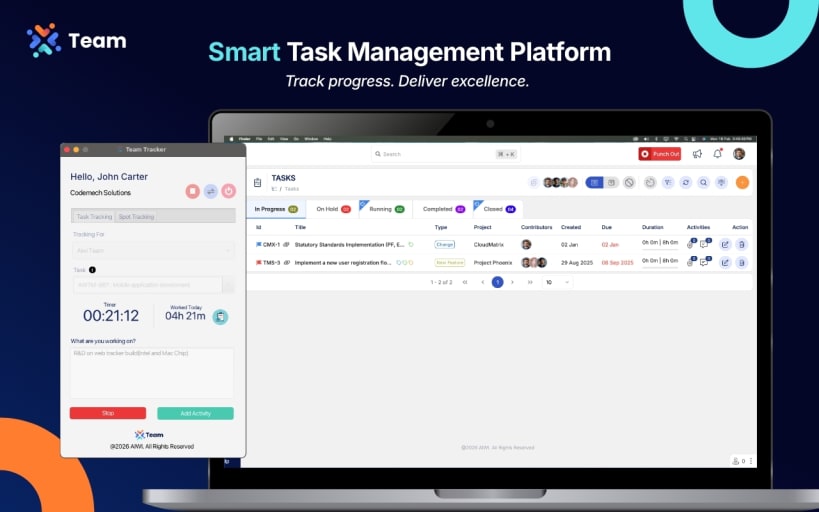
Track tasks, capture screenshots, and monitor productivity all in one app.
Aiwi Team – Time Tracker is a powerful productivity app designed for professionals and teams who want more than just basic time logging. Built for macOS and iOS, it combines time tracking, task management, and monitoring tools to give you complete visibility into your workday.
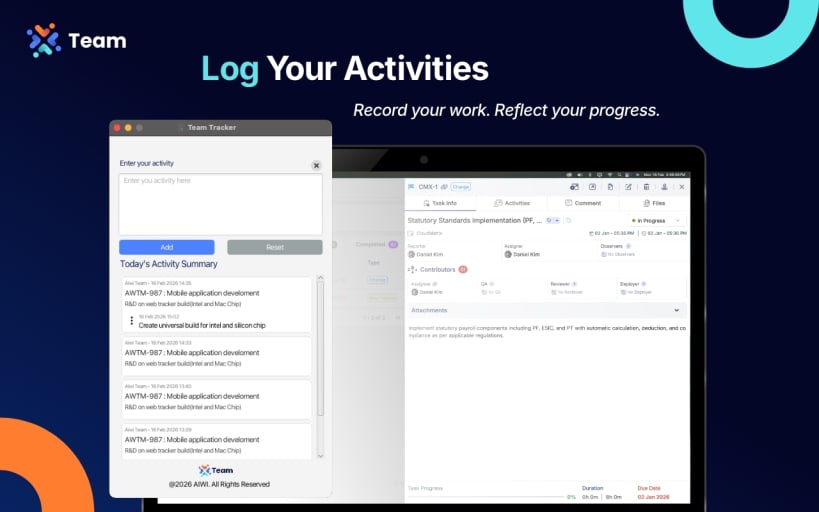
Key Features: Work Timers – Start and stop timers to track tasks in real time. Sport Tracking – Log fitness or activity sessions alongside work tasks for a balanced lifestyle. Screenshot Capture – Take automatic screenshots to document progress. Keystroke & Mouse Monitoring – Measure activity levels to understand productivity patterns. Daily Work Summary – Instantly view how many hours you worked and tasks completed today. Analytics & Reports – Gain insights into productivity trends and team performance.
Why Aiwi Team – Time Tracker? Unlike other time trackers, Aiwi offers all-in-one monitoring and management from task completion to screen activity making it ideal for startups, enterprises, and remote teams. Whether you’re managing projects, tracking fitness, or monitoring employee productivity, Aiwi keeps everything in one place.
| Revision | Channel | Version | Build | Commit | Download SBOM |
|---|
The build and commit information is derived from build infrastructure records.
Install Aiwi Team - Time Tracker on your Linux distribution
Choose your Linux distribution to get detailed installation instructions. If yours is not shown, get more details on the installing snapd documentation.











