

Tekno Notebook
Install latest/stable of Tekno Notebook
Ubuntu 16.04 or later?
Make sure snap support is enabled in your Desktop store.
Install using the command line
sudo snap install tekno-notebookDon't have snapd? Get set up for snaps.


Details for Tekno Notebook
Package name
- tekno-notebook
License
- Proprietary
Last updated
- 13 September 2026 - latest/stable
- 13 September 2026 - latest/edge
Websites
External link warning
You are about to open
Do you wish to proceed?
Report a Snap Store violation
Report Tekno Notebook for a Snap Store violation
Snap Store Violation Report submitted successfully
Thank you for your report. Information you provided will help us investigate further.
Error submitting report
There was an error while sending your report. Please try again later.
Share this snap
Generate an embeddable card to be shared on external websites.
Advanced note-taking application with TTS
Tekno NoteBook
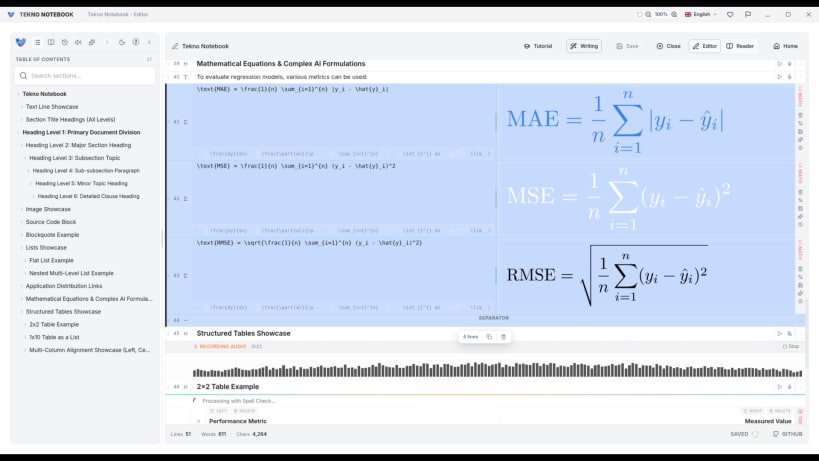
Tekno NoteBook is a note-taking app with text-to-speech, speech recognition, and AI tools.
Features
- Note Creation: Add notes as text, code, images, lists, headings, links, and more.
- Two View Modes: Switch between reader mode and editor mode.
- Audio Reader: Listen to your notes with a built-in media player.
- Auto-Tracking: Highlights the text as it's being read aloud.
- Smart Line Detection: Detects what type of line you're writing and formats it for you.
- Fast Writing Tools: Keyboard shortcuts for quick writing.
- Writing Assistant: Checks spelling and grammar, and suggests improvements.
- AI System & Debugger: Create tasks and test prompts with a built-in debugger.
- Task Creation: Set up tasks to guide the AI assistant.
- AI Integrations: Built-in AI assistant, text-to-speech (TTS), and speech-to-text (STT).
- Multi-Language Support: Available in Arabic, English, Spanish, Portuguese, and Chinese.
- Customizable: Light and dark mode, plus other adjustable settings.
- Math Support: Live math preview with LaTeX support, including tables.
- Import Files: Supports PDF, LaTeX, and Markdown, including images.
- Export Files: Save as PDF, LaTeX, or Markdown.
- Drag & Drop: Reorder notes easily.
- Table of Contents: Navigate notes in both reader and editor modes.
- And more!
| Revision | Channel | Version | Build | Commit | Download SBOM |
|---|
The build and commit information is derived from build infrastructure records.
Install Tekno Notebook on your Linux distribution
Choose your Linux distribution to get detailed installation instructions. If yours is not shown, get more details on the installing snapd documentation.











