

tennis
Install latest/stable of tennis
Ubuntu 16.04 or later?
Make sure snap support is enabled in your Desktop store.
Details for tennis
Package name
- tennis
License
- MIT
Last updated
- Yesterday - latest/stable
- Yesterday - latest/edge
Websites
Contact
Source code
Report a bug
External link warning
You are about to open
Do you wish to proceed?
Report a Snap Store violation
Report tennis for a Snap Store violation
Snap Store Violation Report submitted successfully
Thank you for your report. Information you provided will help us investigate further.
Error submitting report
There was an error while sending your report. Please try again later.
Share this snap
Generate an embeddable card to be shared on external websites.
Print stylish CSV, JSON and SQLite tables in your terminal
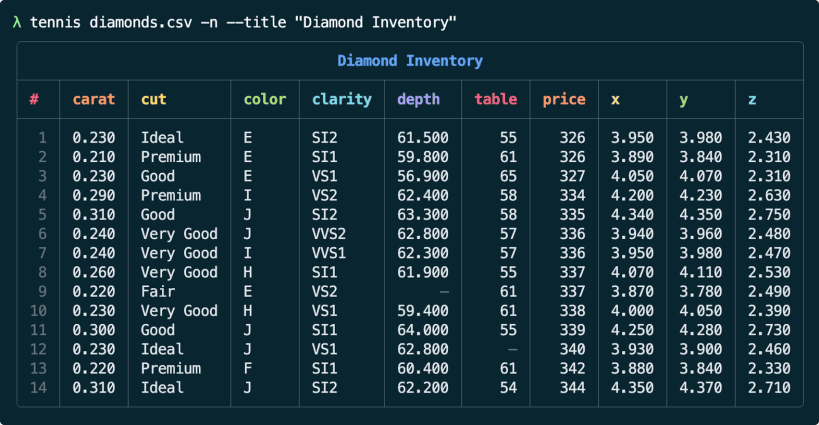
tennis prints CSV, TSV, JSON and SQLite data as colorful tables that fit your terminal. It picks a light or dark theme from your terminal colors, formats numbers, and offers titles, row numbers, zebra stripes, sorting, filtering and a quick --peek summary.
Examples
tennis data.csv
tennis data.csv --title "Sales" --zebra --row-numbers
tennis app.db --table users
cat data.json | tennis
File access
tennis can read files in your home directory and from standard input. To also read files on USB drives and other removable media (/media, /mnt), run:
sudo snap connect tennis:removable-media
| Revision | Channel | Version | Build | Commit | Download SBOM |
|---|
The build and commit information is derived from build infrastructure records.
Install tennis on your Linux distribution
Choose your Linux distribution to get detailed installation instructions. If yours is not shown, get more details on the installing snapd documentation.


