

Test Dataset Generator
Install latest/stable of Test Dataset Generator
Ubuntu 16.04 or later?
Make sure snap support is enabled in your Desktop store.
Install using the command line
sudo snap install test-dataset-generatorDon't have snapd? Get set up for snaps.
Details for Test Dataset Generator
Package name
- test-dataset-generator
License
- MIT
Last updated
- Yesterday - latest/stable
Report a Snap Store violation
Report Test Dataset Generator for a Snap Store violation
Snap Store Violation Report submitted successfully
Thank you for your report. Information you provided will help us investigate further.
Error submitting report
There was an error while sending your report. Please try again later.
Share this snap
Generate an embeddable card to be shared on external websites.
Synthetic relational dataset builder with SQL, CSV, JSON and JSONL export
Test Dataset Generator is a fast, deterministic desktop tool for designing tabular data schemas and producing realistic synthetic test datasets locally on Linux. Build custom column rules, inspect live column value distributions, and export up to 50,000 reproducible rows into batched SQL INSERT statements, CSV, JSON, or JSON-Lines files.
Key Features:
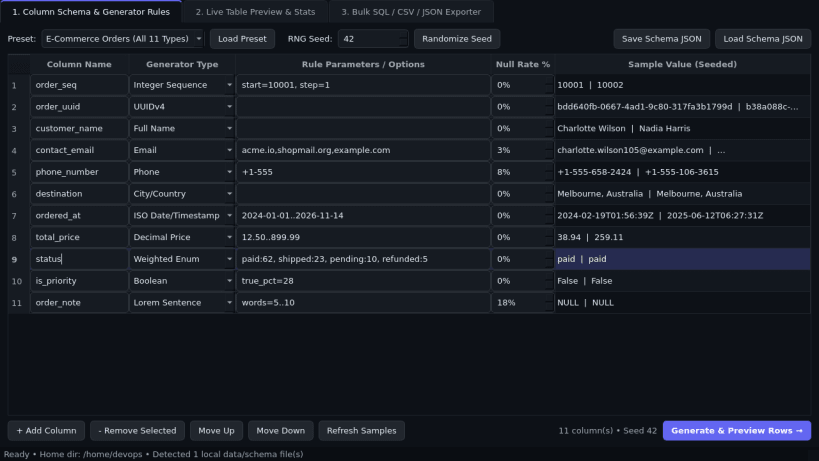
- Column Schema & Generator Rules: Visual field builder supporting UUIDv4, Full Name, Email, Phone, City/Country, ISO Date/Timestamp, Decimal Price, Weighted Enum, Integer Sequence, Boolean, and Lorem Sentence with a reproducible RNG seed and configurable per-column null rate percentage.
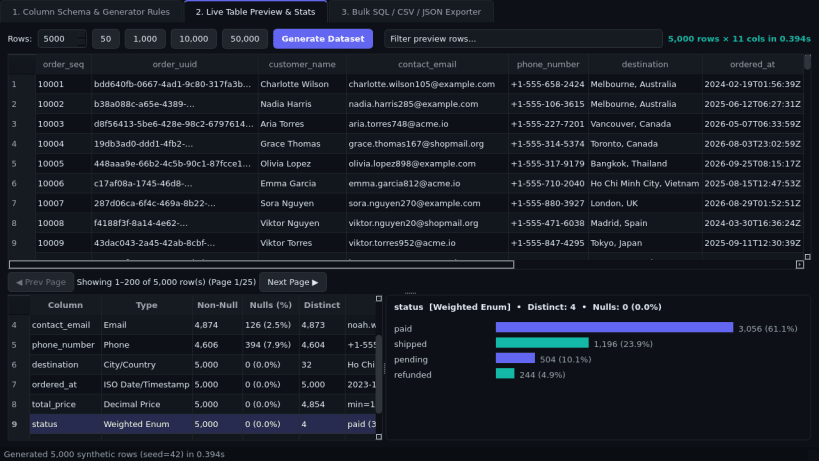
- Live Table Preview & Stats: Generates 10 to 50,000 rows instantaneously in memory with paged table inspection, search filtering, and live column distribution charts and summary statistics.
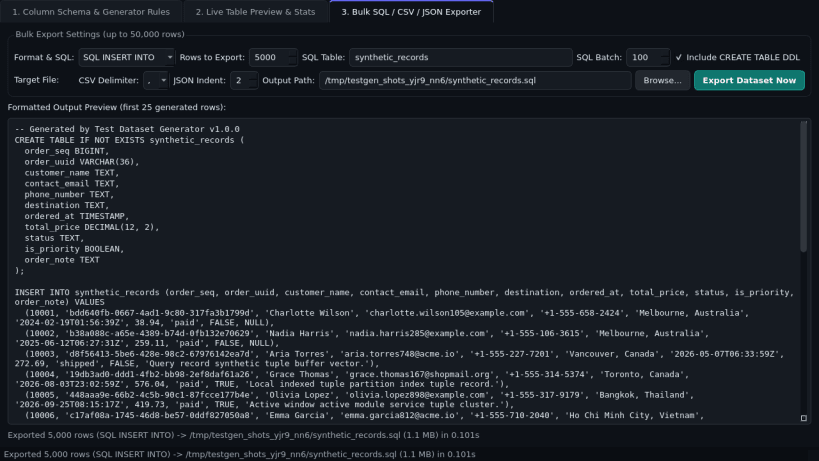
- Bulk SQL / CSV / JSON Exporter: Exports up to 50,000 generated rows as batched SQL INSERT INTO scripts (with optional CREATE TABLE DDL), CSV, formatted JSON, and streaming JSON-Lines (.jsonl).
Disclaimer: Test Dataset Generator is an independent open-source project by TC Studio and is not affiliated with, endorsed by, or sponsored by Mockaroo.
| Revision | Channel | Version | Build | Commit | Download SBOM |
|---|
The build and commit information is derived from build infrastructure records.
Install Test Dataset Generator on your Linux distribution
Choose your Linux distribution to get detailed installation instructions. If yours is not shown, get more details on the installing snapd documentation.


