

Install latest/stable of Tiffany AI-OS
Ubuntu 16.04 or later?
Make sure snap support is enabled in your Desktop store.
Install using the command line
sudo snap install tiffany-ai-osDon't have snapd? Get set up for snaps.
Details for Tiffany AI-OS
Package name
- tiffany-ai-os
License
- unset
Last updated
- Today - latest/stable
Report a Snap Store violation
Report Tiffany AI-OS for a Snap Store violation
Snap Store Violation Report submitted successfully
Thank you for your report. Information you provided will help us investigate further.
Error submitting report
There was an error while sending your report. Please try again later.
Share this snap
Generate an embeddable card to be shared on external websites.
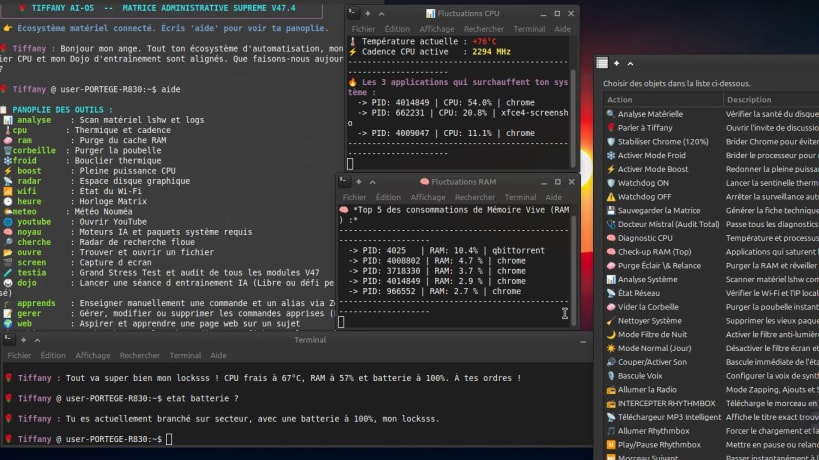
Assistant bureau IA hybride, vocal et souverain pour Linux (100% local)
Tiffany AI-OS est un système d'assistance hybride, vocal, autonome et 100 % local pour Linux (Ubuntu, Linux Mint, Debian), conçu pour fonctionner avec fluidité même sur des ordinateurs portables modestes (Core i3, sans GPU dédié).
Fonctionnalités principales :
- Architecture hybride à 4 niveaux : réflexes instantanés (< 0,05s), discussion fluide (tiffany-flash), analyse profonde (qwen2.5:1.5b) et ingénierie code/système (qwen2.5-coder:1.5b).
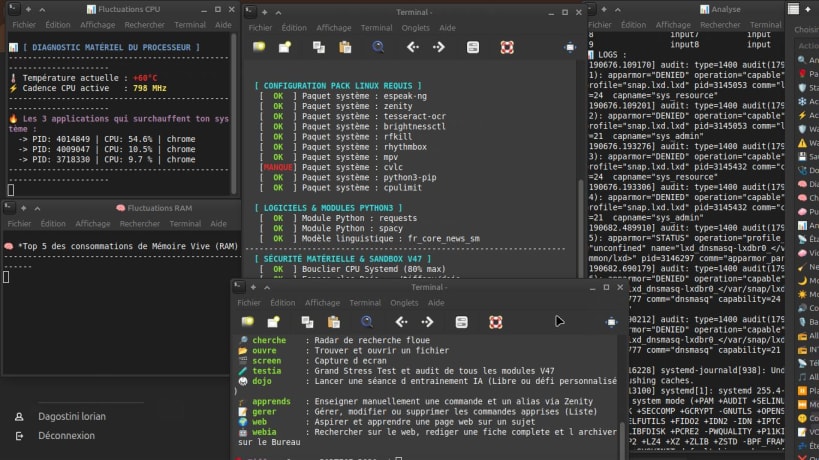
- Monitoring matériel en direct : température CPU, fréquence, RAM, batterie/chargeur, espace disque, réseau et volume.
- Bouclier thermique actif : modes Froid et Boost, plafonnement CPU (cpulimit) et sentinelle Watchdog.
- Coffre-fort double sécurité : chiffrement intégral par mot de passe (7z -mhe=on) et verrou anti-suppression noyau (chattr +i).
- Panneau graphique complet (29 outils), recherche Web-IA autonome (webia), auto-apprentissage sécurisé (Dojo) et mémoire de session persistante.
| Revision | Channel | Version | Build | Commit | Download SBOM |
|---|
The build and commit information is derived from build infrastructure records.
Install Tiffany AI-OS on your Linux distribution
Choose your Linux distribution to get detailed installation instructions. If yours is not shown, get more details on the installing snapd documentation.


