

X509 and TLS Cert Studio (tls-cert-manager)
Install latest/stable of X509 and TLS Cert Studio
Ubuntu 16.04 or later?
Make sure snap support is enabled in your Desktop store.
Install using the command line
sudo snap install tls-cert-managerDon't have snapd? Get set up for snaps.
Details for X509 and TLS Cert Studio
Package name
- tls-cert-manager
License
- MIT
Last updated
- Yesterday - latest/stable
Websites
Contact
External link warning
You are about to open
Do you wish to proceed?
Report a Snap Store violation
Report X509 and TLS Cert Studio for a Snap Store violation
Snap Store Violation Report submitted successfully
Thank you for your report. Information you provided will help us investigate further.
Error submitting report
There was an error while sending your report. Please try again later.
Share this snap
Generate an embeddable card to be shared on external websites.
X509 trust store scanner, remote TLS inspector, and RSA keypair generator
X509 and TLS Cert Studio is an open-source Linux security utility for inspecting local trust stores, probing remote TLS handshakes, and generating development keypairs, certificate signing requests, and self-signed X509 certificates.
Features:
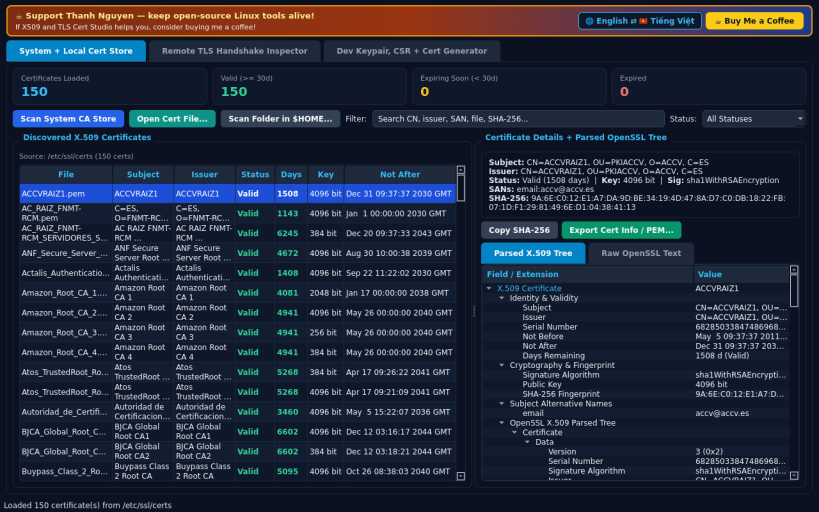
- System and Local Certificate Store: automatically scans the host CA trust store and user-selected certificate folders or files (PEM, CRT, DER) with expiration status badges, SHA-256 fingerprints, SANs, and full parsed tree.
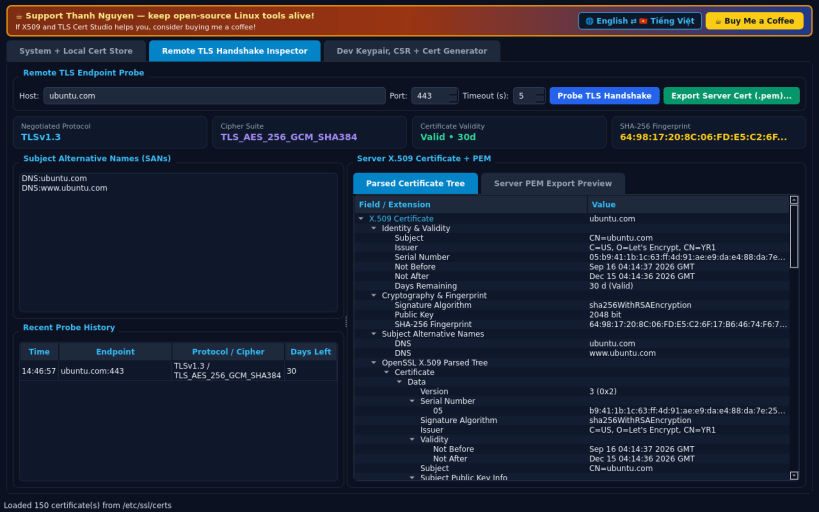
- Remote TLS Handshake Inspector: connects to any host and port over TLS to display negotiated protocol version, cipher suite, Subject Alternative Names, validity countdown, and one-click server certificate PEM export.
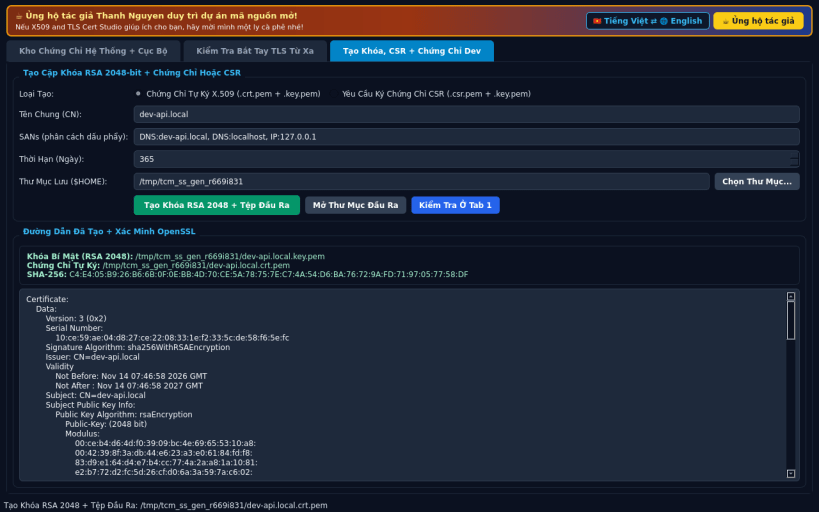
- Development Keypair, CSR and Certificate Generator: creates 2048-bit RSA private keys paired with self-signed certificates or signing requests using custom Common Name and SAN entries saved directly to your chosen folder.
Disclaimer: This project is an independent open-source security utility built on OpenSSL and Python standard libraries.
SUPPORT AND DONATE
- Created by Thanh Nguyen — https://buymeacoffee.com/thanhnv128b
| Revision | Channel | Version | Build | Commit | Download SBOM |
|---|
The build and commit information is derived from build infrastructure records.
Install X509 and TLS Cert Studio on your Linux distribution
Choose your Linux distribution to get detailed installation instructions. If yours is not shown, get more details on the installing snapd documentation.


