

TXT to EPUB Builder
Install latest/stable of TXT to EPUB Builder
Ubuntu 16.04 or later?
Make sure snap support is enabled in your Desktop store.
Install using the command line
sudo snap install txt-to-epub-builderDon't have snapd? Get set up for snaps.
Details for TXT to EPUB Builder
Package name
- txt-to-epub-builder
License
- MIT
Last updated
- Yesterday - latest/stable
Report a Snap Store violation
Report TXT to EPUB Builder for a Snap Store violation
Snap Store Violation Report submitted successfully
Thank you for your report. Information you provided will help us investigate further.
Error submitting report
There was an error while sending your report. Please try again later.
Share this snap
Generate an embeddable card to be shared on external websites.
Split TXT/Markdown chapters, design book covers and build valid EPUB3 ebooks
TXT to EPUB Builder is an offline Linux desktop authoring tool that converts plain text and Markdown manuscripts into standards-compliant EPUB3 ebooks with custom generated covers, clean typography stylesheets, and ZIP archive verification.
Key Features:
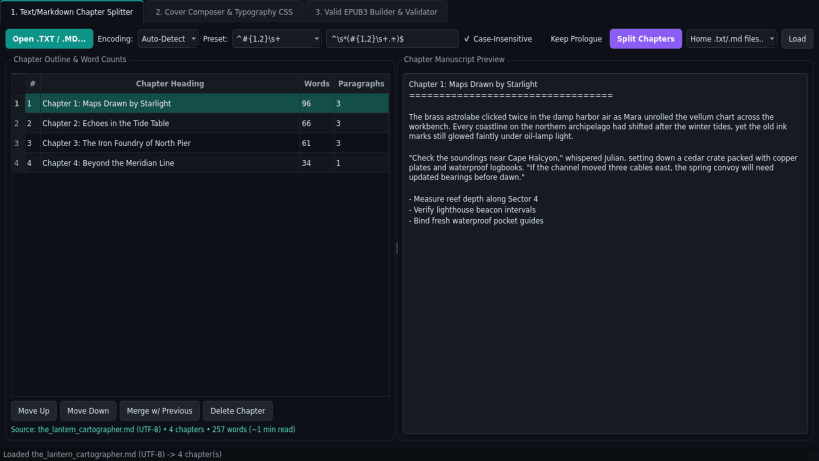
- Text & Markdown Chapter Splitter: Imports .txt and .md manuscripts with automatic encoding detection (UTF-8, UTF-8-BOM, UTF-16, CP1252, CP1258) and splits chapters using customizable regex presets (Chapter \d+, Chương \d+, Markdown headings, or custom patterns) with live chapter outline and word counts.
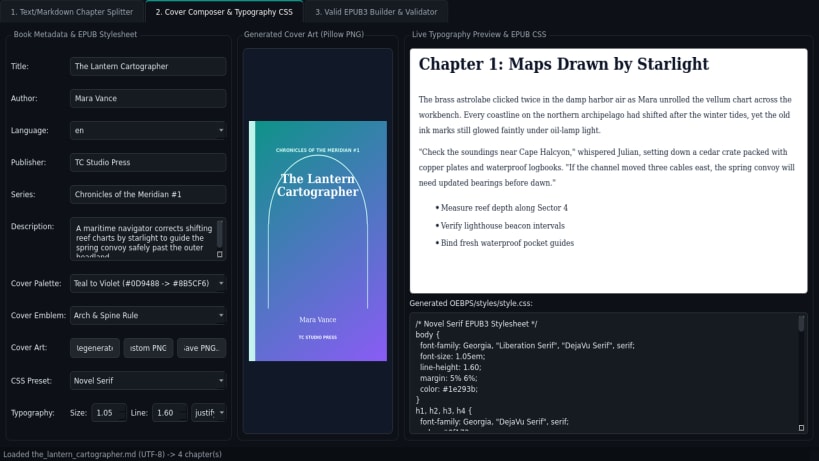
- Cover Composer & Typography CSS: Generates custom cover artwork PNGs with Pillow, edits ebook metadata (Title, Author, Language, Publisher, Series, Description), and applies Novel Serif, Modern Clean, or Technical CSS presets.
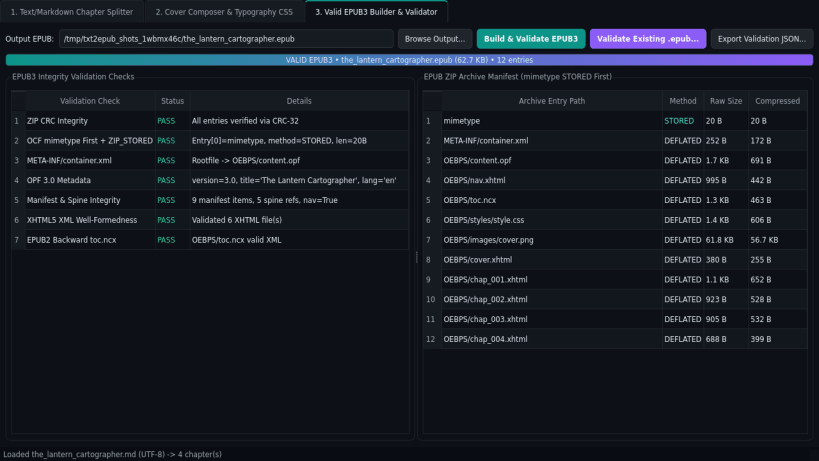
- Valid EPUB3 Builder & Validator: Packages standards-compliant .epub archives with mimetype stored first (ZIP_STORED), META-INF/container.xml, OEBPS/content.opf, OEBPS/nav.xhtml, toc.ncx, and XHTML5 chapters, plus archive integrity checks.
Disclaimer: TXT to EPUB Builder is an independent open-source project by TC Studio and is not affiliated with, endorsed by, or sponsored by any third-party ebook publishing vendor.
| Revision | Channel | Version | Build | Commit | Download SBOM |
|---|
The build and commit information is derived from build infrastructure records.
Install TXT to EPUB Builder on your Linux distribution
Choose your Linux distribution to get detailed installation instructions. If yours is not shown, get more details on the installing snapd documentation.


