

USB Speed Tester
Install latest/stable of USB Speed Tester
Ubuntu 16.04 or later?
Make sure snap support is enabled in your Desktop store.
Install using the command line
sudo snap install usb-speed-testerDon't have snapd? Get set up for snaps.
Details for USB Speed Tester
Package name
- usb-speed-tester
License
- MIT
Last updated
- Today - latest/stable
Report a Snap Store violation
Report USB Speed Tester for a Snap Store violation
Snap Store Violation Report submitted successfully
Thank you for your report. Information you provided will help us investigate further.
Error submitting report
There was an error while sending your report. Please try again later.
Share this snap
Generate an embeddable card to be shared on external websites.
USB, SD & removable drive multi-block speed and sustained-write benchmark
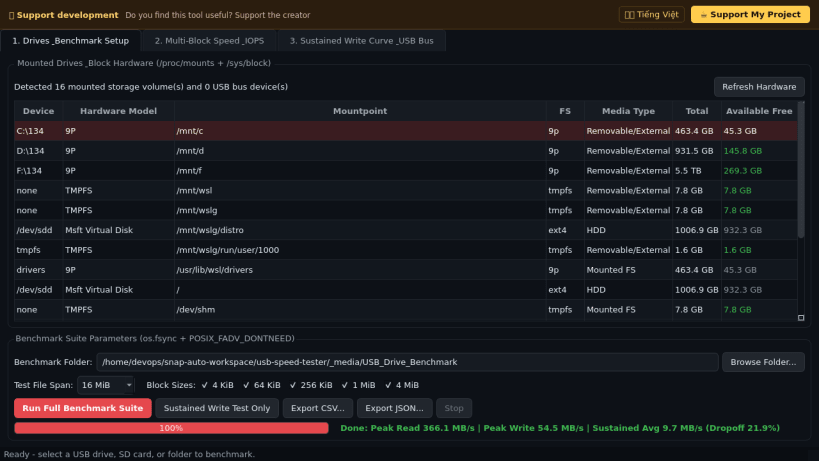
A real storage throughput, IOPS, latency, and sustained-write cache-dropoff benchmark utility for USB flash drives, SD/microSD cards, external SSDs, and Linux filesystems. A lightweight Linux alternative to FlashDriveSpeed and USB Flash Benchmark for testing multi-block transfer speeds and exposing fake speed ratings or SLC cache cliffs.
Key features:
- Live filesystem and hardware inspector reading /proc/mounts, os.statvfs, /sys/block/* device attributes, and /sys/bus/usb/devices link speeds (480 / 5000 / 10000 Mbps).
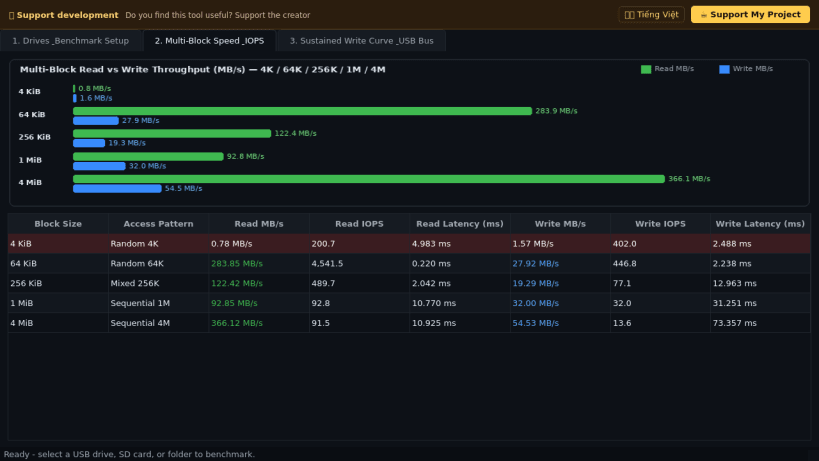
- Genuine Sequential and Random Read/Write benchmarks across 4 KiB, 64 KiB, 256 KiB, 1 MiB, and 4 MiB block sizes using os.fsync and POSIX_FADV_DONTNEED page-cache hints.
- Visual multi-block Read vs Write MB/s bar chart with IOPS and per-operation millisecond latency table.
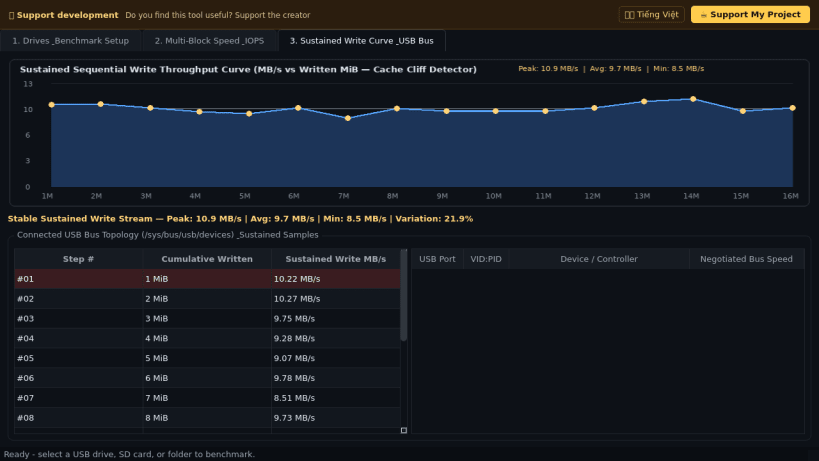
- Sustained Write Throughput curve plotting MB/s across continuous written megabytes to reveal thermal throttling and flash cache dropoffs, with CSV and JSON report export.
Disclaimer: This project is an independent open-source tool and is not affiliated with, sponsored by, or endorsed by FlashDriveSpeed or its respective authors.
| Revision | Channel | Version | Build | Commit | Download SBOM |
|---|
The build and commit information is derived from build infrastructure records.
Install USB Speed Tester on your Linux distribution
Choose your Linux distribution to get detailed installation instructions. If yours is not shown, get more details on the installing snapd documentation.


