

UwDiff
Install latest/stable of UwDiff
Ubuntu 16.04 or later?
Make sure snap support is enabled in your Desktop store.
Details for UwDiff
Package name
- uwdiff
License
- Proprietary
Last updated
- Today - latest/stable
- Today - latest/edge
Report a Snap Store violation
Report UwDiff for a Snap Store violation
Snap Store Violation Report submitted successfully
Thank you for your report. Information you provided will help us investigate further.
Error submitting report
There was an error while sending your report. Please try again later.
Share this snap
Generate an embeddable card to be shared on external websites.
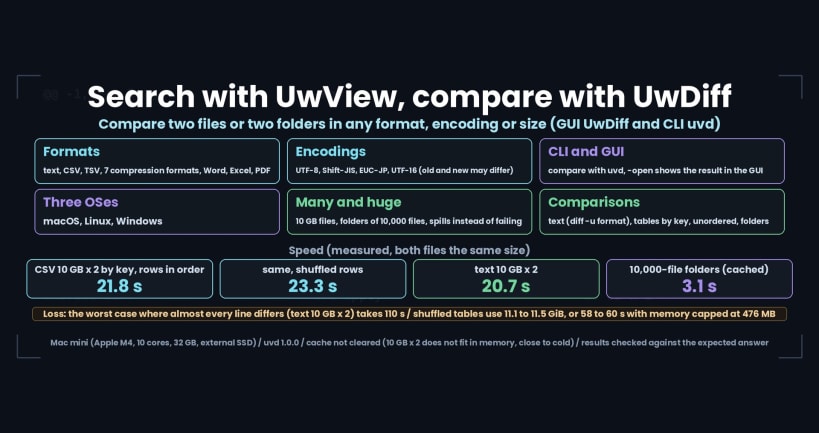
Compare two files or folders in any format or encoding, with the uvd command
UwDiff compares two files (or two folders) and shows what changed. The GUI (UwDiff) and the command line (uvd) use the same comparison engine.
- Text, compared line by line with the order kept; the output is a unified diff, the same format as
diff -u. - CSV, TSV and Excel matched by key columns, even when the row order differs; one line per changed cell.
- Order-independent comparison, and folder vs folder (only in old, only in new, different, same).
- Inside seven compressed formats (gz, bz2, xz, lzma, zst, lz4, br) and the text of Word, Excel and PDF files.
- Encodings detected automatically (UTF-8, Shift_JIS/CP932, EUC-JP, UTF-16); old and new may differ.
- Add -open and the result appears in the window. Exit codes are the same as diff (0 same, 1 different, 2 error).
Setup after install (once)
Use the command as uvd:
sudo snap alias uwdiff.uvd uvd
Read files on USB drives and other removable media (/media, /mnt):
sudo snap connect uwdiff:removable-media
Without the alias, run the command as uwdiff.uvd. To undo the alias: sudo snap unalias uvd.
Examples
 uvd old.log new.log -o changes.diff
 uvd old.csv new.csv -key id -open
uwdiff opens the GUI.
Where the snap can read
Files in your home folder, and removable media after the connect command above. Files elsewhere are not reachable from the snap; copy them under your home folder first.
Free for personal and internal company use under the UwDiff License (PolyForm Internal Use 1.0.0 plus a packaging permission). Not open-source software. Source: https://github.com/amru195704/UwDiff
| Revision | Channel | Version | Build | Commit | Download SBOM |
|---|
The build and commit information is derived from build infrastructure records.
Install UwDiff on your Linux distribution
Choose your Linux distribution to get detailed installation instructions. If yours is not shown, get more details on the installing snapd documentation.












