

Batch Video Audio Track Extractor (video-audio-extractor)
Install latest/stable of Batch Video Audio Track Extractor
Ubuntu 16.04 or later?
Make sure snap support is enabled in your Desktop store.
Install using the command line
sudo snap install video-audio-extractorDon't have snapd? Get set up for snaps.
Details for Batch Video Audio Track Extractor
Package name
- video-audio-extractor
License
- MIT
Last updated
- Today - latest/stable
Report a Snap Store violation
Report Batch Video Audio Track Extractor for a Snap Store violation
Snap Store Violation Report submitted successfully
Thank you for your report. Information you provided will help us investigate further.
Error submitting report
There was an error while sending your report. Please try again later.
Share this snap
Generate an embeddable card to be shared on external websites.
Batch extract multi-language audio streams from videos losslessly or to FLAC/M
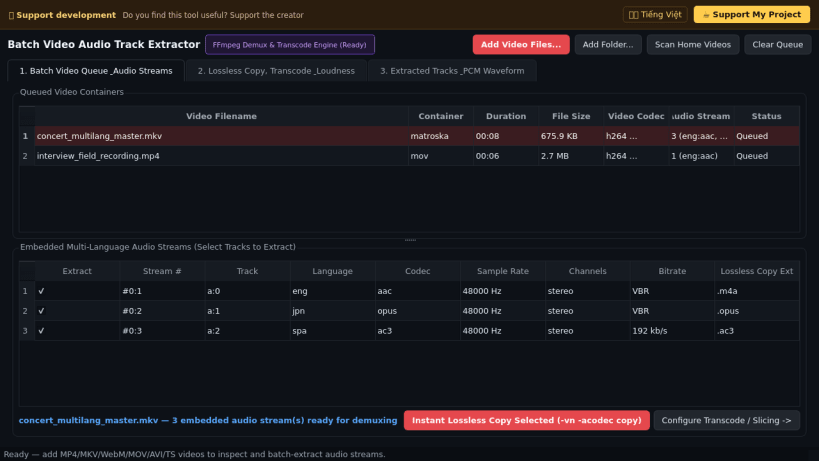
Batch Video Audio Track Extractor is a desktop audio demuxing and transcoding workbench for extracting soundtracks and multi-language audio streams from MP4, MKV, WebM, MOV, AVI, and TS video containers. A lightweight Linux alternative to Pazera Free Audio Extractor for instant lossless audio stream copy, format conversion, time slicing, and loudness normalization.
Key Features:
- Multi-Stream Audio Inspector: Probes video containers via bundled FFmpeg to display every embedded audio track with codec, bitrate, sample rate, channel layout, and language metadata.
- Instant Lossless Stream Copy: Demuxes elementary audio tracks directly without re-encoding (-vn -acodec copy) into native .m4a, .opus, .ogg, .ac3, .mp3, .flac, or .wav files with zero quality loss.
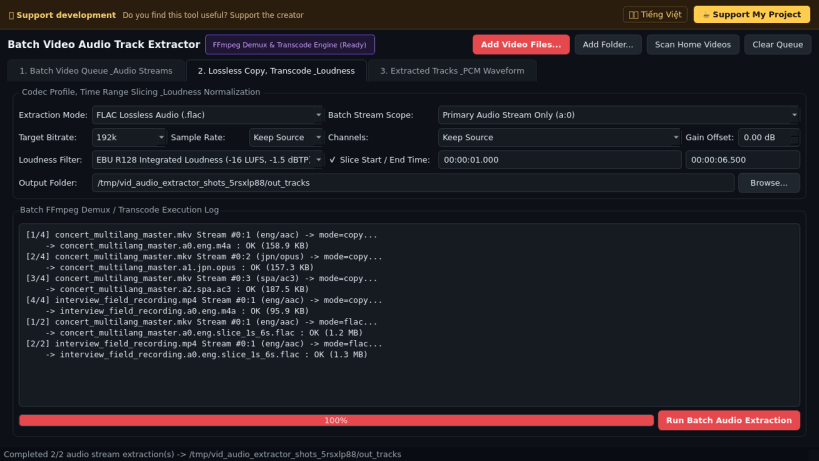
- Batch Audio Transcoding & Slicing: Converts selected or all multi-language tracks to FLAC, WAV, MP3, Opus, AAC, or Ogg Vorbis with custom bitrate, sample rate, channel downmix, and start/end timestamp slicing.
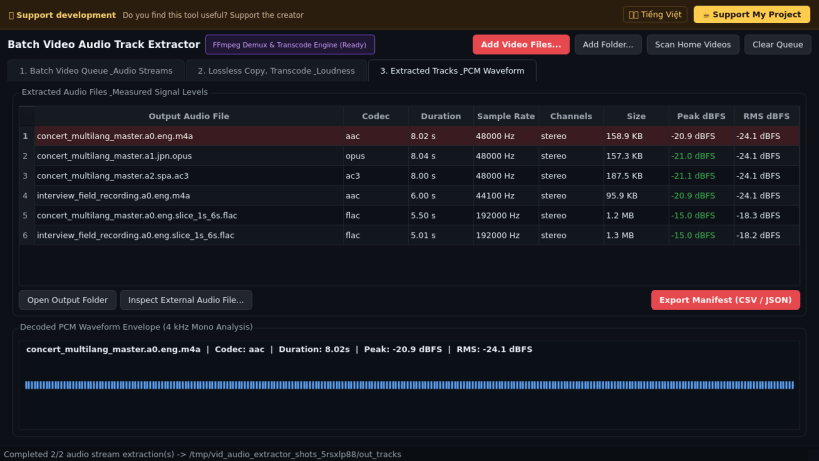
- EBU R128 Loudness & Waveform Verification: Supports integrated loudness normalization (loudnorm / dynaudnorm / dB gain) and renders real decoded PCM waveform envelopes alongside measured Peak and RMS dBFS levels.
Disclaimer: This project is an independent open-source tool and is not affiliated with, sponsored by, or endorsed by Jacek Pazera.
| Revision | Channel | Version | Build | Commit | Download SBOM |
|---|
The build and commit information is derived from build infrastructure records.
Install Batch Video Audio Track Extractor on your Linux distribution
Choose your Linux distribution to get detailed installation instructions. If yours is not shown, get more details on the installing snapd documentation.


