

Video Bitrate and Quality Analyzer (video-bitrate-calculator)
Install latest/stable of Video Bitrate and Quality Analyzer
Ubuntu 16.04 or later?
Make sure snap support is enabled in your Desktop store.
Install using the command line
sudo snap install video-bitrate-calculatorDon't have snapd? Get set up for snaps.
Details for Video Bitrate and Quality Analyzer
Package name
- video-bitrate-calculator
License
- MIT
Last updated
- 14 November 2026 - latest/stable
Report a Snap Store violation
Report Video Bitrate and Quality Analyzer for a Snap Store violation
Snap Store Violation Report submitted successfully
Thank you for your report. Information you provided will help us investigate further.
Error submitting report
There was an error while sending your report. Please try again later.
Share this snap
Generate an embeddable card to be shared on external websites.
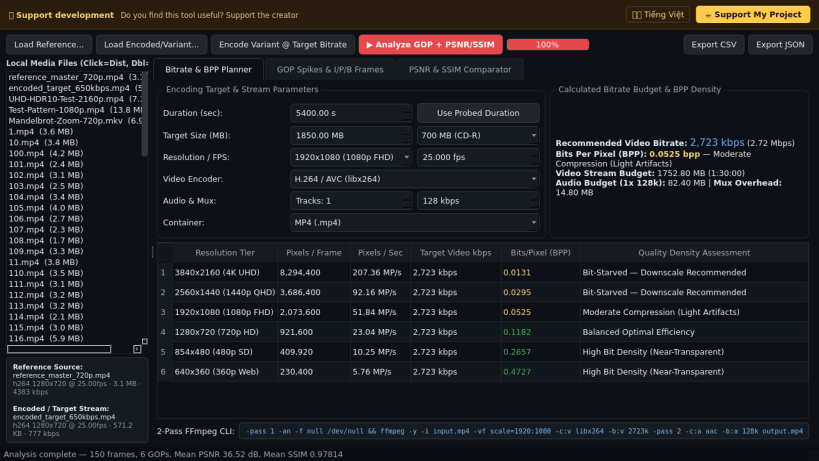
Target-size video bitrate planner, GOP analyzer & PSNR/SSIM comparator
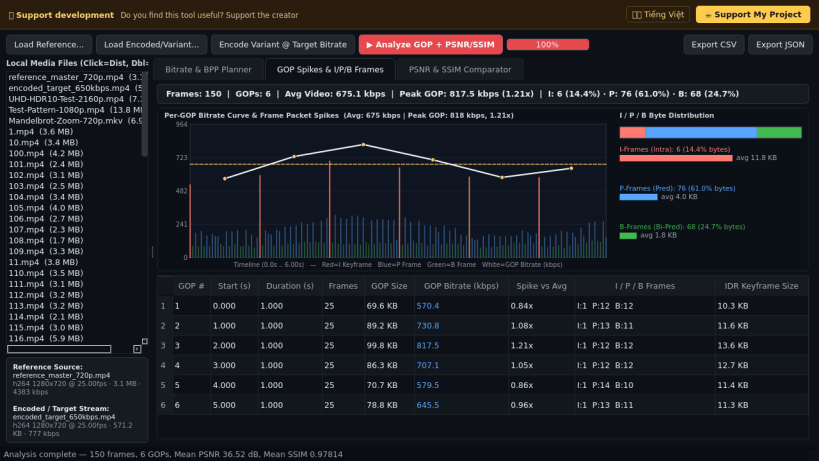
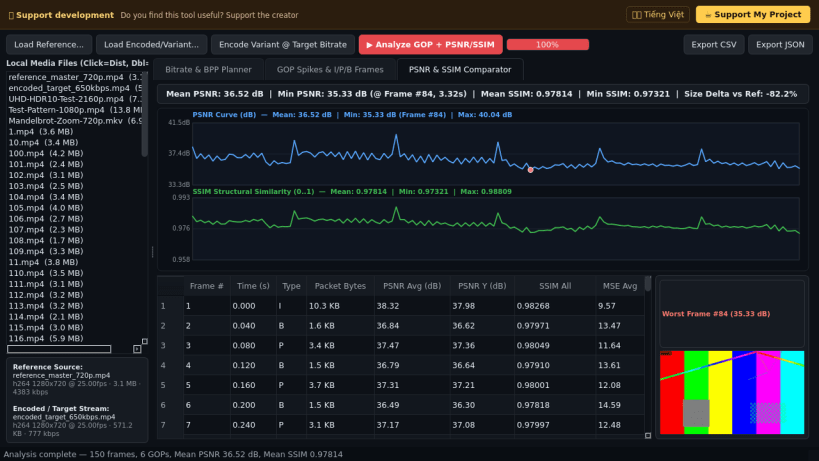
Video Bitrate and Quality Analyzer is a desktop video encoding bitrate calculator, per-GOP packet and frame-type distribution inspector, and frame-by-frame PSNR and SSIM visual quality comparator for Linux. An independent Linux alternative inspired by desktop video transcoding and bitrate planning suites, it combines storage budget calculation with real bitstream packet demuxing and full-reference objective quality metrics.
Key Features:
- Target-Size Bitrate & Bits-Per-Pixel (BPP) Planner: Computes exact target video bitrates from duration, target file size (MB/GB presets), audio track count and codec rates, and container muxing overhead (MP4, MKV, WebM, MPEG-TS) alongside multi-resolution BPP density ratings and two-pass encoding commands.
- Per-GOP Bitrate Spikes & I/P/B Frame Distribution: Demuxes and inspects real video streams to measure compressed byte size per frame, keyframe intervals, per-GOP bitrate peaks, Peak-to-Average ratio, and I/P/B picture-type byte shares.
- Frame-by-Frame PSNR & SSIM Quality Comparator: Evaluates encoded video variants against a reference source stream to report average, minimum, and maximum PSNR (dB) and SSIM (0..1) scores, interactive quality curves, and worst-frame visual inspection.
- Test Variant Encoding & Structured Reports: Encodes target-bitrate test variants and exports complete per-GOP and per-frame quality telemetry to JSON and CSV files.
Disclaimer: This project is an independent open-source tool and is not affiliated with, sponsored by, or endorsed by the MeGUI project or its contributors.
| Revision | Channel | Version | Build | Commit | Download SBOM |
|---|
The build and commit information is derived from build infrastructure records.
Install Video Bitrate and Quality Analyzer on your Linux distribution
Choose your Linux distribution to get detailed installation instructions. If yours is not shown, get more details on the installing snapd documentation.


