

Video Splitter
Install latest/stable of Video Splitter
Ubuntu 16.04 or later?
Make sure snap support is enabled in your Desktop store.
Install using the command line
sudo snap install video-splitterDon't have snapd? Get set up for snaps.
Details for Video Splitter
Package name
- video-splitter
License
- unset
Last updated
- 6 June 2026 - latest/stable
Report a Snap Store violation
Report Video Splitter for a Snap Store violation
Snap Store Violation Report submitted successfully
Thank you for your report. Information you provided will help us investigate further.
Error submitting report
There was an error while sending your report. Please try again later.
Share this snap
Generate an embeddable card to be shared on external websites.
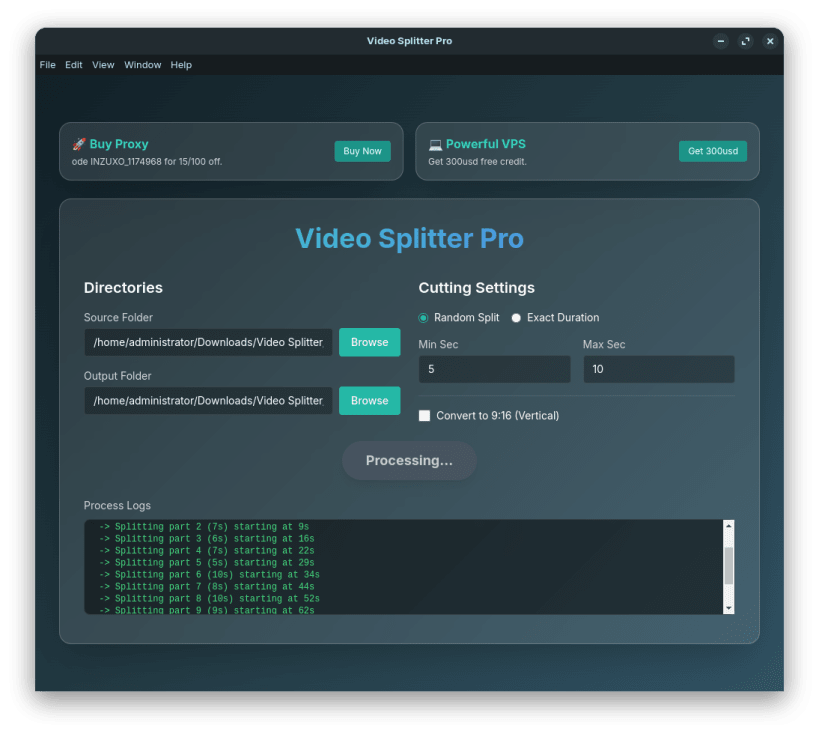
Easily split and convert your videos. Supports random cutting & 9:16 vertical format with blur!
Video Splitter Pro is an essential desktop application designed for modern content creators, marketers, and video enthusiasts. Whether you need to quickly extract specific scenes from a long video or randomly split a video into dynamic, short clips for social media, Video Splitter Pro offers an intuitive and lightning-fast experience.
Built with an elegant Glassmorphism interface, it hides the complexity of video processing while giving you total control. You can effortlessly convert standard horizontal videos (16:9) into TikTok/Shorts-ready vertical videos (9:16) with a beautiful blurred background effect—all fully automated and offline.
Key Features:
- ✂️ Precise Extraction: Accurately split videos by specifying exact start and end times.
- 🎲 Random Splitter: Automatically divide your videos into multiple clips of random lengths (e.g., 5-10 seconds).
- 📱 Vertical Video Conversion: Transform horizontal 16:9 videos to 9:16 format with a single click.
- 🎨 Cinematic Background Blur: Automatically adds an aesthetic blurred background to vertical conversions.
- 📂 Batch Processing: Process entire folders of .mp4 videos seamlessly without manual intervention.
- 🔒 100% Offline & Secure: All video processing runs locally on your machine without relying on the cloud.
| Revision | Channel | Version | Build | Commit | Download SBOM |
|---|
The build and commit information is derived from build infrastructure records.
Install Video Splitter on your Linux distribution
Choose your Linux distribution to get detailed installation instructions. If yours is not shown, get more details on the installing snapd documentation.











