

Visual Git Client Desk
Install latest/stable of Visual Git Client Desk
Ubuntu 16.04 or later?
Make sure snap support is enabled in your Desktop store.
Install using the command line
sudo snap install visual-git-client-deskDon't have snapd? Get set up for snaps.
Details for Visual Git Client Desk
Package name
- visual-git-client-desk
License
- GPL-3.0-or-later
Last updated
- Today - latest/stable
Websites
Contact
External link warning
You are about to open
Do you wish to proceed?
Report a Snap Store violation
Report Visual Git Client Desk for a Snap Store violation
Snap Store Violation Report submitted successfully
Thank you for your report. Information you provided will help us investigate further.
Error submitting report
There was an error while sending your report. Please try again later.
Share this snap
Generate an embeddable card to be shared on external websites.
Visual Git client with commit graph, staging, diff viewer, and blame
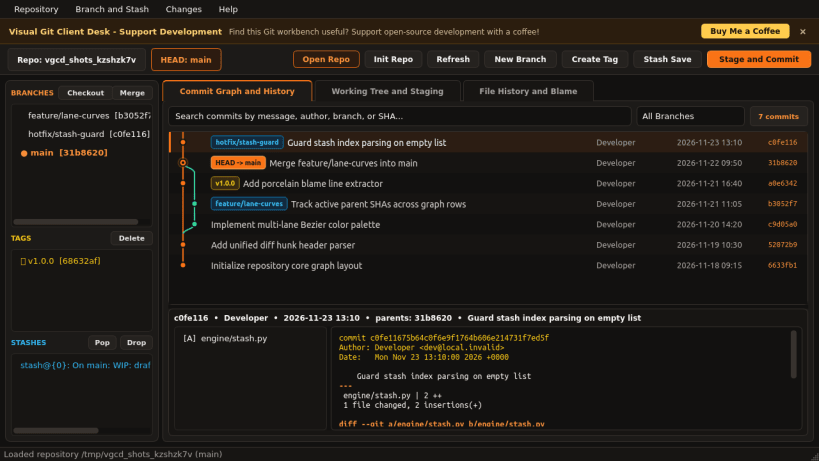
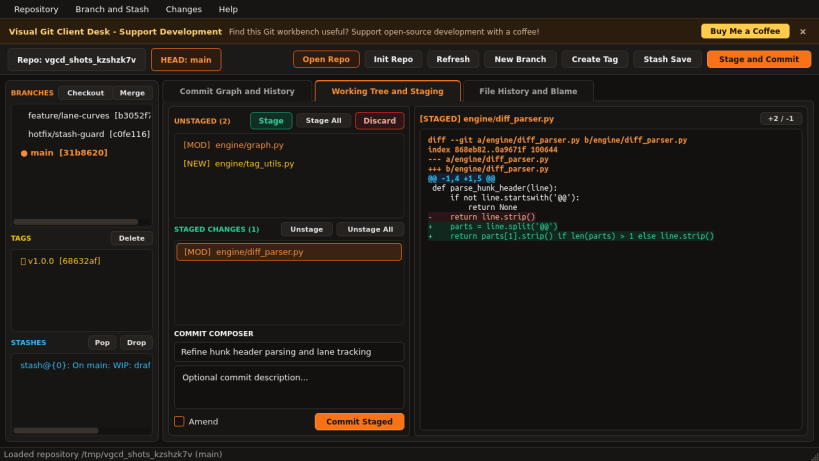
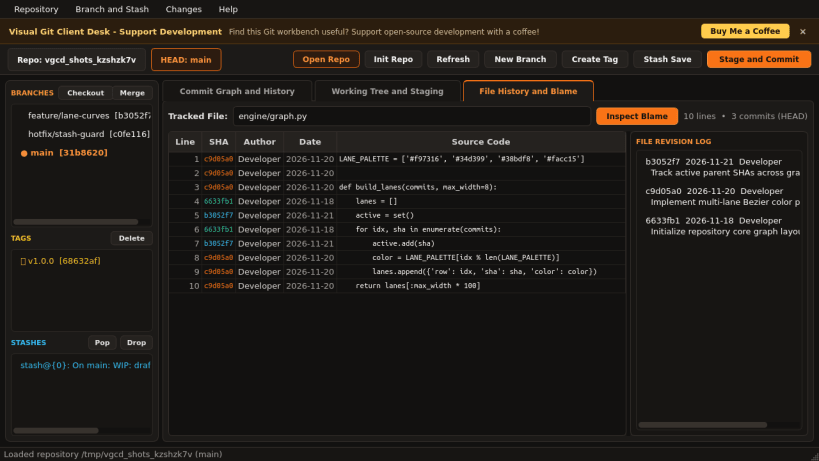
Visual Git Client Desk is a clean, offline-first desktop Git workbench for Linux developers. Inspect complex branch and merge topologies in a custom commit lane graph, stage and commit working tree edits with a colorized diff inspector, manage local branches, tags, and stashes, and trace line-by-line file history and blame directly on your local repositories.
Key features:
- Topological Commit Lane Graph: Visualizes multi-branch commits, merge parents, HEAD markers, branch pills, and tag badges in topological and date order with instant search and commit patch inspection.
- Working Tree Staging & Diff Viewer: Separates staged changes from unstaged and untracked files, supports one-click stage, unstage, discard, commit, and amend actions, and highlights additions, deletions, and hunk headers.
- Branch, Tag & Stash Management: Create, checkout, merge, and delete local branches, create and remove tags, and save, pop, or drop stashes from a unified repository sidebar.
- File History & Blame Workbench: Inspect line-by-line commit attribution with author, date, and short hash stripes alongside per-file revision logs.
| Revision | Channel | Version | Build | Commit | Download SBOM |
|---|
The build and commit information is derived from build infrastructure records.
Install Visual Git Client Desk on your Linux distribution
Choose your Linux distribution to get detailed installation instructions. If yours is not shown, get more details on the installing snapd documentation.











