

VPS Manager (vpsm-app)
Install latest/stable of VPS Manager
Ubuntu 16.04 or later?
Make sure snap support is enabled in your Desktop store.
Details for VPS Manager
Package name
- vpsm-app
License
- Proprietary
Last updated
- 14 September 2026 - latest/stable
Websites
External link warning
You are about to open
Do you wish to proceed?
Report a Snap Store violation
Report VPS Manager for a Snap Store violation
Snap Store Violation Report submitted successfully
Thank you for your report. Information you provided will help us investigate further.
Error submitting report
There was an error while sending your report. Please try again later.
Share this snap
Generate an embeddable card to be shared on external websites.
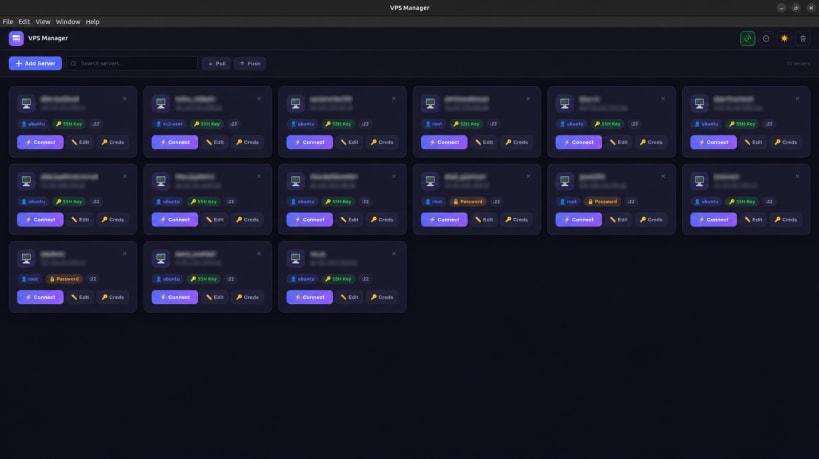
Manage and connect to your VPS servers from one place
VPS Manager is a desktop application for managing multiple remote servers from a single, clean interface. Built for developers, sysadmins, and anyone who regularly connects to Linux servers.
Instead of remembering IP addresses, usernames, ports, and SSH keys across a dozen terminal tabs, VPS Manager keeps all your servers organized and lets you connect with a single click.
Features:
- One-click SSH connections to any server
- Supports both SSH key and password authentication
- Store and manage credentials securely per server
- Search and filter across all your servers instantly
- Drag and drop to reorder your server list
- Cloud sync to share your server list across machines
- Push and pull your server config to a remote backup
- Light and dark theme
- Runs on Linux, Windows, and macOS
- Automatic updates
VPS Manager does not store passwords in plain text and does not send any data to third-party services. Cloud sync uses your own server over SSH.
| Revision | Channel | Version | Build | Commit | Download SBOM |
|---|
The build and commit information is derived from build infrastructure records.
Install VPS Manager on your Linux distribution
Choose your Linux distribution to get detailed installation instructions. If yours is not shown, get more details on the installing snapd documentation.











