

Wallpaper SysInfo Overlay
Install latest/stable of Wallpaper SysInfo Overlay
Ubuntu 16.04 or later?
Make sure snap support is enabled in your Desktop store.
Install using the command line
sudo snap install wallpaper-sysinfo-overlayDon't have snapd? Get set up for snaps.
Details for Wallpaper SysInfo Overlay
Package name
- wallpaper-sysinfo-overlay
License
- MIT
Last updated
- 13 November 2026 - latest/stable
Report a Snap Store violation
Report Wallpaper SysInfo Overlay for a Snap Store violation
Snap Store Violation Report submitted successfully
Thank you for your report. Information you provided will help us investigate further.
Error submitting report
There was an error while sending your report. Please try again later.
Share this snap
Generate an embeddable card to be shared on external websites.
Wallpaper SysInfo Overlay - Live Host Telemetry HUD Wallpaper Generator
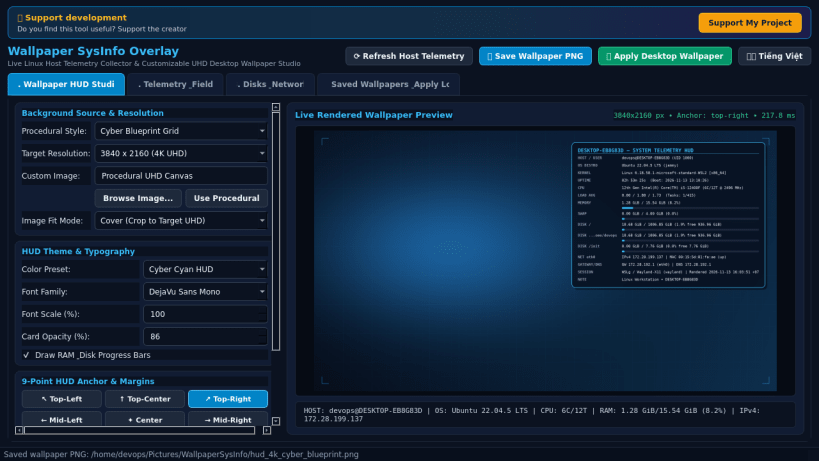
Wallpaper SysInfo Overlay is a real-time Linux desktop telemetry HUD generator and wallpaper studio. An independent Linux alternative inspired by BgInfo for rendering live host system metrics directly onto custom or procedural desktop wallpapers.
Genuine Implemented Linux Features:
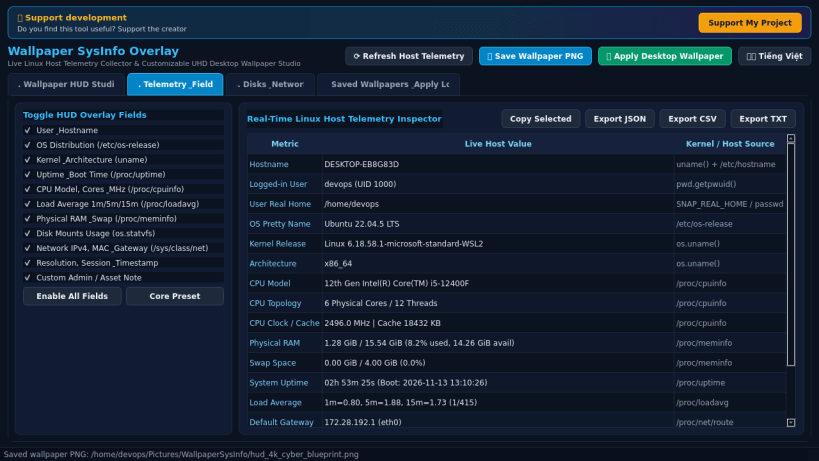
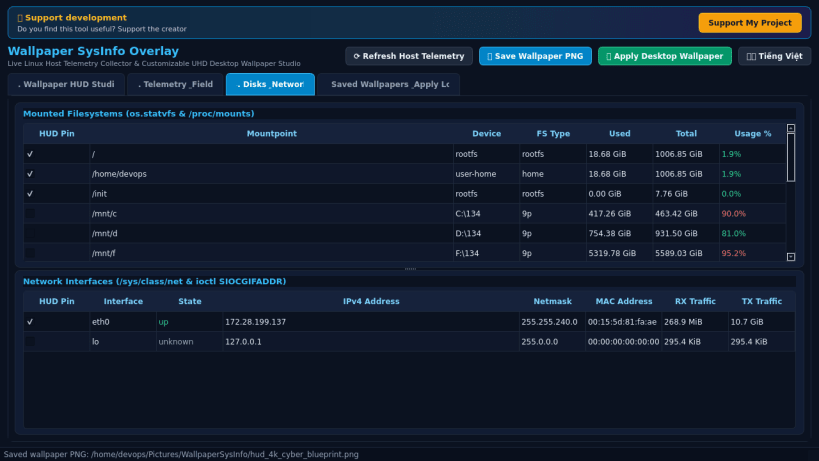
- Live Linux Host Telemetry Collection: Reads real operating system release metadata (/etc/os-release), kernel and architecture details (uname), CPU model, core/thread topology, and clock speed (/proc/cpuinfo), physical RAM and swap usage (/proc/meminfo), system uptime (/proc/uptime), 1m/5m/15m load averages (/proc/loadavg), mounted disk space statistics (os.statvfs and /proc/mounts), and active network interface IPv4, MAC, and gateway addresses (/sys/class/net and /proc/net/route).
- Procedural UHD & Custom Image Backgrounds: Generates crisp 1920x1080 (FHD), 2560x1440 (QHD), and 3840x2160 (4K UHD) procedural technical wallpapers using Pillow or overlays HUD cards onto user-selected PNG, JPG, BMP, and WEBP images from your home directory.
- Customizable 9-Anchor HUD Layout & Themes: Position the info overlay at any of 9 screen anchors (Top/Middle/Bottom x Left/Center/Right) with adjustable margins, toggle individual telemetry fields, add custom asset notes, and switch between multiple typography and color theme presets with optional RAM and disk usage bars.
- One-Click Wallpaper Apply & Telemetry Export: Saves rendered PNG wallpapers into Pictures/WallpaperSysInfo inside your user home directory, applies desktop backgrounds via gsettings, and exports live host telemetry snapshots to JSON, CSV, and TXT formats.
- Bilingual Interface: Instant Vietnamese and English UI toggle.
Disclaimer: This project is an independent open-source utility built by TC Studio and is not affiliated with, sponsored by, or endorsed by Microsoft Corporation.
| Revision | Channel | Version | Build | Commit | Download SBOM |
|---|
The build and commit information is derived from build infrastructure records.
Install Wallpaper SysInfo Overlay on your Linux distribution
Choose your Linux distribution to get detailed installation instructions. If yours is not shown, get more details on the installing snapd documentation.


