

Window Tab Docker
Install latest/stable of Window Tab Docker
Ubuntu 16.04 or later?
Make sure snap support is enabled in your Desktop store.
Install using the command line
sudo snap install window-tab-dockerDon't have snapd? Get set up for snaps.
Details for Window Tab Docker
Package name
- window-tab-docker
License
- MIT
Last updated
- Today - latest/stable
Websites
Contact
External link warning
You are about to open
Do you wish to proceed?
Report a Snap Store violation
Report Window Tab Docker for a Snap Store violation
Snap Store Violation Report submitted successfully
Thank you for your report. Information you provided will help us investigate further.
Error submitting report
There was an error while sending your report. Please try again later.
Share this snap
Generate an embeddable card to be shared on external websites.
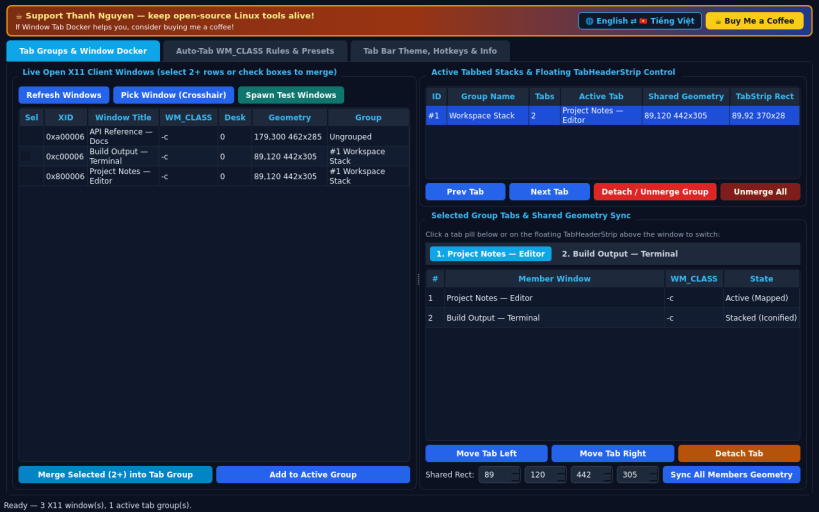
Floating X11 tab header bar grouping unrelated windows into tabbed stacks
A Linux X11 alternative to TidyTabs. Independent open-source project, not affiliated with or endorsed by Nurgo Software. Window enumeration, grouping, and tab header docking operate on X11/XWayland client windows; Wayland-native windows cannot be controlled externally by X11 utilities.
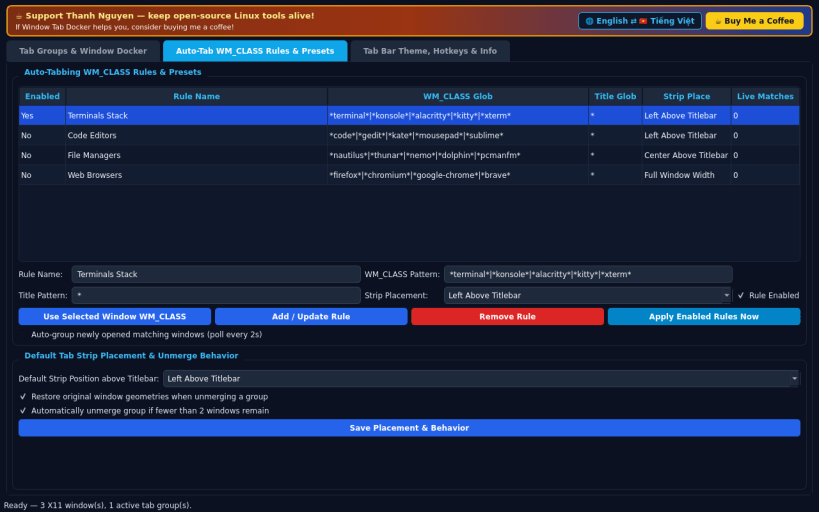
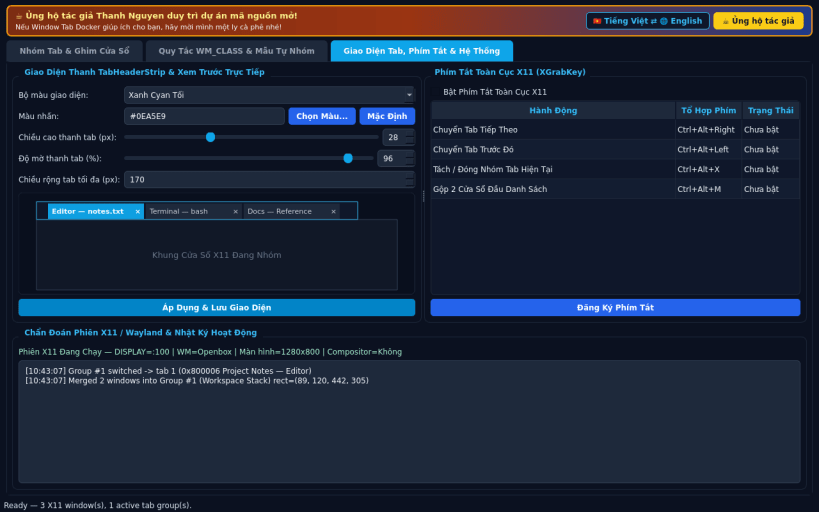
FEATURES • Tab Groups & Live X11 Window Docker: select 2 or more open X11 windows to merge into a unified tabbed stack with a floating slim TabHeaderStrip bar docked immediately above the active window. Click any tab to raise and map it to the shared geometry while iconifying sibling windows, drag the strip to move the stack, reorder tabs, and detach or restore all windows cleanly. • Auto-Tabbing WM_CLASS Rules & Presets: define wildcard WM_CLASS and title rules to auto-group matching newly opened windows (such as terminals or editors), customize strip placement (Left, Center, Right, or Full Width), and manage active groups. • Tab Bar Theme & Global Hotkeys: customize accent colors, height, and opacity with live preview, bind global X11 hotkeys (Ctrl+Alt+Right/Left/X) via XGrabKey, view X11/Wayland diagnostics, and toggle English / Vietnamese UI.
SUPPORT & DONATE • Created by Thanh Nguyen — https://buymeacoffee.com/thanhnv128b
| Revision | Channel | Version | Build | Commit | Download SBOM |
|---|
The build and commit information is derived from build infrastructure records.
Install Window Tab Docker on your Linux distribution
Choose your Linux distribution to get detailed installation instructions. If yours is not shown, get more details on the installing snapd documentation.


