

Xournal++ (xournalpp)
Install latest/stable of Xournal++
Ubuntu 16.04 or later?
Make sure snap support is enabled in your Desktop store.

Details for Xournal++
Package name
- xournalpp
License
- GPL-2.0
Last updated
- 30 September 2026 - latest/stable
- Yesterday - latest/edge
Websites
Contact
Source code
Report a bug
External link warning
You are about to open
Do you wish to proceed?
Report a Snap Store violation
Report Xournal++ for a Snap Store violation
Snap Store Violation Report submitted successfully
Thank you for your report. Information you provided will help us investigate further.
Error submitting report
There was an error while sending your report. Please try again later.
Share this snap
Generate an embeddable card to be shared on external websites.
Take handwritten notes
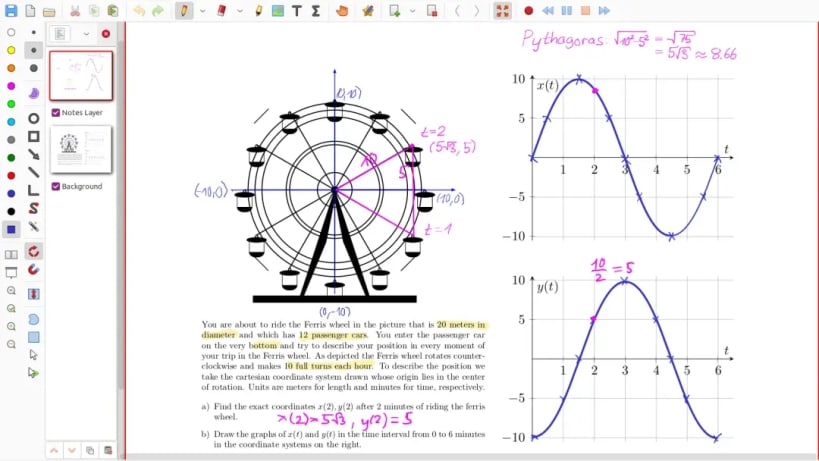
Xournal++ is a hand note-taking software written in C++ with the target of flexibility, functionality and speed. Stroke recognizer and other parts are based on Xournal Code, which you can find at sourceforge. It supports GNU/Linux (e.g. Ubuntu, Debian, Arch, SUSE), macOS and Windows. Supports pen input from devices such as Wacom Tablets.
Xournal++ features:
- Supports pressure-sensitive styluses and digital pen tables (e.g. Wacom, Huion, XP Pen, etc. tablets)
- Paper backgrounds for note-taking, scratch paper, or whiteboarding
- Annotate on top of PDFs
- Select text from the background PDF, copy, highlight or underline it or strike it through
- Follow links from the background PDF
- Export to a variety of formats including SVG, PNG and PDF, both from the GUI and command line
- Different drawing tools (e.g. pen, highlighter) and stroke styles (e.g. solid, dotted)
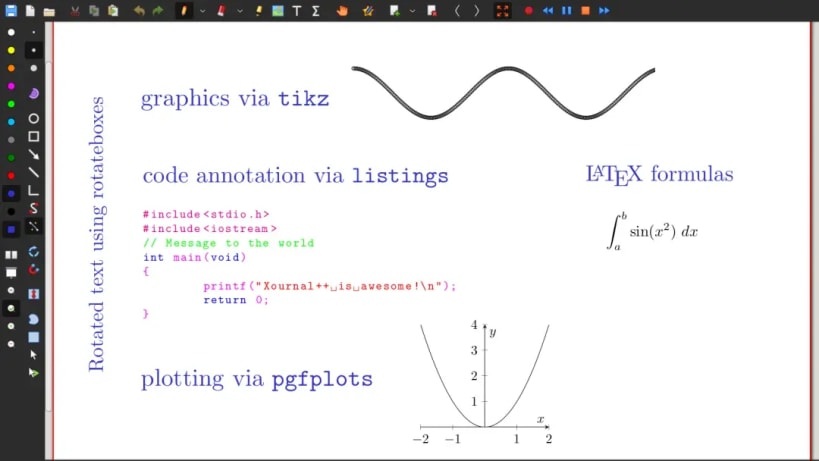
- Shape drawing (line, arrow, circle, rectangle, spline)
- Use the set-square and compass tools for measurements or as a guide for drawing straight lines, circular arcs and radii
- Fill shape functionality
- Shape resizing and rotation
- Rotation and grid snapping for precise alignment of objects
- Input stabilization for smoother writing/drawing
- Text tool for adding text in different fonts, colors, and sizes
- Enhanced support for image insertion
- Eraser with multiple configurations
- LaTeX support (requires a working LaTeX installation) with customizable template and a resizable editor with syntax highlighting
- Sidebar containing page previews with advanced page sorting, PDF bookmarks and layers (can be individually hidden/edited)
- Allows mapping different tools/colors etc. to stylus/mouse buttons
- Customizable toolbar with multiple configurations, e.g. to optimize toolbar for portrait/landscape
- Custom color palette support using the .gpl format
- Page template definitions
- Bug reporting, autosave, and auto backup tools
- Audio recording and playback alongside with handwritten notes
- Multi language support (over 20 languages supported)
- Plugins using Lua scripting
| Revision | Channel | Version | Build | Commit | Download SBOM |
|---|
The build and commit information is derived from build infrastructure records.
Install Xournal++ on your Linux distribution
Choose your Linux distribution to get detailed installation instructions. If yours is not shown, get more details on the installing snapd documentation.












