

Zalos
Install latest/stable of Zalos
Ubuntu 16.04 or later?
Make sure snap support is enabled in your Desktop store.
Details for Zalos
Package name
- zalos
License
- MIT
Last updated
- Today - latest/stable
- Today - latest/edge
Websites
Contact
Source code
Report a bug
External link warning
You are about to open
Do you wish to proceed?
Report a Snap Store violation
Report Zalos for a Snap Store violation
Snap Store Violation Report submitted successfully
Thank you for your report. Information you provided will help us investigate further.
Error submitting report
There was an error while sending your report. Please try again later.
Share this snap
Generate an embeddable card to be shared on external websites.
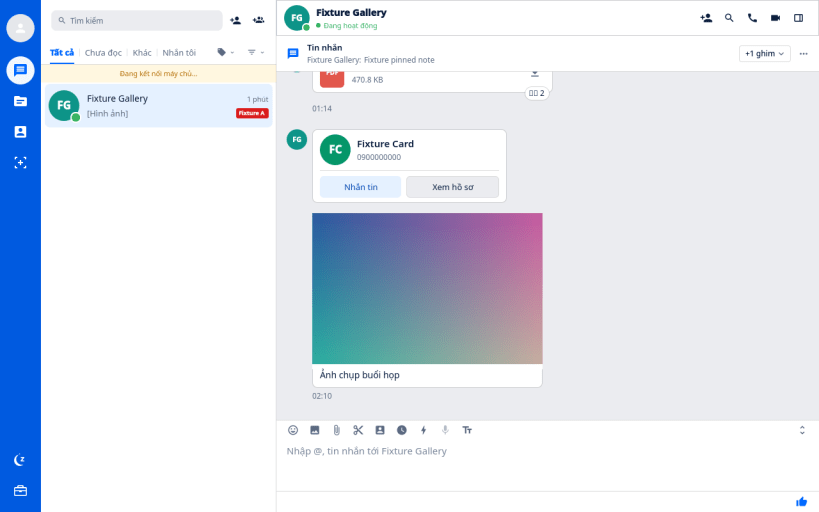
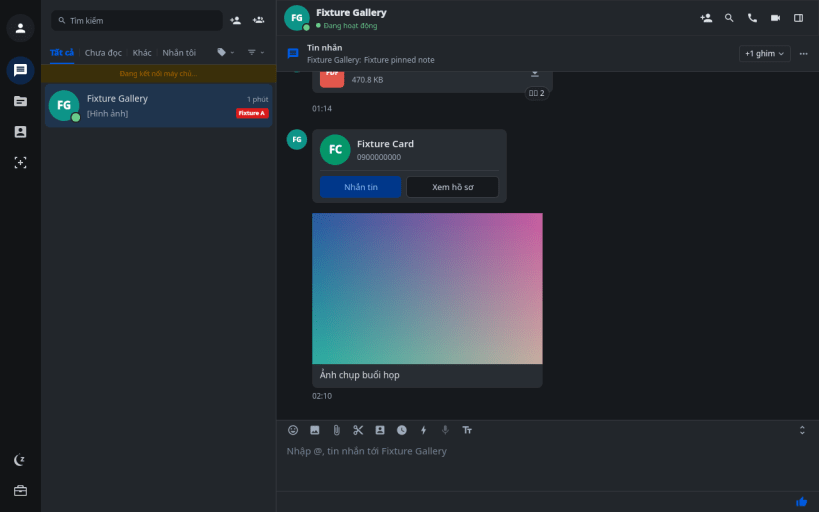
Lightweight native desktop client for Zalo on Linux
Zalos is a high-performance, ultra-lightweight native Linux desktop client for Zalo, built completely in C++17 and Qt 6 QML. It replaces heavy Electron/Chromium wrappers with a lean, purpose-built native architecture delivering ~40–65 MB RAM usage, sub-second cold startup, and smooth 60 FPS hardware-accelerated graphics. Key Features:
- Native Wayland & X11: Smooth dual-engine support with Client-Side Decorations (CSD) and seamless Vietnamese IME input.
- Adaptive System Theme: Automatically follows GNOME (Adwaita) and KDE (Breeze) Dark/Light desktop settings.
- E2EE & Mobile History Sync: Native C++ cryptographic verification (
db-cross-v4) for synchronized end-to-end encrypted message history. - Voice & Video Calls: Built-in C++ 1-1 and group calling engine with OpenH264 video support.
- System Tray Integration: StatusNotifierItem tray icon with dynamic unread message badge count.
- Desktop Utilities: Built-in screenshot capture (
Ctrl+Alt+S), drag-and-drop file transfer, Kiki assistant, and My Documents browser.
| Revision | Channel | Version | Build | Commit | Download SBOM |
|---|
The build and commit information is derived from build infrastructure records.
Install Zalos on your Linux distribution
Choose your Linux distribution to get detailed installation instructions. If yours is not shown, get more details on the installing snapd documentation.


