

zipbox
Install latest/stable of zipbox
Ubuntu 16.04 or later?
Make sure snap support is enabled in your Desktop store.
Details for zipbox
Package name
- zipbox
License
- MIT
Last updated
- Today - latest/stable
- Today - latest/edge
Websites
Contact
Source code
Report a bug
External link warning
You are about to open
Do you wish to proceed?
Report a Snap Store violation
Report zipbox for a Snap Store violation
Snap Store Violation Report submitted successfully
Thank you for your report. Information you provided will help us investigate further.
Error submitting report
There was an error while sending your report. Please try again later.
Share this snap
Generate an embeddable card to be shared on external websites.
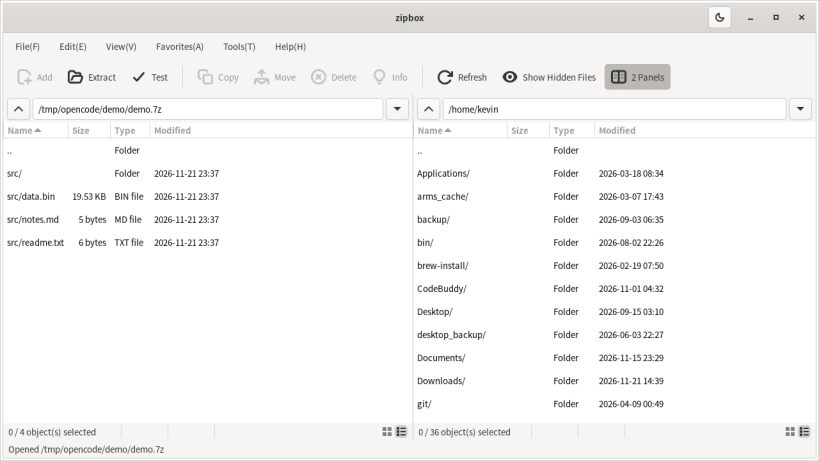
7-Zip File Manager for Linux
zipbox is a two-panel archive manager in the style of the 7-Zip File Manager for Windows, built with GTK4 and Rust.
Browse archives like folders, create new ones, add and extract files, and test or repair damaged archives. Every operation runs through the official 7-Zip command line tool, which ships inside the snap, so there is nothing else to install.
Features:
- Two folders side by side, with F5/F6 copy and move between them
- Open, create and edit 7z, zip, tar, gz, bz2, xz, zstd, rar, cab, iso and wim archives
- Password protected archives, encryption and volume splitting
- Favorites, history, flat view, wildcard selection
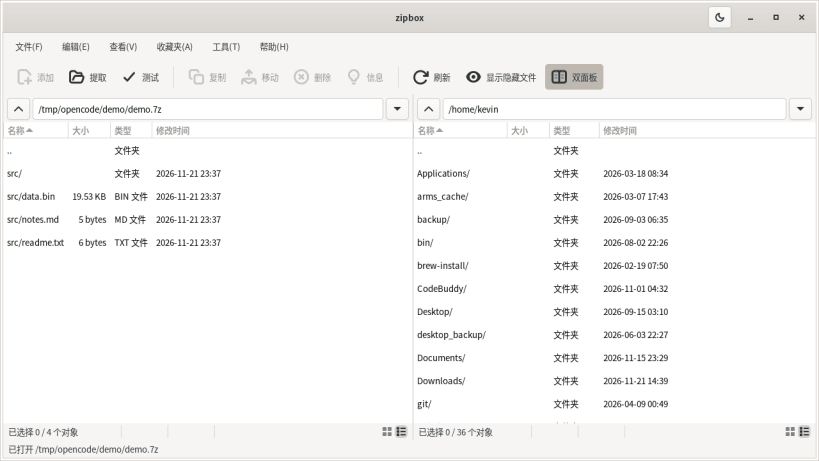
- English and Simplified Chinese interface
Notes on the sandbox: this snap can read and write your home folder and,
after snap connect zipbox:removable-media, external drives. System
folders such as /usr and /etc stay out of reach, and the file manager
menus of Nautilus and Dolphin are not installed by the snap.
Updates come from the App Center.
| Revision | Channel | Version | Build | Commit | Download SBOM |
|---|
The build and commit information is derived from build infrastructure records.
Install zipbox on your Linux distribution
Choose your Linux distribution to get detailed installation instructions. If yours is not shown, get more details on the installing snapd documentation.


