

CapLite Video Editor
Install latest/stable of CapLite Video Editor
Ubuntu 16.04 or later?
Make sure snap support is enabled in your Desktop store.
Install using the command line
sudo snap install caplite-video-editorDon't have snapd? Get set up for snaps.

Details for CapLite Video Editor
Package name
- caplite-video-editor
License
- unset
Last updated
- 8 June 2026 - latest/stable
Report a Snap Store violation
Report CapLite Video Editor for a Snap Store violation
Snap Store Violation Report submitted successfully
Thank you for your report. Information you provided will help us investigate further.
Error submitting report
There was an error while sending your report. Please try again later.
Share this snap
Generate an embeddable card to be shared on external websites.
Fast. Sleek. Dynamic. Video Editing Simplified.
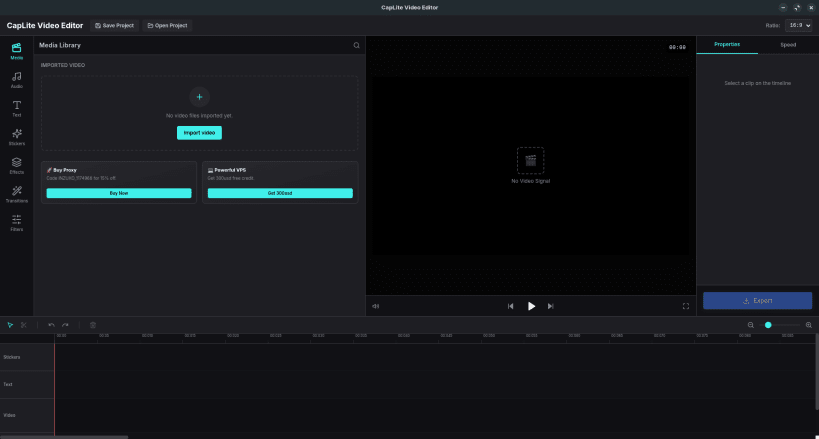
CapLite Video Editor is a lightning-fast, modern, and user-friendly video editing application designed to bring professional-grade tools to everyone. Whether you are creating a quick reel for social media or a detailed vlog, CapLite provides a seamless and intuitive editing experience. With its glassmorphism UI, drag-and-drop mechanics, and powerful backend driven by FFmpeg, CapLite ensures your creative workflow is never interrupted.
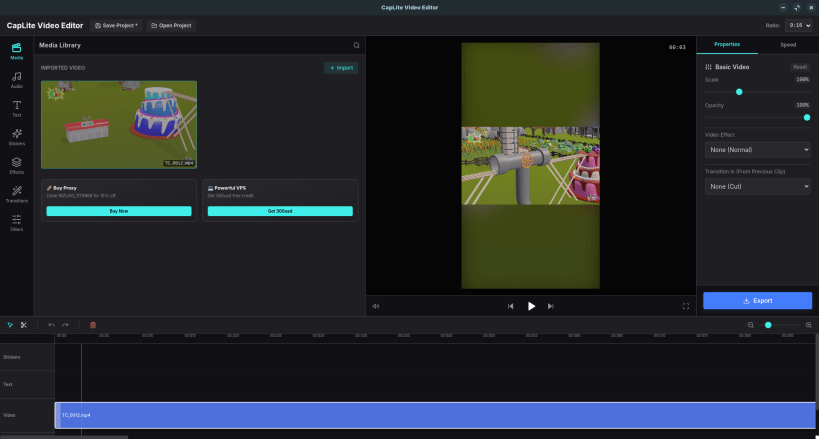
Key Features: ✨ Intuitive Timeline: Easy drag-and-drop interface for video, audio, and text clips. 📱 Multi-Format Support: Seamlessly switch between 16:9 (Landscape) and 9:16 (Portrait) aspect ratios with auto-blur backgrounds for vertical videos. 🎵 Audio Control: Mute original audio and adjust volume levels dynamically. 🚀 Professional Export: Fast, high-quality rendering powered by a robust FFmpeg engine. 💾 Smart Project Management: Save and open your projects (.lcp files) securely with dirty-state protections. 🔥 Premium Assets: Includes a built-in library of high-quality stickers and text customization tools.
Experience the next generation of video editing with CapLite Video Editor today!
| Revision | Channel | Version | Build | Commit | Download SBOM |
|---|
The build and commit information is derived from build infrastructure records.
Install CapLite Video Editor on your Linux distribution
Choose your Linux distribution to get detailed installation instructions. If yours is not shown, get more details on the installing snapd documentation.











