

Desktop Icon Boxes (desktop-icon-boxes-linux)
Install latest/stable of Desktop Icon Boxes
Ubuntu 16.04 or later?
Make sure snap support is enabled in your Desktop store.
Install using the command line
sudo snap install desktop-icon-boxes-linuxDon't have snapd? Get set up for snaps.
Details for Desktop Icon Boxes
Package name
- desktop-icon-boxes-linux
License
- MIT
Last updated
- Today - latest/stable
Websites
Contact
External link warning
You are about to open
Do you wish to proceed?
Report a Snap Store violation
Report Desktop Icon Boxes for a Snap Store violation
Snap Store Violation Report submitted successfully
Thank you for your report. Information you provided will help us investigate further.
Error submitting report
There was an error while sending your report. Please try again later.
Share this snap
Generate an embeddable card to be shared on external websites.
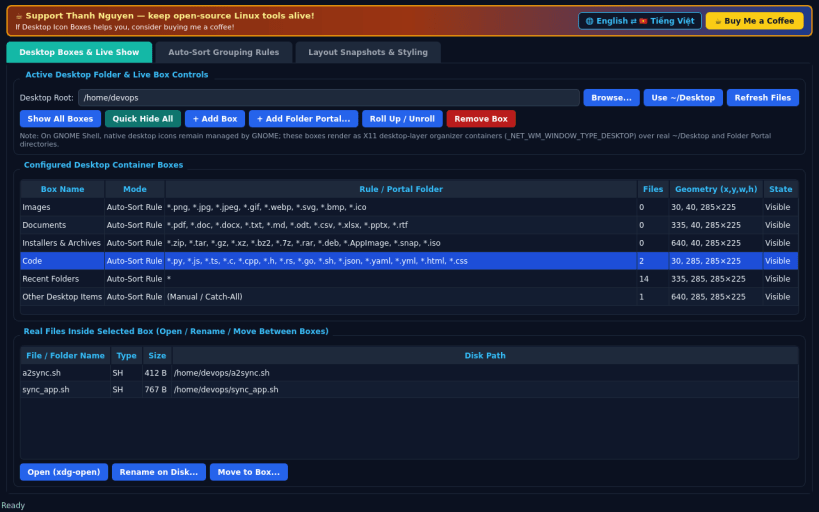
Desktop icon container boxes & auto-sorting groups over ~/Desktop folders
A Linux X11 alternative to Fences. Independent open-source project, not affiliated with or endorsed by Stardock.
DESKTOP BOXES & LIVE SHOW • Translucent, draggable, resizable desktop container boxes rendered as X11 desktop-layer windows (_NET_WM_WINDOW_TYPE_DESKTOP, pinned at lower stack) backed 100% by real files in your ~/Desktop or chosen user folder. • Each box features a shaded titlebar header, Double-Click Titlebar Roll-Up animation, scrollable real file/folder icons with crisp file-type badges, click/double-click open via xdg-open, Rename, Move File Between Boxes, and Quick Hide / Show All Boxes toggle + global hotkey (Ctrl+Alt+B).
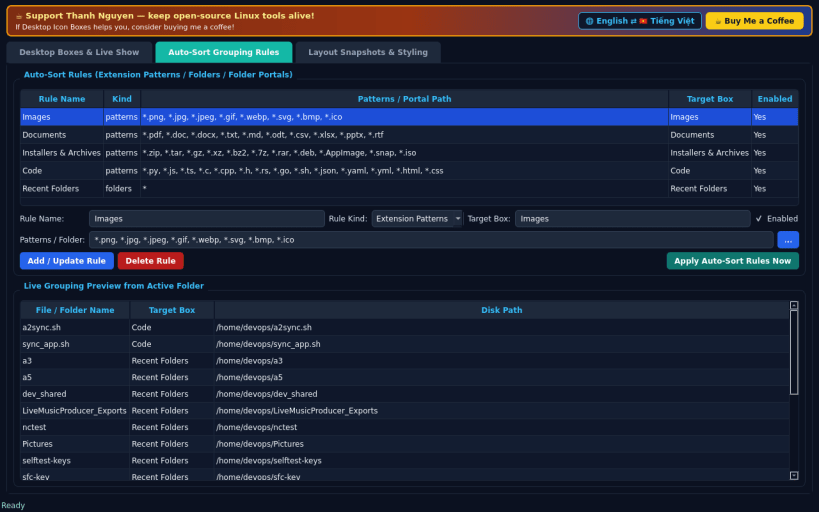
AUTO-SORT GROUPING RULES & FOLDER PORTALS • Define extension/pattern sorting rules (Images, Documents, Installers & Archives, Code, Recent Folders) and apply rules directly against real ~/Desktop files. • Point any Box directly at any real folder on disk as a live Folder Portal.
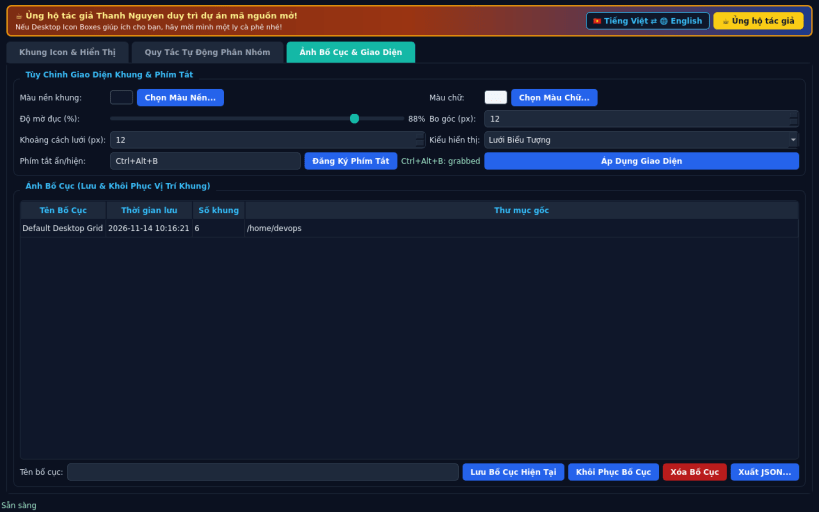
LAYOUT SNAPSHOTS & BOX STYLING • Customize box translucent tint color, opacity, border radius, font color, and icon grid spacing, and save/restore named layout snapshots.
LIMITATIONS (honest) • On GNOME Shell, native desktop icons remain managed by GNOME; these boxes render as desktop-layer organizer containers over real ~/Desktop and Folder Portal directories. • Desktop-layer EWMH hints and global XGrabKey hotkeys require an X11 / XWayland session.
SUPPORT & DONATE • Created by Thanh Nguyen — https://buymeacoffee.com/thanhnv128b
| Revision | Channel | Version | Build | Commit | Download SBOM |
|---|
The build and commit information is derived from build infrastructure records.
Install Desktop Icon Boxes on your Linux distribution
Choose your Linux distribution to get detailed installation instructions. If yours is not shown, get more details on the installing snapd documentation.


