

DMX Core 100 (dmxcore100)
Install latest/stable of DMX Core 100
Ubuntu 16.04 or later?
Make sure snap support is enabled in your Desktop store.
Details for DMX Core 100
Package name
- dmxcore100
License
- Proprietary
Last updated
- 15 October 2026 - latest/stable
- Yesterday - latest/edge
Websites
Contact
Report a bug
External link warning
You are about to open
Do you wish to proceed?
Report a Snap Store violation
Report DMX Core 100 for a Snap Store violation
Snap Store Violation Report submitted successfully
Thank you for your report. Information you provided will help us investigate further.
Error submitting report
There was an error while sending your report. Please try again later.
Share this snap
Generate an embeddable card to be shared on external websites.
Professional Art-Net/sACN lighting controller. Stream up to 800 universes with web control, scheduling, and API integration.
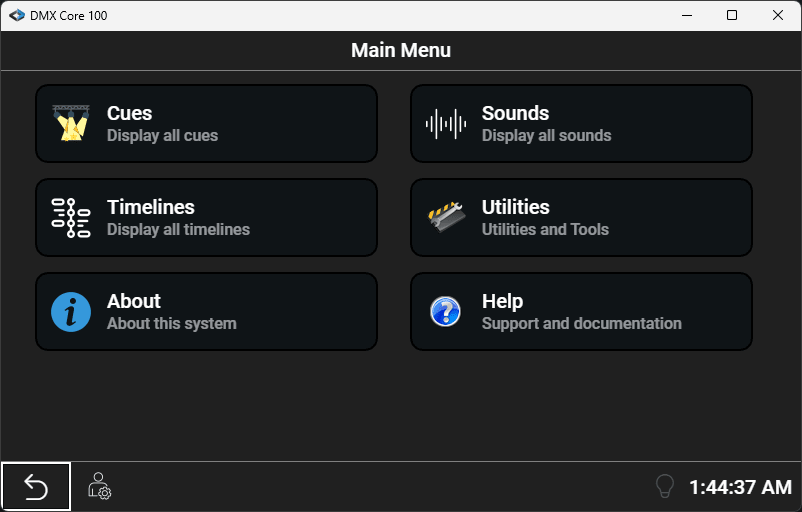
Transform any standard Linux system into a powerful lighting control platform. DMX Core 100 brings professional-grade show control and streaming capabilities to Art-Net, sACN, and KiNet lighting networks.
Key Features:
- High-Performance Streaming - Output up to 800 universes at 40 Hz (600 at 60 Hz) with rock-solid reliability
- Synchronized Audio - Play audio tracks perfectly synchronized with lighting cues
- Multi-Protocol Support - Native Art-Net, sACN (E1.31), and KiNet v1/v2 protocols, plus DMX-512 with compatible USB interfaces
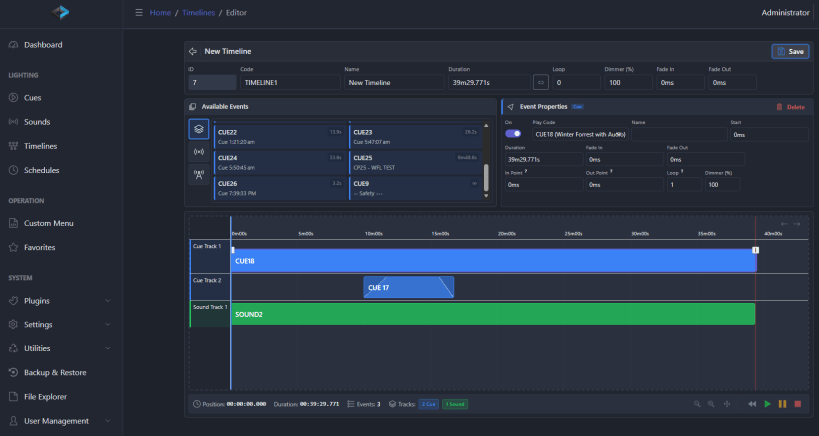
- Flexible Show Control - Record custom shows from your lighting software and trigger playback via touchscreen, schedule, web API, OSC, HTTP, MQTT, UDP, TCP, or DMX input
- Web-Based Interface - Full control and configuration via modern web UI accessible from any device
- Scheduling Engine - Automate lighting scenes with the built-in RTC clock and scheduling system
- Recording & Playback - Capture lighting sequences and play them back standalone
- Remote Management - Optional BalenaCloud integration for remote access and monitoring
- Integrator-Friendly - Extensive API and integration options for custom control systems
Originally Designed for Dedicated Hardware
While DMX Core 100 was originally developed for custom wall-mounted hardware controllers, this snap package brings the same powerful software to standard computing platforms. Run on your own server, industrial PC, or embedded Linux device.
Web Server and Default PIN
The local web server for the Web UI is hosted on port 8000 and 8001 for https (self-signed cert). Login with default pin 1111.
Post-Installation Configuration
Because of the high performance requirements of processing 800 universes we need to make sure the host computer is set up with larger than default network buffers. Also to get audio playback you have to connect the alsa to the snap. We have developed a simple script that handles all of that, linked in the documentation at this page: https://docs.dmxcore.com/dmx-core-100/troubleshooting/config-issues
Perfect For:
- Architectural lighting installations
- Theaters and performance venues
- Houses of worship
- Museums and galleries
- Corporate facilities
- Entertainment venues
- Hospitality and retail
Documentation & Support
Full documentation: https://docs.dmxcore.com/dmx-core-100/
Note: This software requires compatible Art-Net/sACN lighting equipment. USB DMX output supported via Enttec Pro or DMXking USB interfaces (up to 4 universes). The current version is running in demo-mode, please contact us to purchase a commercial license.
| Revision | Channel | Version | Build | Commit | Download SBOM |
|---|
The build and commit information is derived from build infrastructure records.
Install DMX Core 100 on your Linux distribution
Choose your Linux distribution to get detailed installation instructions. If yours is not shown, get more details on the installing snapd documentation.












