

FFQueue
Install latest/stable of FFQueue
Ubuntu 16.04 or later?
Make sure snap support is enabled in your Desktop store.
Details for FFQueue
Package name
- ffqueue
License
- GPL-3.0
Last updated
- 25 August 2026 - latest/stable
- 29 August 2026 - latest/edge
Websites
Contact
External link warning
You are about to open
Do you wish to proceed?
Report a Snap Store violation
Report FFQueue for a Snap Store violation
Snap Store Violation Report submitted successfully
Thank you for your report. Information you provided will help us investigate further.
Error submitting report
There was an error while sending your report. Please try again later.
Share this snap
Generate an embeddable card to be shared on external websites.
GUI for FFmpeg
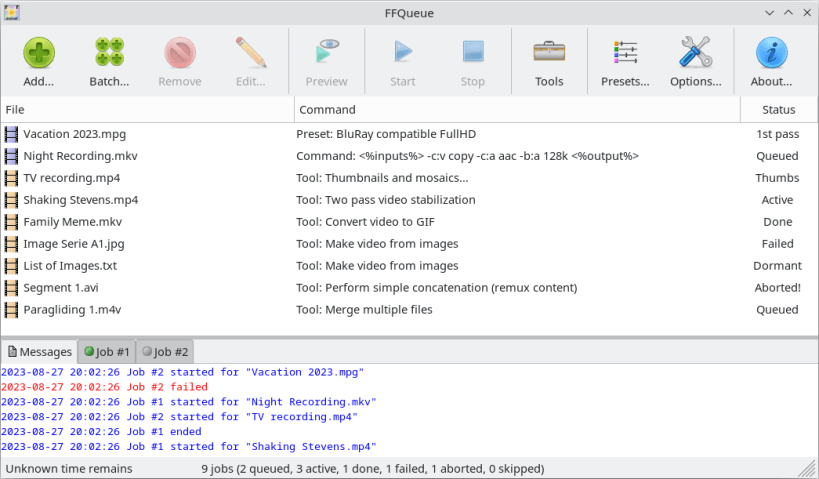
FFQueue is (yet another) graphical user interface for FFmpeg with comprehensive support for both the basic features but also the more advanced features like filtergraphs. FFQueue makes it easy to create multiple jobs and process them as a single queue.
- Run multiple jobs in parallel.
- User extensible "Full Specification" support for codecs, filters and presets.
- Baked in "Full Specification" support for H.264 (AVC), H.265 (HEVC), AV1 (LibAOM and Rust AV1).
About the releases:
- STABLE: Is based on Ubuntu 24.04 LTS (core24) and includes FFmpeg V6.1 from the Ubuntu repositories.
- EDGE: As "stable" but includes the latest build of FFmpeg available from https://github.com/BtbN at the time the snap was built/packed. BEWARE that FFmpeg only has gone through basic testing and thus cannot be quaranteed to be fully operational and since pre-build software from any external source may impose a security risk you should not allow FFQueue access to "removable-media" as described below unless you fully trust the precompiled binaries from "BtbN@github".
If you cannot access content on secondary drives, and would like to do so, you may grant read+write access to all secondary drives with the command sudo snap connect ffqueue:removable-media. You may also use bind-mounts to grant read+write to a single folder on a secondary drive with the command sudo mount --bind /media/user-name/drive-name/folder-name /home/user-name/mount-point. If you only want to grant read access, use sudo mount -o bind,ro /media/user-name/drive-name/folder-name /home/user-name/mount-point.
Please report bugs! :-)
| Revision | Channel | Version | Build | Commit | Download SBOM |
|---|
The build and commit information is derived from build infrastructure records.
Install FFQueue on your Linux distribution
Choose your Linux distribution to get detailed installation instructions. If yours is not shown, get more details on the installing snapd documentation.











