

Gadget Editor

Install latest/stable of Gadget Editor
Ubuntu 16.04 or later?
Make sure snap support is enabled in your Desktop store.
Install using the command line
sudo snap install gadget-editorDon't have snapd? Get set up for snaps.


Details for Gadget Editor
Package name
- gadget-editor
License
- GPL-2.0-only
Last updated
- 25 October 2026 - latest/stable
- 23 October 2026 - latest/edge
Websites
Contact
Source code
Report a bug
External link warning
You are about to open
Do you wish to proceed?
Report a Snap Store violation
Report Gadget Editor for a Snap Store violation
Snap Store Violation Report submitted successfully
Thank you for your report. Information you provided will help us investigate further.
Error submitting report
There was an error while sending your report. Please try again later.
Share this snap
Generate an embeddable card to be shared on external websites.
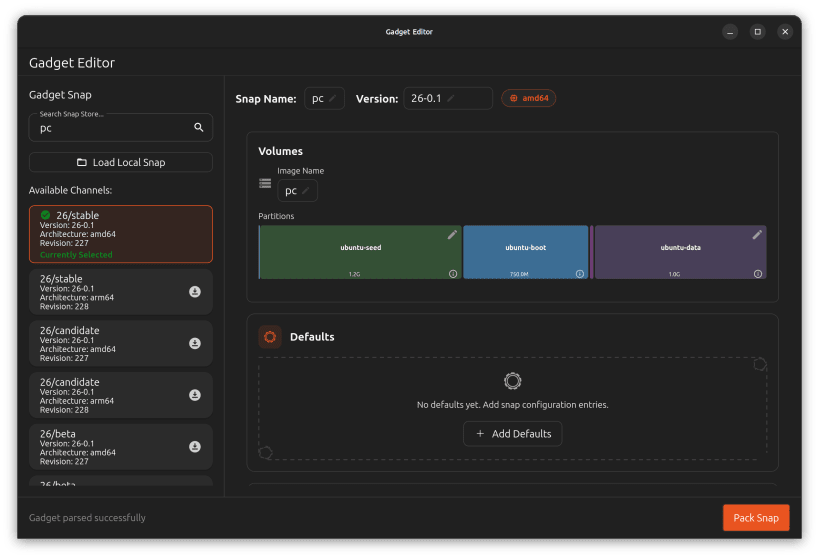
Edit Ubuntu Core Gadget Snap Packages
An editor for binary Gadget Snap packages to easily:
- change volume sizes of the seed and data partitions
- add/remove entries for auto connections of snaps in the image
- apply default configurations for snap packages seeded in the image
- manage kernel command-line parameters
- change the image file name in the volume definition
- manage interface slots the gadget provides
- Add an API Key for a dedicated store
- and indeed change the name and version of the snap itself
You can search and download existing gadget snaps from the global store with the built in search function or import a local gadget snap file to edit it.
The gadget snap will only be re-packed after the edit and does not need to be compiled from source (which provides full cross architecture support).
Note that the existing snap assertions will not match anymore after the edit and you will have to either re-upload to the store to obtain a fresh signature or use it with a "dangerous" model assertion for local image builds.
If you need to load/save gadget files to/from external media, you need to connect the removable-media snap interface with:
sudo snap connect gadget-editor:removable-media
| Revision | Channel | Version | Build | Commit | Download SBOM |
|---|
The build and commit information is derived from build infrastructure records.
Install Gadget Editor on your Linux distribution
Choose your Linux distribution to get detailed installation instructions. If yours is not shown, get more details on the installing snapd documentation.












