

jsCPUInspector
Install latest/stable of jsCPUInspector
Ubuntu 16.04 or later?
Make sure snap support is enabled in your Desktop store.
Install using the command line
sudo snap install jscpuinspectorDon't have snapd? Get set up for snaps.
Details for jsCPUInspector
Package name
- jscpuinspector
License
- Proprietary
Last updated
- 31 October 2026 - latest/stable
Websites
Contact
External link warning
You are about to open
Do you wish to proceed?
Report a Snap Store violation
Report jsCPUInspector for a Snap Store violation
Snap Store Violation Report submitted successfully
Thank you for your report. Information you provided will help us investigate further.
Error submitting report
There was an error while sending your report. Please try again later.
Share this snap
Generate an embeddable card to be shared on external websites.
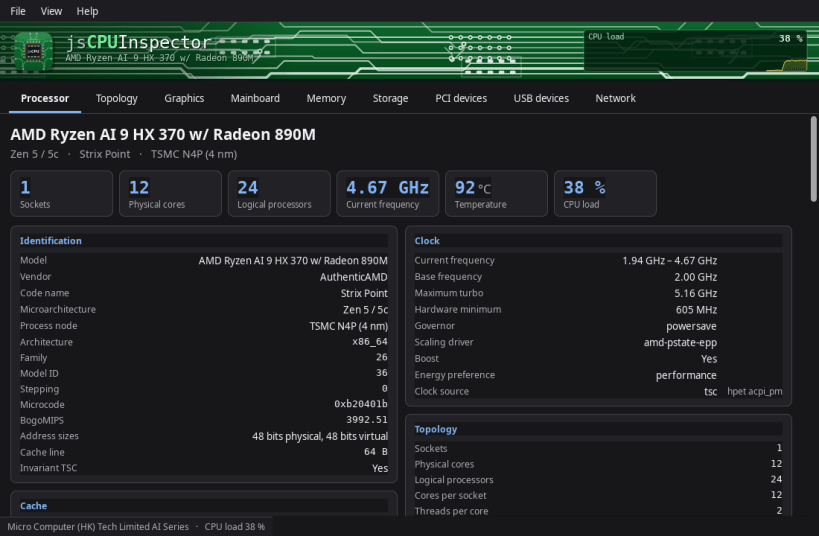
See every detail of your processor, graphics, memory and drives
Update jsCPUInspector 1.1
- Live history charts: see the last two minutes of processor load, clock speed, temperature and power at a glance — and the same for graphics, memory, every drive and every network connection
- System activity: how busy the whole computer really is, and how long programs had to wait for the processor, memory or drives
- Interrupts per device: find out which device keeps the processor busy
- Memory: page activity and how your system handles low memory
- Radio switches: see whether Wi-Fi and Bluetooth are on or blocked
- More kernel details: build, loaded modules, security modules and the time the system started
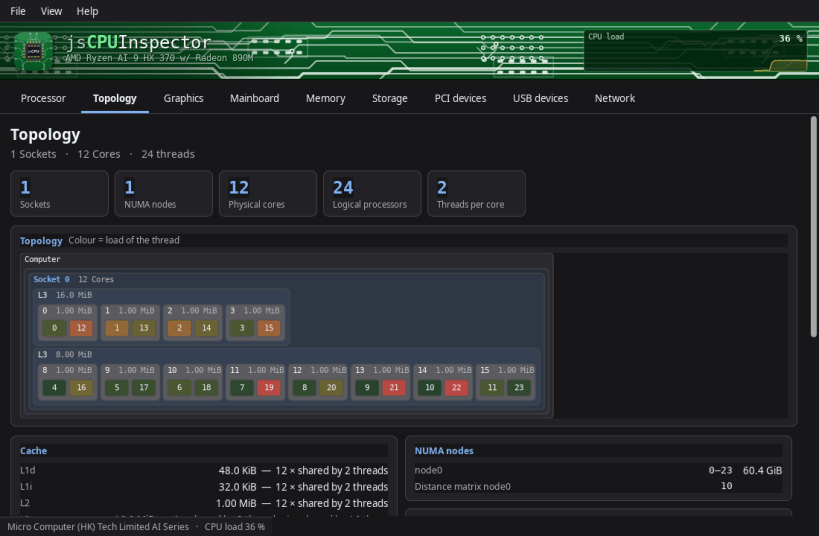
- The core view now follows the load second by second
- The layout adapts when you resize the window — narrower or wider
- Long values wrap instead of being cut off, with more room around them
- Cleaner text in Japanese, Chinese and Korean
- Now available in 83 languages
- The About window links to all other Linux packages
Everything your computer can tell you about itself, in one window — from the processor down to the last thing plugged into a USB port. No terminal, no commands to remember.
Nine tabs, and a live view across the top that shows what every processor core is doing right now.
- Processor: sockets, cores and threads, each core with its own clock
- Cache levels drawn to scale, and which cores share them
- Code name, generation and manufacturing process
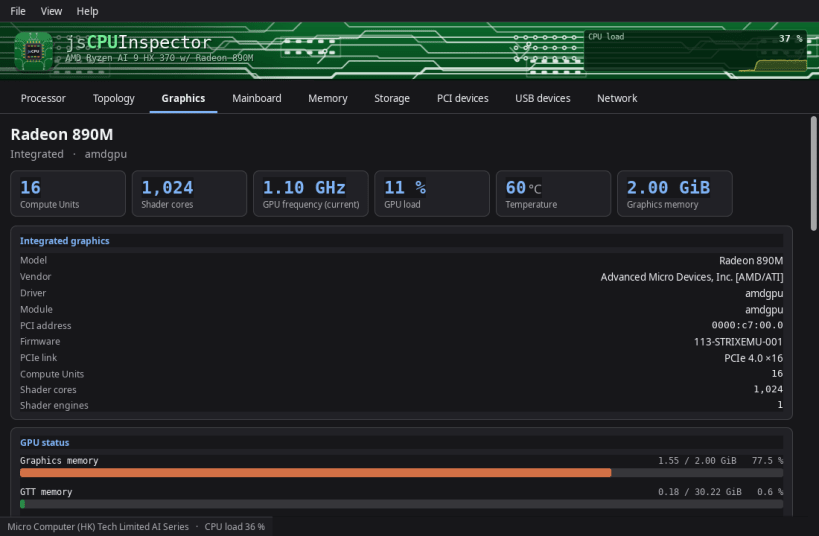
- Graphics: every card and chip, with clock, temperature and load live
- The connected monitor: make, model, size and its native resolution
- Mainboard, chipset, BIOS and firmware type
- Memory: every module with size, speed, part number and timings
- Drives: capacity, partitions, free space, read and write speed live
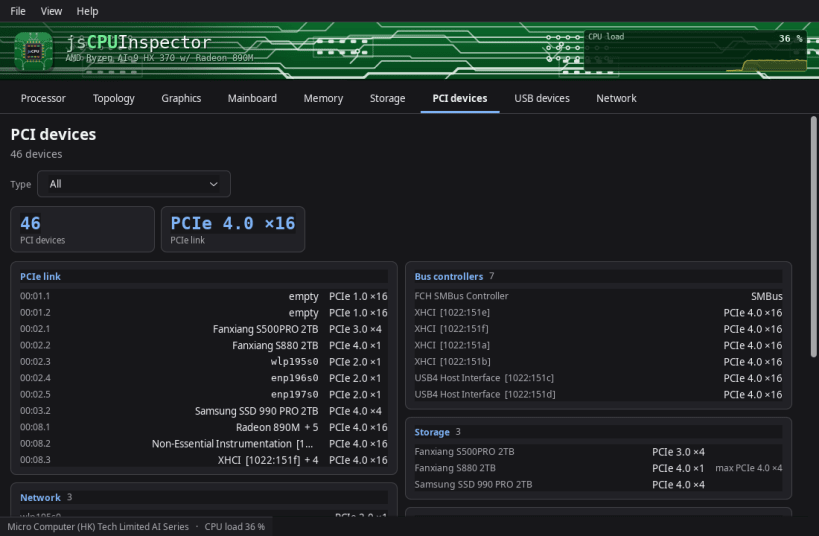
- PCI: which card sits in which slot, and how fast it is connected
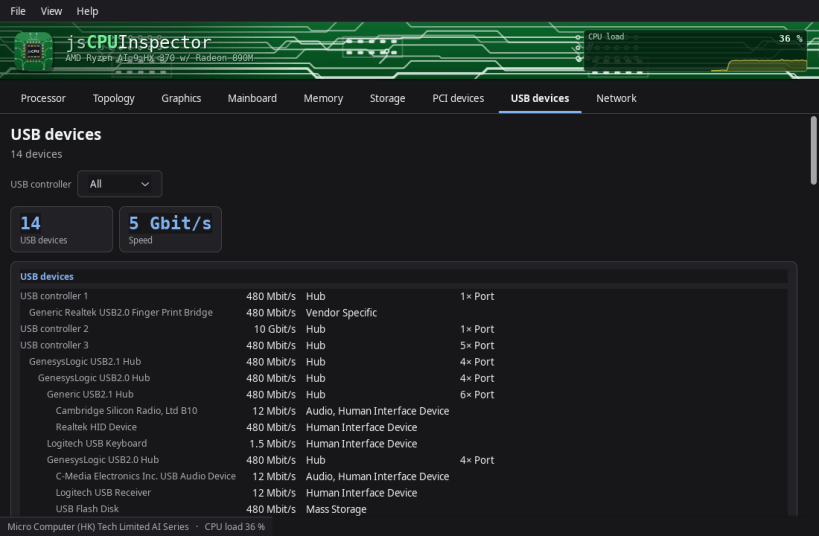
- USB: every device on every port, with its speed and power draw
- Network: addresses, link speed, traffic per second, Wi-Fi signal
- Temperatures, fan speeds and voltages, named by where they sit
- Saves the whole report as a text file you can send on
- 83 languages, light and dark theme, colours to your taste
▶ ONE-TIME SETUP
Snap packages may only see very little of the computer at first. Without the one-time setup below these stay empty: mainboard and BIOS details, all sensors and temperatures, and the network interfaces.
One command grants read access. It downloads nothing, installs nothing and changes none of your data — the app may only see more, not do more:
sudo sh -c 'for i in hardware-observe system-observe network-observe; do snap connect jscpuinspector:$i; done'
The app tells you the same thing on first start and offers to copy the command for you. It works without it; the affected entries simply stay empty and say so. No restart needed — a click on Refresh is enough. To undo, use "snap disconnect" instead of "snap connect".
▶ WHAT THIS SNAP CANNOT DO
A Snap is never allowed to ask for the administrator password, and two things need it: the health data of your drives — wear, spare capacity, power-on hours, written and read totals — and the serial numbers of the machine and its parts. Everything else is there. For those two as well, use the .deb, RPM, Flatpak or AppImage version from www.budbrain.de — there the app can ask for the password and read them.
Supported systems:
- Any Linux desktop with X11 or Wayland
- x86_64 (64-bit)
Developed by Josef Sejrek / Budbrain Software Contact: jscpuinspector@budbrain.de | www.budbrain.de
| Revision | Channel | Version | Build | Commit | Download SBOM |
|---|
The build and commit information is derived from build infrastructure records.
Install jsCPUInspector on your Linux distribution
Choose your Linux distribution to get detailed installation instructions. If yours is not shown, get more details on the installing snapd documentation.











