
jsFileManager
Install latest/stable of jsFileManager
Ubuntu 16.04 or later?
Make sure snap support is enabled in your Desktop store.
Install using the command line
sudo snap install jsfilemanagerDon't have snapd? Get set up for snaps.

Details for jsFileManager
Package name
- jsfilemanager
License
- Proprietary
Last updated
- 11 August 2026 - latest/stable
Websites
Contact
External link warning
You are about to open
Do you wish to proceed?
Report a Snap Store violation
Report jsFileManager for a Snap Store violation
Snap Store Violation Report submitted successfully
Thank you for your report. Information you provided will help us investigate further.
Error submitting report
There was an error while sending your report. Please try again later.
Share this snap
Generate an embeddable card to be shared on external websites.
Two-pane file manager built around the copy
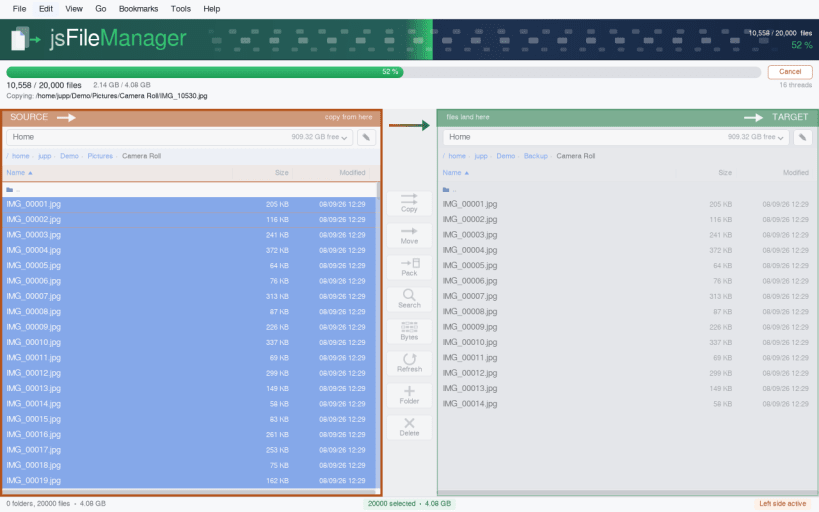
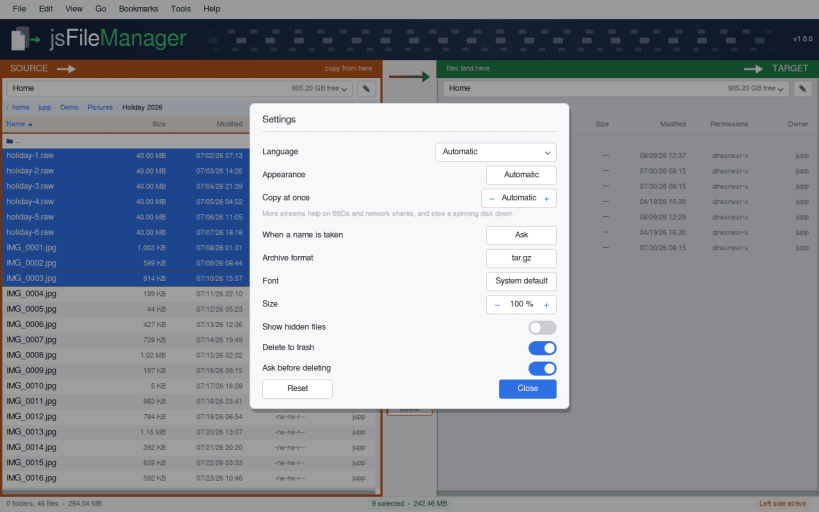
Two Filebrowser side by side, and the buttons between them that move files from one side to the other. Pick a drive at the top of each side, select what should go, press the arrow.
Built around the copy itself: while it runs you see which file is being written, how many of how many are done, how fast it is going, how long is left, and what failed — as it happens, not afterwards.
What it does:
- Local disks, removable media and network shares in one picker, each with the free space on it
- Columns for name, size, date, permissions and owner, sorted by a click on the column title — and sorted naturally, so file10 comes after file9
- Select with click, shift-click for a range, ctrl-click for single ones, or by a pattern like *.png
- Hidden files shown, symlinks with their target, broken ones marked
- Copy and move in both directions, with as many parallel streams as your hardware likes
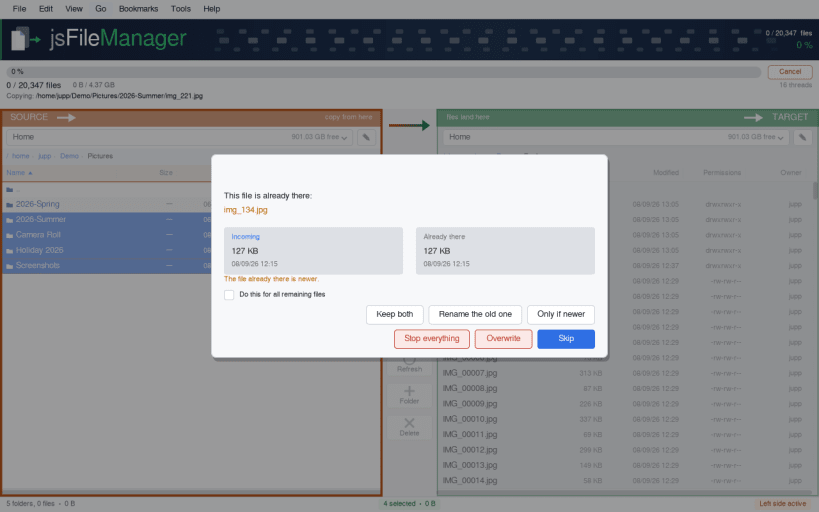
- When a name is taken: overwrite, skip, keep both, rename the existing one, or only if the incoming file is newer — asked once per file, or once for all of them
- The box shows both files with size and date, and says which is newer
- Rename in the row itself, duplicate, new folder, and a link on the other side
- Permissions and owner in one box, changed by clicking the bits
- Look inside an archive without unpacking it, unpack it, and pack a selection into one (formats: see the note below)
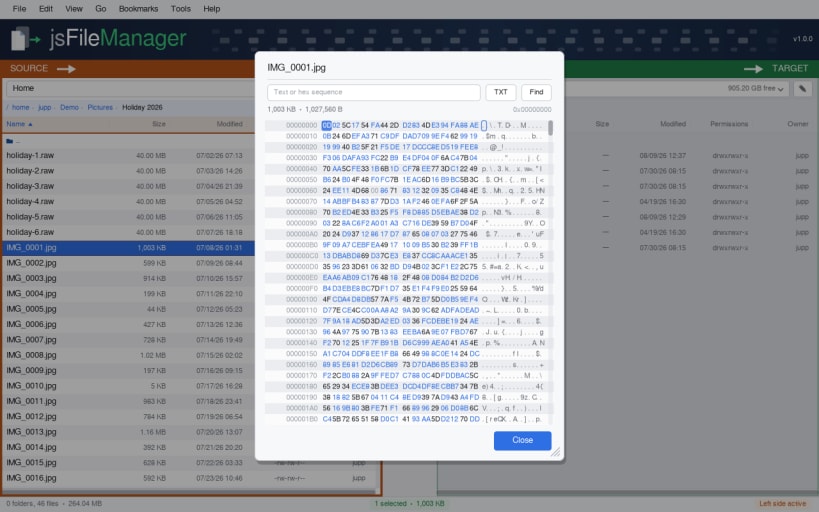
- Show any file as raw bytes, search in them, and change a byte
- Delete to the trash or for good, with the names listed before you confirm
- Drag files in from another window — the side you are over is highlighted before you let go, and that is where they land
- Available in 44 languages: English, German, French, Spanish, Italian, Portuguese, Catalan, Dutch, Polish, Czech, Slovak, Slovenian, Croatian, Serbian, Bulgarian, Romanian, Hungarian, Swedish, Danish, Norwegian, Finnish, Lithuanian, Latvian, Greek, Turkish, Russian, Ukrainian, Japanese, Chinese (Simplified), Chinese (Traditional), Korean, Vietnamese, Thai, Indonesian, Malay, Tagalog, Hindi, Bengali, Nepali, Urdu, Persian, Arabic, Hebrew, Swahili (Automatic follows the system language)
- Light and dark theme, following the desktop
▶ ARCHIVES IN THE SNAP EDITION
Packing, unpacking and looking inside an archive work here for tar.gz, tar.bz2 and plain tar — those come with the Snap base. zip, 7z, tar.xz, tar.zst and tar.lz4 do not: the sandbox is not allowed to run your system's programs, and this package deliberately does not bundle its own copies of them. The .deb, .rpm, AppImage and AUR editions handle every format, using the programs your system already has.
▶ ONE-TIME SETUP
For USB sticks, SD cards, external disks, network mounts and folders outside your home directory — one line, once:
sudo sh -c 'for i in removable-media system-backup mount-observe; do snap connect jsfilemanager:$i; done'
Your home directory works without it. No reboot, just restart the app.
Supported systems:
- Ubuntu 24.04+, Fedora 40+, Arch Linux, openSUSE Tumbleweed
- Any Linux desktop with X11 or Wayland
- x86_64 (64-bit)
Also available as .deb and .rpm, flatpack, AppImage at www.budbrain.de
▶ PLEASE NOTE
Moving and deleting change your files. Deleting to the trash can be undone from your desktop's trash; deleting permanently cannot, and neither can overwriting a file during a copy. Please check what you have selected before you confirm, and keep a backup of anything you cannot recreate. The software is provided "as is", without warranty of any kind, and is used at your own risk.
Keywords: file manager, two-pane file manager, dual pane, twin panel, commander, file browser, copy files, move files, rename, duplicate, delete, trash, folders, directories, USB stick, SD card, external drive, network share, NAS, disk space, file transfer, progress, GTK, Linux desktop
Developed by Josef Sejrek / Budbrain Software Contact: jsfilemanager@budbrain.de | www.budbrain.de
| Revision | Channel | Version | Build | Commit | Download SBOM |
|---|
The build and commit information is derived from build infrastructure records.
Install jsFileManager on your Linux distribution
Choose your Linux distribution to get detailed installation instructions. If yours is not shown, get more details on the installing snapd documentation.











