

LiveFaceSwap AI (livefaceswap-desktop)
Install latest/stable of LiveFaceSwap AI
Ubuntu 16.04 or later?
Make sure snap support is enabled in your Desktop store.
Install using the command line
sudo snap install livefaceswap-desktopDon't have snapd? Get set up for snaps.
Details for LiveFaceSwap AI
Package name
- livefaceswap-desktop
License
- Proprietary
Last updated
- 1 November 2026 - latest/stable
Websites
External link warning
You are about to open
Do you wish to proceed?
Report a Snap Store violation
Report LiveFaceSwap AI for a Snap Store violation
Snap Store Violation Report submitted successfully
Thank you for your report. Information you provided will help us investigate further.
Error submitting report
There was an error while sending your report. Please try again later.
Share this snap
Generate an embeddable card to be shared on external websites.
Real-time AI face swap, virtual try-on and restyle for Linux webcams
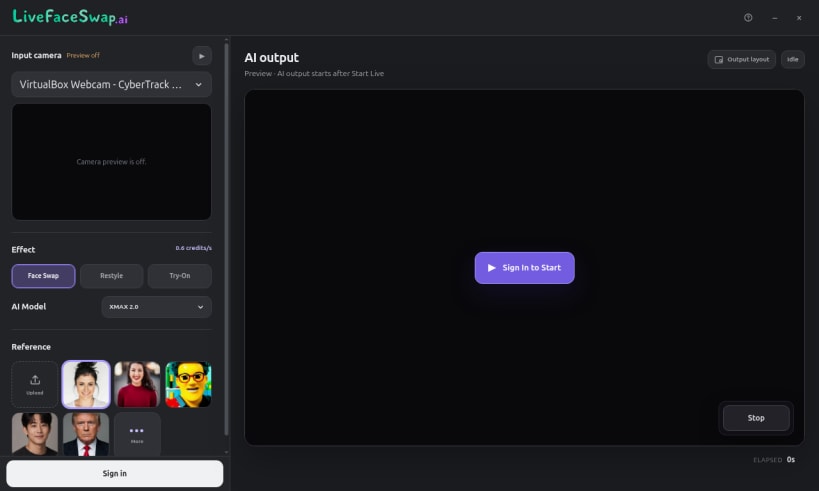
LiveFaceSwap AI lets you explore a new face, outfit, or visual style live through your Linux webcam. Choose a camera, an authorized reference image or built-in preset, and an AI model, then watch the result in the desktop app as you move. AI processing runs in the cloud, so you do not need a dedicated GPU or a local model download.
Explore three creative modes: • Face Swap: preview an authorized face reference on your live camera video. • Live Try-On: explore clothing and looks with outfit references. • Live Restyle: transform your camera scene into a new visual style or character look.
Switch effects, models, and references in one workspace. Preview your camera input and AI output, and check the selected model's credit rate before starting. Learn more and try LiveFaceSwap AI online at https://livefaceswap.ai/desktop.
Linux preview: AI output is available inside the app. Virtual camera output to OBS, Zoom, or other programs is not available on Linux yet. Sign-in and internet access are required; real-time sessions use credits at the displayed rate. If the webcam is unavailable, run sudo snap connect livefaceswap-desktop:camera and reopen the app.
Use only media and likenesses you have permission to use.
| Revision | Channel | Version | Build | Commit | Download SBOM |
|---|
The build and commit information is derived from build infrastructure records.
Install LiveFaceSwap AI on your Linux distribution
Choose your Linux distribution to get detailed installation instructions. If yours is not shown, get more details on the installing snapd documentation.











