

Low Latency Screen Stream
Install latest/stable of Low Latency Screen Stream
Ubuntu 16.04 or later?
Make sure snap support is enabled in your Desktop store.
Install using the command line
sudo snap install low-latency-screen-streamDon't have snapd? Get set up for snaps.
Details for Low Latency Screen Stream
Package name
- low-latency-screen-stream
License
- MIT
Last updated
- Yesterday - latest/stable
Websites
Contact
External link warning
You are about to open
Do you wish to proceed?
Report a Snap Store violation
Report Low Latency Screen Stream for a Snap Store violation
Snap Store Violation Report submitted successfully
Thank you for your report. Information you provided will help us investigate further.
Error submitting report
There was an error while sending your report. Please try again later.
Share this snap
Generate an embeddable card to be shared on external websites.
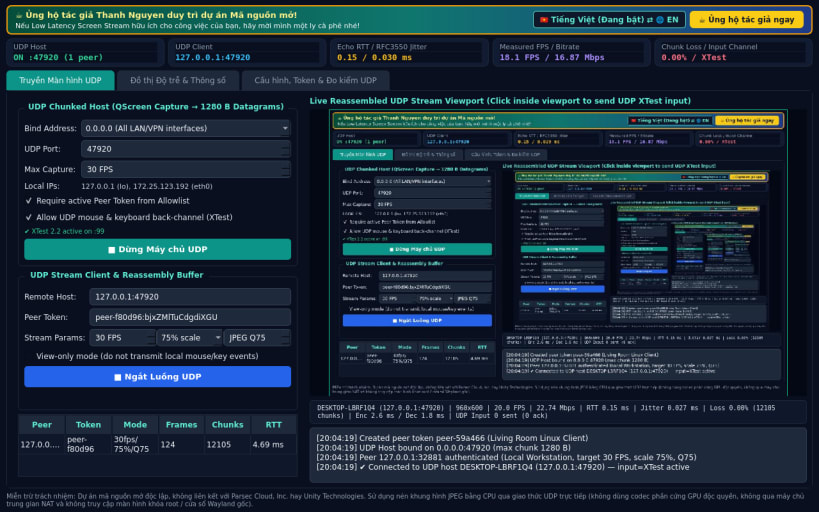
UDP chunked screen streaming and real-time latency telemetry for Linux
A lightweight Linux alternative to Parsec for UDP screen streaming & real-time latency telemetry inspired by Parsec workflows. Disclaimer: This project is an independent open-source tool and is not affiliated with, sponsored by, or endorsed by Parsec Cloud, Inc. or Unity Technologies. Uses CPU JPEG frame encoding over UDP rather than proprietary GPU hardware codecs.
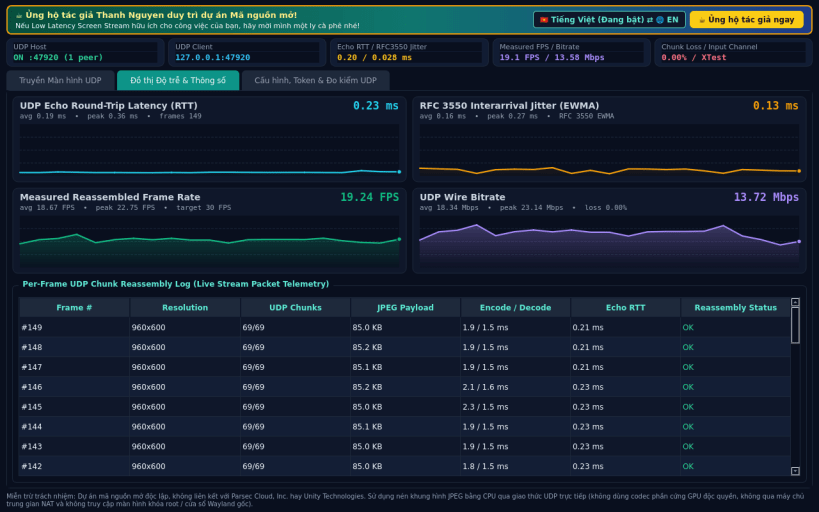
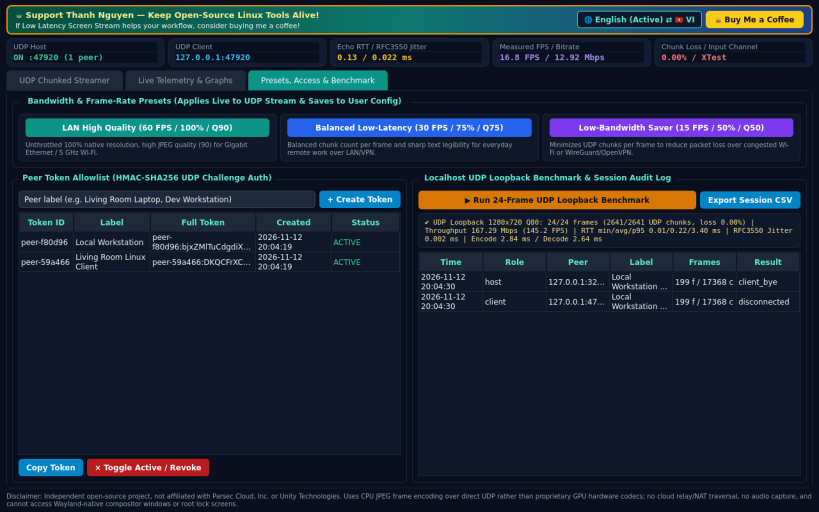
Key capabilities: • UDP Chunked Frame Streamer (Host & Client): captures X11 desktop frames via QScreen.grabWindow, encodes JPEG at configurable FPS (10-60), scale (50%-100%), and quality (30-95), splits frames into numbered UDP datagram chunks with microsecond timestamps, and reassembles frames in real time. • UDP Input Back-Channel: forwards mouse movement, clicks, scroll wheel, and keyboard events over UDP; applies input on X11 via XTest (libXtst) when available, or runs in honest view-only mode otherwise. • Live Real-Time Telemetry & Graphs: measures round-trip latency (RTT ms) via UDP timestamp echo, RFC 3550 EWMA jitter (ms), packet/chunk loss (%), measured FPS, and bitrate (Mbps) on live QPainter sparklines + frame log. • Stream Presets, Peer Access Control & Diagnostics: LAN High Quality / Balanced / Low-Bandwidth presets, HMAC peer token allowlist & session log, and a built-in localhost UDP loopback benchmark.
Honest limitations: direct UDP only (no cloud relay or NAT traversal; host UDP port must be reachable on LAN/VPN). Uses CPU JPEG frame encoding rather than GPU hardware H.264/HEVC codecs, does not stream audio, and cannot access Wayland-native compositor windows or root lock screens.
Support development: https://buymeacoffee.com/thanhnv128b
| Revision | Channel | Version | Build | Commit | Download SBOM |
|---|
The build and commit information is derived from build infrastructure records.
Install Low Latency Screen Stream on your Linux distribution
Choose your Linux distribution to get detailed installation instructions. If yours is not shown, get more details on the installing snapd documentation.


