

MicTune
Install latest/stable of MicTune
Ubuntu 16.04 or later?
Make sure snap support is enabled in your Desktop store.
Details for MicTune
Package name
- mictune
License
- Proprietary
Last updated
- Yesterday - latest/stable
- Yesterday - latest/edge
Websites
Contact
Donations
Source code
Report a bug
External link warning
You are about to open
Do you wish to proceed?
Report a Snap Store violation
Report MicTune for a Snap Store violation
Snap Store Violation Report submitted successfully
Thank you for your report. Information you provided will help us investigate further.
Error submitting report
There was an error while sending your report. Please try again later.
Share this snap
Generate an embeddable card to be shared on external websites.
Live pitch correction, vocal effects and harmonies
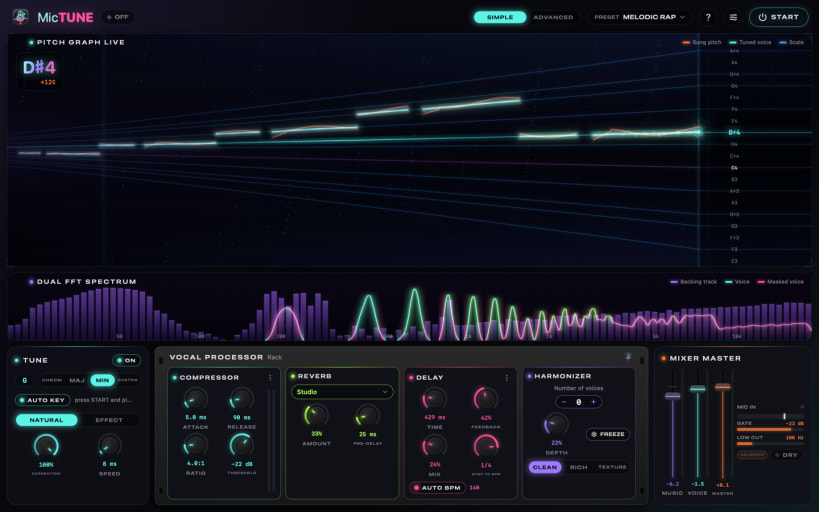
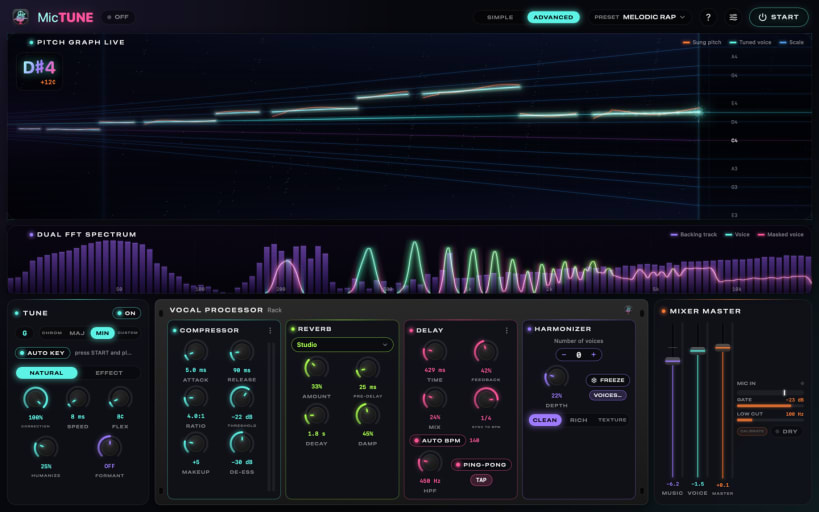
MicTune turns your computer into a vocal processor for live singing: real-time pitch correction, studio effects (reverb, delay, compression, harmonies) and the backing track taken straight from YouTube, Spotify, VLC or your karaoke player, all at very low latency.
- NATURAL correction (no robotic sound, keeps your vibrato) or EFFECT (the trap hard-tune)
- AUTO KEY detects the song's key, AUTO BPM syncs the echoes
- MIDI-guided correction and choirs: a karaoke player (Vocalis) or a keyboard sends the melody to the MicTune MIDI In port
- Ready-made presets, SIMPLE and ADVANCED modes
- Vocal Processor rack: compressor, reverb, delay and a 4-voice harmonizer
- Output to headphones and speakers together, microphone gate, animated spectrums
- Italiano, English, Français, Deutsch, Español
Your voice is processed on your computer and is never recorded or sent. Needs PipeWire (default on Ubuntu) and a microphone; wired headphones are recommended.
After installing, connect PipeWire, the microphone and MIDI once:
snap connect mictune:pipewiresnap connect mictune:audio-recordsnap connect mictune:alsa
| Revision | Channel | Version | Build | Commit | Download SBOM |
|---|
The build and commit information is derived from build infrastructure records.
Install MicTune on your Linux distribution
Choose your Linux distribution to get detailed installation instructions. If yours is not shown, get more details on the installing snapd documentation.


