

OBSCura

Install latest/stable of OBSCura
Ubuntu 16.04 or later?
Make sure snap support is enabled in your Desktop store.



Details for OBSCura
Package name
- obscura
License
- GPL-3.0-or-later
Last updated
- 28 September 2026 - latest/stable
- 1 October 2026 - latest/candidate
Websites
Contact
Source code
Report a bug
External link warning
You are about to open
Do you wish to proceed?
Report a Snap Store violation
Report OBSCura for a Snap Store violation
Snap Store Violation Report submitted successfully
Thank you for your report. Information you provided will help us investigate further.
Error submitting report
There was an error while sending your report. Please try again later.
Share this snap
Generate an embeddable card to be shared on external websites.
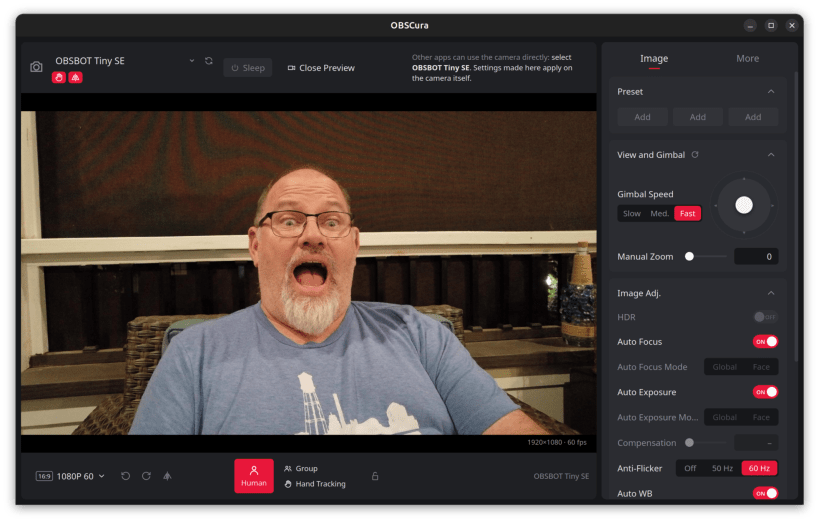
Unofficial control panel for OBSBOT webcams
Configure OBSBOT webcams on Linux: AI tracking (human, group, hand), gesture control, gimbal joystick, mirror image, and image settings such as focus, exposure and white balance, with a live preview.
Settings are written to the camera itself, so they apply in every app that
uses it. Also includes a lightweight panel indicator (obscura.indicator)
for quick toggles during calls, and the obscura.obsbotctl command-line
tool.
Supported: OBSBOT Tiny SE. Other OBSBOT models get the standard webcam controls. Not affiliated with OBSBOT / Remo Tech.
After installing, connect the camera interface:
sudo snap connect obscura:camera
Optionally, to show the camera's USB product name, serial number and revision in the Device panel:
sudo snap connect obscura:hardware-observe
To call the CLI as plain obsbotctl:
sudo snap alias obscura.obsbotctl obsbotctl
| Revision | Channel | Version | Build | Commit | Download SBOM |
|---|
The build and commit information is derived from build infrastructure records.
Install OBSCura on your Linux distribution
Choose your Linux distribution to get detailed installation instructions. If yours is not shown, get more details on the installing snapd documentation.












