

Paintwell
Install latest/stable of Paintwell
Ubuntu 16.04 or later?
Make sure snap support is enabled in your Desktop store.
Details for Paintwell
Package name
- paintwell
License
- GPL-3.0-or-later
Last updated
- Yesterday - latest/stable
- Yesterday - latest/edge
Report a Snap Store violation
Report Paintwell for a Snap Store violation
Snap Store Violation Report submitted successfully
Thank you for your report. Information you provided will help us investigate further.
Error submitting report
There was an error while sending your report. Please try again later.
Share this snap
Generate an embeddable card to be shared on external websites.
A friendly, capable image editor for Linux
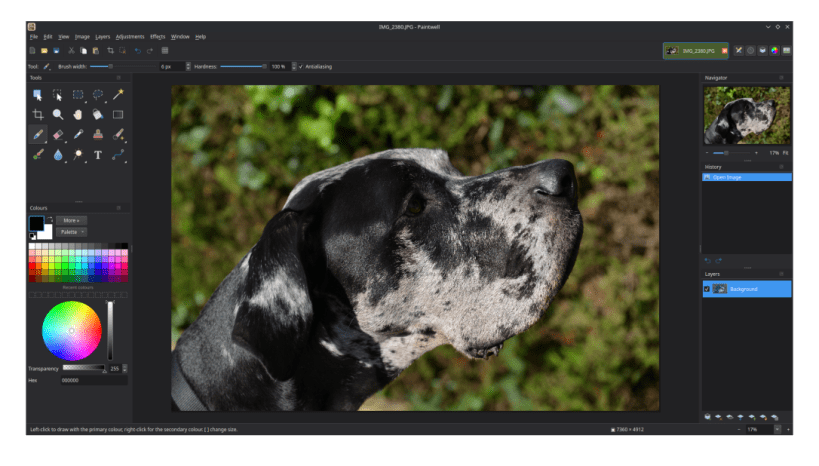
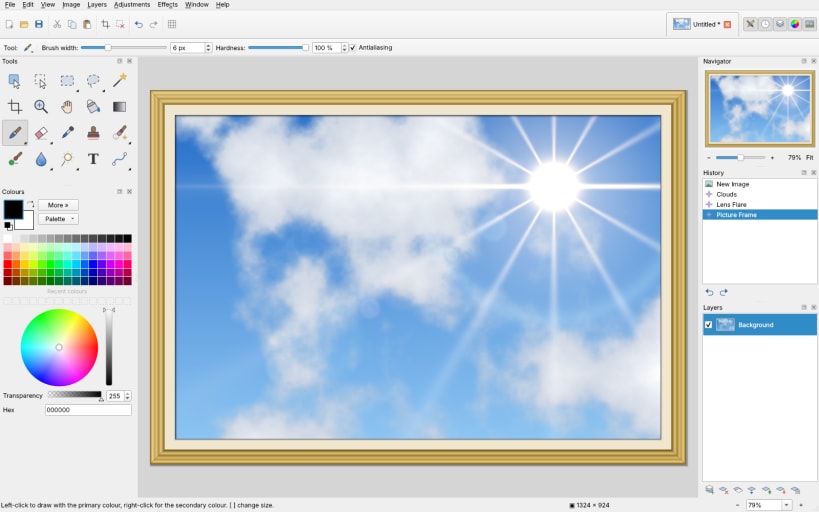
Paintwell is an image editor with a familiar style layout: menus, a toolbar, a tool options bar, image tabs, and dockable Tools, Colours, History, Layers and Navigator windows.
Tools: selections, Magic Wand, Magnetic Lasso, brushes, Clone Stamp, Remove, Red Eye, Blur, Sharpen, Smudge, Dodge, Burn, Sponge, Text and Shapes.
Layers with blend modes, opacity and editable text layers, saved in OpenRaster (.ora) format.
Adjustments: Levels, Curves, Hue / Saturation, Auto-Level and more.
Effects: Artistic, Blurs, Borders and frames, Distort, Photo and Render (Clouds, Lens Flare, Lighting Effects, fractals, Starfield, Rain and Snow), and more.
Content-Aware Fill, unlimited history, rulers and guides, printing and scanning.
| Revision | Channel | Version | Build | Commit | Download SBOM |
|---|
The build and commit information is derived from build infrastructure records.
Install Paintwell on your Linux distribution
Choose your Linux distribution to get detailed installation instructions. If yours is not shown, get more details on the installing snapd documentation.


