

PickPDF - PDF Editor, Reader, Signer (pickpdf)
Install latest/stable of PickPDF - PDF Editor, Reader, Signer
Ubuntu 16.04 or later?
Make sure snap support is enabled in your Desktop store.


Details for PickPDF - PDF Editor, Reader, Signer
Package name
- pickpdf
License
- unset
Last updated
- 17 August 2026 - latest/stable
Websites
Contact
External link warning
You are about to open
Do you wish to proceed?
Report a Snap Store violation
Report PickPDF - PDF Editor, Reader, Signer for a Snap Store violation
Snap Store Violation Report submitted successfully
Thank you for your report. Information you provided will help us investigate further.
Error submitting report
There was an error while sending your report. Please try again later.
Share this snap
Generate an embeddable card to be shared on external websites.
Private, local-first PDF reader and editor
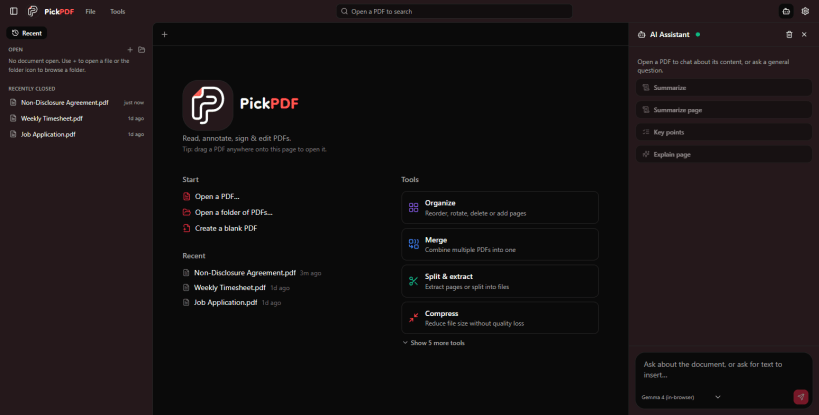
PickPDF is a local-first PDF reader and editor. Open PickPDF from the toolbar, choose a PDF from your device or drag it into the editor, then save the finished document locally.
With PickPDF, you can: • Edit existing PDF text • Highlight, draw, add shapes, stamps, and notes • Fill forms or create fillable form fields • Add signatures • Redact sensitive information • Run OCR on scanned documents • Reorder, rotate, duplicate, delete, merge, split, and extract pages • Compress, crop, watermark, and add page numbers • Export pages and compare PDF documents • Summarize and explain documents with the optional AI assistant Privacy is built into PickPDF. Core PDF editing happens locally in your browser, and your files are not uploaded to a PickPDF server. Optional AI connections configured in Settings may send selected document content to the provider you choose. No PickPDF account or subscription is required. Once loaded, the editor can continue working offline.
| Revision | Channel | Version | Build | Commit | Download SBOM |
|---|
The build and commit information is derived from build infrastructure records.
Install PickPDF - PDF Editor, Reader, Signer on your Linux distribution
Choose your Linux distribution to get detailed installation instructions. If yours is not shown, get more details on the installing snapd documentation.











