

Portop
Install latest/stable of Portop
Ubuntu 16.04 or later?
Make sure snap support is enabled in your Desktop store.
Details for Portop
Package name
- portop
License
- MIT
Last updated
- 23 October 2026 - latest/stable
Websites
Source code
Report a bug
External link warning
You are about to open
Do you wish to proceed?
Report a Snap Store violation
Report Portop for a Snap Store violation
Snap Store Violation Report submitted successfully
Thank you for your report. Information you provided will help us investigate further.
Error submitting report
There was an error while sending your report. Please try again later.
Share this snap
Generate an embeddable card to be shared on external websites.
htop-style TUI for network ports and processes
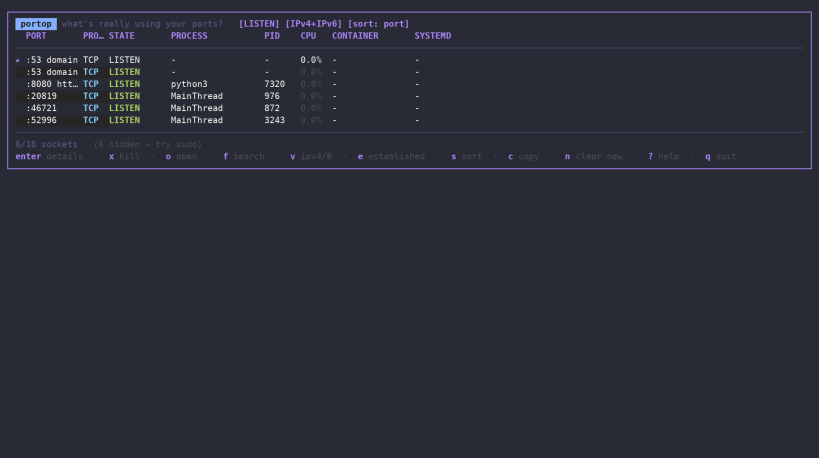
Portop is a fast, interactive network port monitor for Linux — available in your terminal, browser, and Cockpit.
Portop gives you an htop-style view of TCP and UDP sockets and the processes behind them, helping you quickly answer a simple question:
What's really using your ports?
Terminal UI
Run portop for a lightweight, keyboard-driven TUI with real-time network and process information.
Features include:
- Real-time TCP and UDP socket monitoring
- Listening and established connections
- Local and remote endpoints
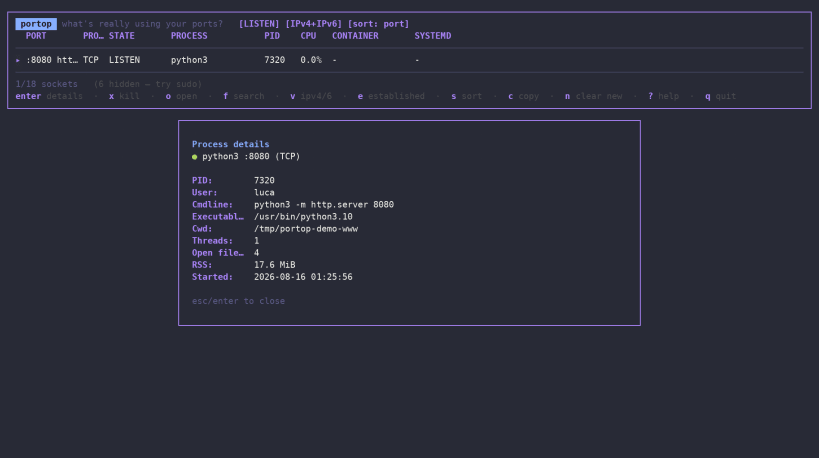
- Process identification with PID, user and command line
- CPU and memory information
- IPv4 and IPv6 support
- systemd unit detection
- Docker container detection
- Search and filtering
- Detailed process inspection
- Process termination with SIGTERM or SIGKILL
- JSON output for scripts and automation
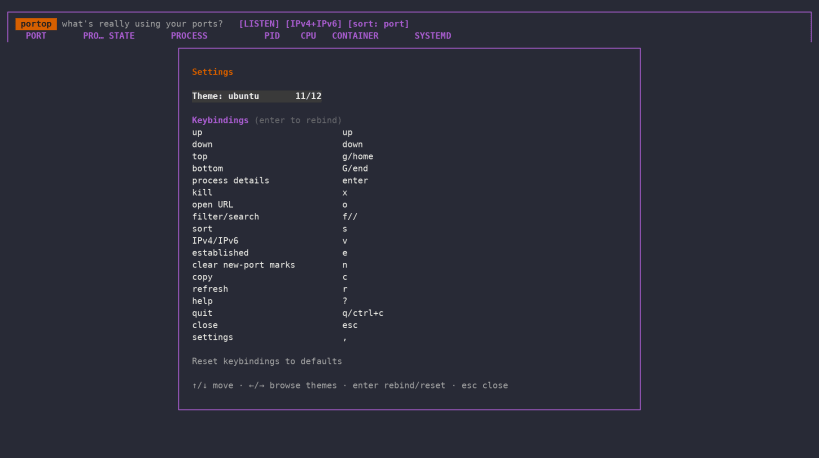
- Multiple themes, including Rose Pine
Web Dashboard
Run:
portop --web
to launch a local web dashboard with live TCP/UDP socket and process information.
The dashboard provides:
- Live socket monitoring with automatic refresh
- Process CPU and memory information
- systemd and Docker integration
- Search and filtering
- Detailed process information, including executable, threads and open files
- Confirmed SIGTERM and SIGKILL actions
- Multiple dashboard themes
By default, the web server listens only on the local loopback interface.
Optional authentication can be enabled with:
portop --web --web-auth
Portop also supports custom bind addresses and HTTPS using your own TLS certificate and key, making it possible to securely access the dashboard from another machine.
Cockpit integration
Portop can also be installed as a Cockpit add-on.
Once installed, open:
Tools → Ports (portop)
to get the same live port and process inspection directly from the Cockpit web interface.
The integration uses Cockpit's own bridge and user permissions, so no additional Portop daemon or network service is required.
Three ways to use Portop
Terminal: portop
Browser: portop --web
Cockpit: Tools → Ports (portop)
Portop is designed for developers, system administrators, DevOps engineers and Linux users who need a fast way to understand network activity and identify the processes behind it.
Lightweight, open source and released under the MIT License.
| Revision | Channel | Version | Build | Commit | Download SBOM |
|---|
The build and commit information is derived from build infrastructure records.
Install Portop on your Linux distribution
Choose your Linux distribution to get detailed installation instructions. If yours is not shown, get more details on the installing snapd documentation.












