

Screen Awake Keeper
Install latest/stable of Screen Awake Keeper
Ubuntu 16.04 or later?
Make sure snap support is enabled in your Desktop store.
Install using the command line
sudo snap install screen-awake-keeperDon't have snapd? Get set up for snaps.
Details for Screen Awake Keeper
Package name
- screen-awake-keeper
License
- MIT
Last updated
- Today - latest/stable
Websites
Contact
External link warning
You are about to open
Do you wish to proceed?
Report a Snap Store violation
Report Screen Awake Keeper for a Snap Store violation
Snap Store Violation Report submitted successfully
Thank you for your report. Information you provided will help us investigate further.
Error submitting report
There was an error while sending your report. Please try again later.
Share this snap
Generate an embeddable card to be shared on external websites.
Keep display & session awake via timed X11 idle-reset pulses and power rules
A Linux X11 alternative to Caffeine. Independent open-source project, not affiliated with or endorsed by Zhorn Software.
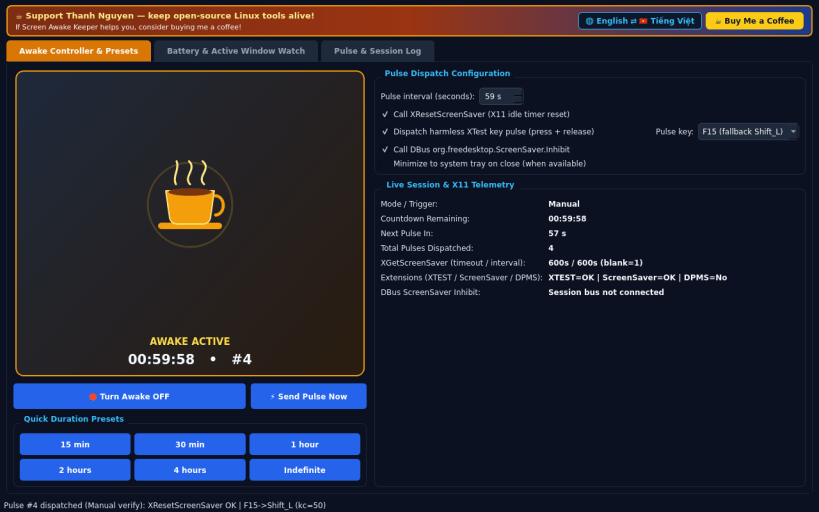
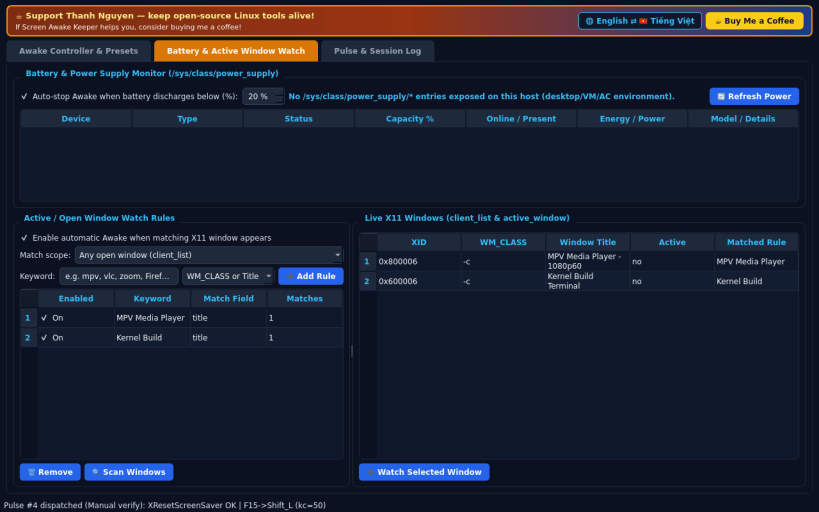
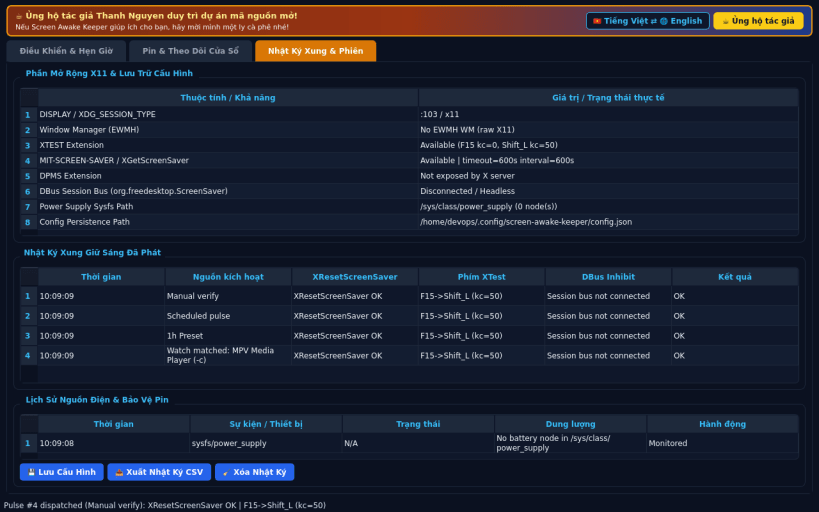
FEATURES • Awake Controller & Presets: quick coffee-cup state toggle, one-click presets (15 min, 30 min, 1 hour, 2 hours, 4 hours, Indefinite), configurable pulse interval (default 59s), real X11 XResetScreenSaver calls, optional XTest harmless key pulse (F15 / Shift_L), and optional DBus org.freedesktop.ScreenSaver.Inhibit integration when the session bus is available. • Battery & Active Window Watch: reads real power supply metrics from /sys/class/power_supply/ to auto-stop when discharging below a chosen battery threshold, and watches X11 client/active windows against WM_CLASS or title keywords to keep the display awake automatically. • Pulse & Session Log: live table of dispatched pulses, X11 extension diagnostics (XTEST, DPMS, MIT-SCREEN-SAVER), battery event history, and persistent JSON settings.
SUPPORT & DONATE • Created by Thanh Nguyen — https://buymeacoffee.com/thanhnv128b
| Revision | Channel | Version | Build | Commit | Download SBOM |
|---|
The build and commit information is derived from build infrastructure records.
Install Screen Awake Keeper on your Linux distribution
Choose your Linux distribution to get detailed installation instructions. If yours is not shown, get more details on the installing snapd documentation.


