

sensorz — Temperature and Fan Monitor (sensorz)
Install latest/stable of sensorz — Temperature and Fan Monitor
Ubuntu 16.04 or later?
Make sure snap support is enabled in your Desktop store.
Details for sensorz — Temperature and Fan Monitor
Package name
- sensorz
License
- Apache-2.0
Last updated
- 27 October 2026 - latest/stable
Report a Snap Store violation
Report sensorz — Temperature and Fan Monitor for a Snap Store violation
Snap Store Violation Report submitted successfully
Thank you for your report. Information you provided will help us investigate further.
Error submitting report
There was an error while sending your report. Please try again later.
Share this snap
Generate an embeddable card to be shared on external websites.
A terminal temperature and fan monitor
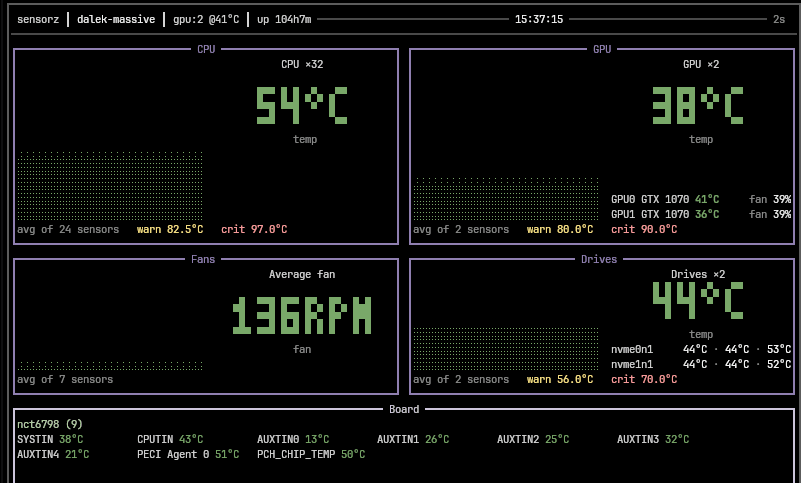
sensorz shows how hot your machine is and whether its fans are still spinning.
One box per class of sensor - CPU, GPU, drives, and the motherboard thermistors - each with one large figure, its history as a graph, and the thresholds it is judged against. Where a machine reports many of a thing, the readings are averaged rather than listed: sixteen cores and eight case fans are four numbers, not twenty-four.
It reads the kernel's hardware monitoring interface directly, so it works with whatever drivers the machine already has, and it reports temperatures and fan speeds and nothing else.
| Revision | Channel | Version | Build | Commit | Download SBOM |
|---|
The build and commit information is derived from build infrastructure records.
Install sensorz — Temperature and Fan Monitor on your Linux distribution
Choose your Linux distribution to get detailed installation instructions. If yours is not shown, get more details on the installing snapd documentation.











