

Simple Camera App
Install latest/stable of Simple Camera App
Ubuntu 16.04 or later?
Make sure snap support is enabled in your Desktop store.
Install using the command line
sudo snap install simple-camera-appDon't have snapd? Get set up for snaps.


Details for Simple Camera App
Package name
- simple-camera-app
License
- Proprietary
Last updated
- 6 September 2026 - latest/stable
- 25 August 2026 - latest/candidate
Websites
Contact
External link warning
You are about to open
Do you wish to proceed?
Report a Snap Store violation
Report Simple Camera App for a Snap Store violation
Snap Store Violation Report submitted successfully
Thank you for your report. Information you provided will help us investigate further.
Error submitting report
There was an error while sending your report. Please try again later.
Share this snap
Generate an embeddable card to be shared on external websites.
Native camera previews, modes and device controls.
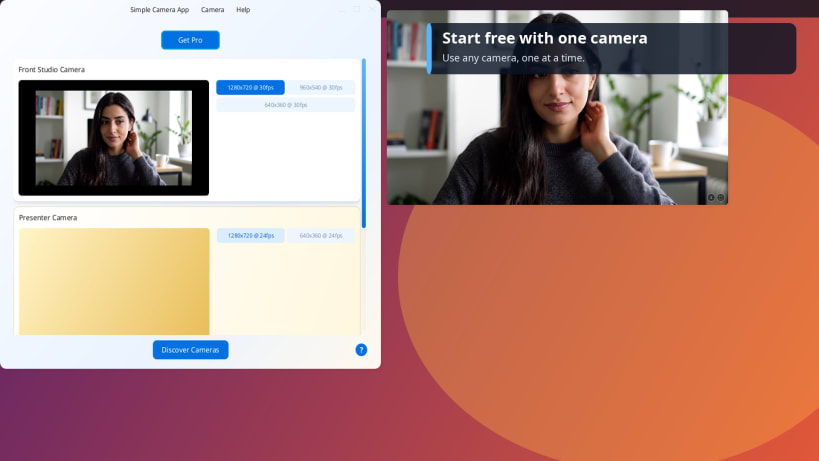
Simple Camera App is a focused camera viewer for Linux. It discovers built-in, USB, virtual and other V4L2 cameras, shows the resolutions and frame rates each device reports, and opens a clean live preview without adding a recording or editing workflow.
Use it to:
- identify which camera name belongs to which device
- inspect reported resolutions, frame rates and device details
- adjust camera controls such as focus or exposure when the hardware supports them
- check framing before a call, stream, presentation or recording
- use fullscreen, zoom and light, dark or system appearance
The free version lets you use any one camera at a time at its default resolution and frame rate. The optional, one-time Simple Camera Pro upgrade unlocks multiple simultaneous camera windows and selection of any available resolution and frame rate.
Camera feeds stay on your Linux desktop. The app does not record or upload
video and does not require an account, analytics or a background service. The
installed command is simple-camera-app.
Learn more at https://simplecamera.app.
| Revision | Channel | Version | Build | Commit | Download SBOM |
|---|
The build and commit information is derived from build infrastructure records.
Install Simple Camera App on your Linux distribution
Choose your Linux distribution to get detailed installation instructions. If yours is not shown, get more details on the installing snapd documentation.












