

Tradicted Journal (tradicted-trading-journal)
Install latest/stable of Tradicted Journal
Ubuntu 16.04 or later?
Make sure snap support is enabled in your Desktop store.
Install using the command line
sudo snap install tradicted-trading-journalDon't have snapd? Get set up for snaps.
Details for Tradicted Journal
Package name
- tradicted-trading-journal
License
- MIT
Last updated
- 4 June 2026 - latest/stable
- 4 June 2026 - latest/edge
Websites
Contact
Source code
External link warning
You are about to open
Do you wish to proceed?
Report a Snap Store violation
Report Tradicted Journal for a Snap Store violation
Snap Store Violation Report submitted successfully
Thank you for your report. Information you provided will help us investigate further.
Error submitting report
There was an error while sending your report. Please try again later.
Share this snap
Generate an embeddable card to be shared on external websites.
Trade journal with analytics, position sizing, and plan rule tracking
Tradicted Journal is a trade logging and analysis tool for active traders.
Log trades at entry with automatic position sizing based on account size and risk percentage. R:R ratio, dollar risk, dollar reward, total position value, and breakeven win rate all calculate in real time as you type.
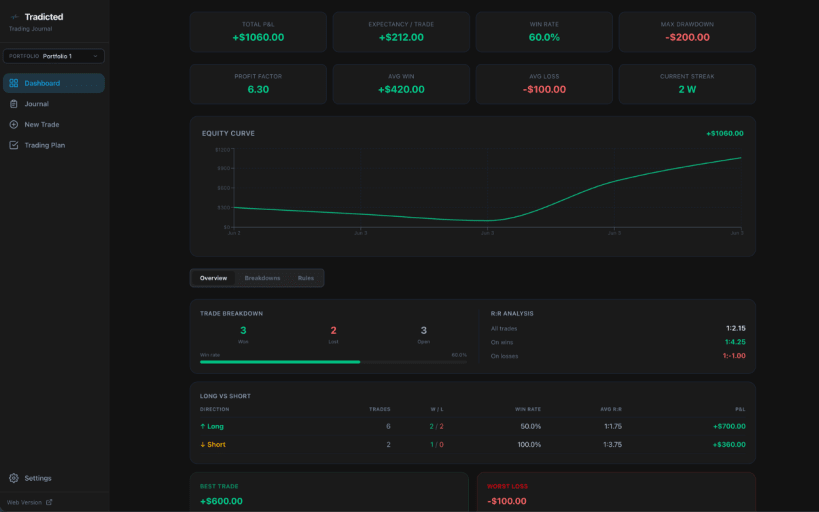
The dashboard surfaces key metrics once 5 or more trades are recorded: total P&L, win rate, profit factor, expectancy, max drawdown, average R:R, win/loss streaks, performance by ticker, by day of week, and monthly P&L. An equity curve plots cumulative P&L over time.
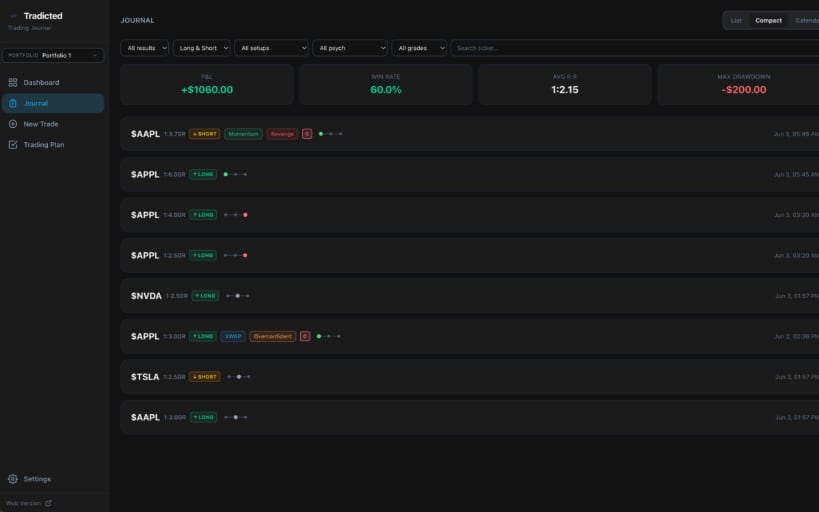
The journal supports list, compact, and calendar views with filters for result, direction, setup type, psychology tag, grade, and ticker. All fields edit inline with automatic saving.
The trading plan lets you build a rule-based checklist tied to each portfolio. Rules are checked off before logging a trade and stored with the trade record. The dashboard shows per-rule win rates and adherence data across all trades.
The position size calculator runs independently — no trade is saved unless you choose to log it.
Multiple portfolios are supported, each with its own trades, journal, trading plan, and settings. Trade data can be exported and imported as CSV.
| Revision | Channel | Version | Build | Commit | Download SBOM |
|---|
The build and commit information is derived from build infrastructure records.
Install Tradicted Journal on your Linux distribution
Choose your Linux distribution to get detailed installation instructions. If yours is not shown, get more details on the installing snapd documentation.











