

Voltkit
Install latest/stable of Voltkit
Ubuntu 16.04 or later?
Make sure snap support is enabled in your Desktop store.
Details for Voltkit
Package name
- voltkit
License
- MIT
Last updated
- Today - latest/stable
Websites
Contact
Donations
Source code
Report a bug
External link warning
You are about to open
Do you wish to proceed?
Report a Snap Store violation
Report Voltkit for a Snap Store violation
Snap Store Violation Report submitted successfully
Thank you for your report. Information you provided will help us investigate further.
Error submitting report
There was an error while sending your report. Please try again later.
Share this snap
Generate an embeddable card to be shared on external websites.
PowerToys-style desktop tools for Linux in one GTK4 app
Voltkit puts the everyday tools you'd otherwise hunt down one by one into a single native GTK4 app, with one set of keyboard shortcuts. Built for Wayland and X11, it runs locally with no network access and no telemetry.
Tools in the snap
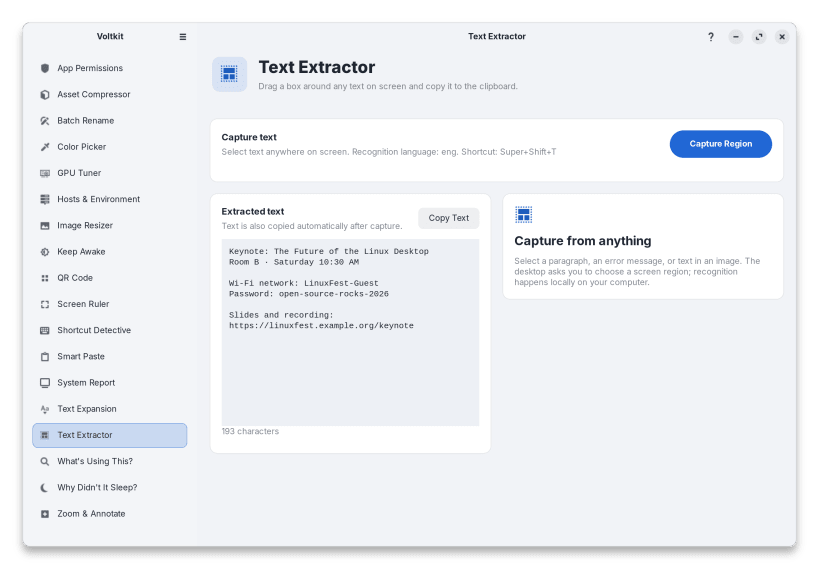
- Text Extractor (Super+Shift+T): drag a box around any text on screen, even in videos and images, and it lands on your clipboard
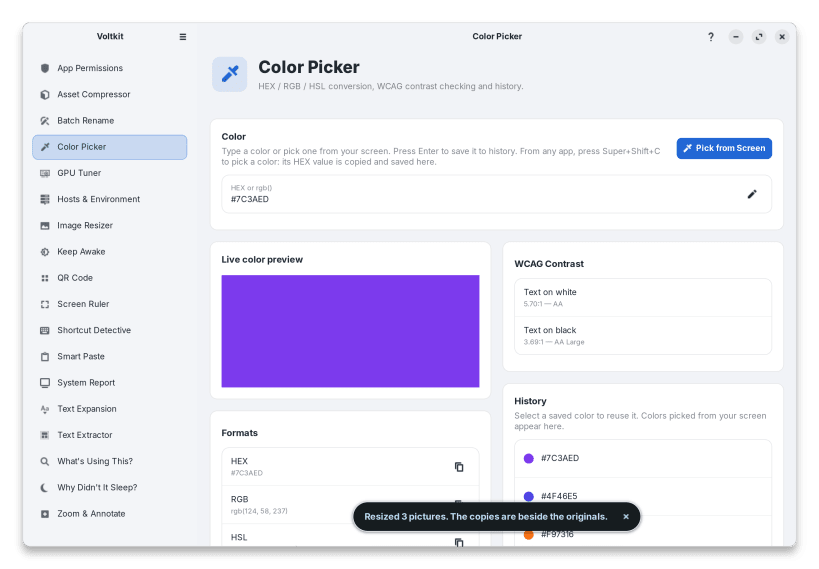
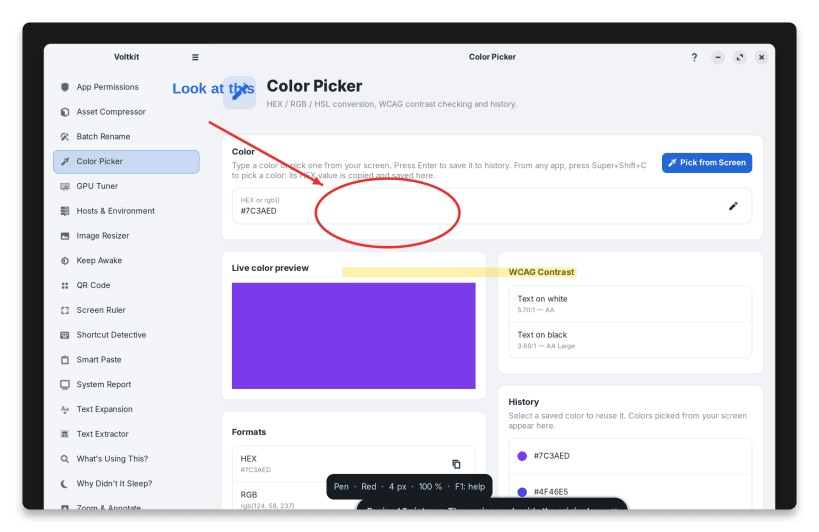
- Color Picker (Super+Shift+C): an eyedropper for any pixel, HEX/RGB/HSL, WCAG contrast check and history
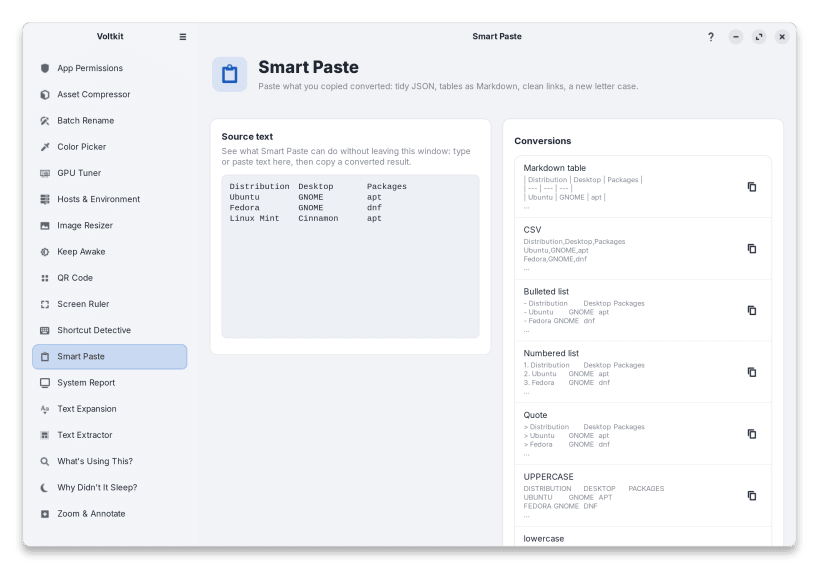
- Smart Paste (Super+Shift+V): paste the clipboard converted: tidy JSON, a spreadsheet range as a Markdown table, a link without tracking, PDF text without broken lines, or the text in a copied image
- QR Code (Super+Shift+Q): read a QR code anywhere on screen, or turn text, links and Wi-Fi details into one
- Screen Ruler (Super+Shift+R): freeze the screen and measure anything in pixels
- Zoom & Annotate (Super+Shift+Z): freeze the screen, zoom in and draw on it with a pen, arrows, boxes and text
- Text Expansion (Super+Shift+E): a searchable snippet picker with dates, your clipboard and fill-in fields
- Asset Compressor: drop PNG, JPEG, WebP or MP4 files to strip metadata and shrink them
- Batch Rename: rename many files at once with search and replace, regular expressions and numbering, with a preview and undo
- Image Resizer: resize many pictures at once, keeping their shape, without touching the originals
- Keep Awake: stop your computer from sleeping or locking for 30 minutes to 4 hours, or until you turn it off
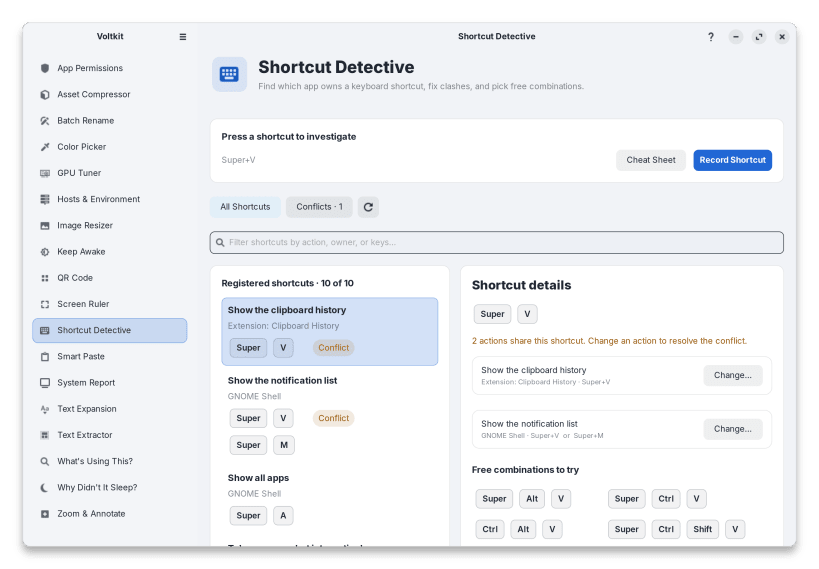
- Shortcut Detective: press any shortcut to see what owns it, find clashes, pick a free combination and change it
- What's Using This?: see which apps keep a file, folder, drive or port busy, and close them
- Why Didn't It Sleep?: see what keeps the computer awake, what woke it up, and how much battery it used asleep
- System Report: your hardware explained, with driver checks, temperatures, what changed since an update, and a report that's safe to share
- GPU Tuner: monitor NVIDIA, AMD and Intel graphics cards
Manual
The Voltkit Manual explains every tool step by step: https://arios4k.github.io/voltkit/manual/
About the snap version
Snaps run in a sandbox that can't ask for your administrator password, change system files or read the desktop's permission store. These work only when Voltkit is installed with APT (Ubuntu, Debian) or DNF (Fedora):
- changing GPU settings (power limit, fans, clocks, voltage)
- Hosts & Environment (editing /etc/hosts and session environment variables)
- App Permissions
- typed triggers such as ;date
- drive health, memory slots and firmware update checks
- stopping a USB device from waking the computer
Each affected page in the app says so. A few tools need a permission you connect once with sudo snap connect; the app lists the exact commands, and so does voltkit doctor. After installing: https://arios4k.github.io/voltkit/manual/install.html#snap-store
| Revision | Channel | Version | Build | Commit | Download SBOM |
|---|
The build and commit information is derived from build infrastructure records.
Install Voltkit on your Linux distribution
Choose your Linux distribution to get detailed installation instructions. If yours is not shown, get more details on the installing snapd documentation.


