

Desktop for Claude (Unofficial) (claude-ai-desktop)
Install latest/stable of Desktop for Claude (Unofficial)
Ubuntu 16.04 or later?
Make sure snap support is enabled in your Desktop store.
Install using the command line
sudo snap install claude-ai-desktopDon't have snapd? Get set up for snaps.


Details for Desktop for Claude (Unofficial)
Package name
- claude-ai-desktop
License
- MIT
Last updated
- 9 October 2026 - latest/stable
Websites
Source code
Report a bug
External link warning
You are about to open
Do you wish to proceed?
Report a Snap Store violation
Report Desktop for Claude (Unofficial) for a Snap Store violation
Snap Store Violation Report submitted successfully
Thank you for your report. Information you provided will help us investigate further.
Error submitting report
There was an error while sending your report. Please try again later.
Share this snap
Generate an embeddable card to be shared on external websites.
Unofficial Claude AI Browser Wrapper – Modern Desktop Client for Linux
Desktop for Claude is a fast desktop app for Claude AI - no browser needed. Use Claude directly from your desktop, distraction-free and always at hand.
There is an official Claude app for Linux. Anthropic ships one since 30 June 2026 for Ubuntu 22.04+ and Debian 12+ from their own apt repository, including Cowork and Claude Code. If that fits your system, use it: https://code.claude.com/docs/en/desktop-linux
This app is not discontinued. Updates and fixes keep coming, new features less often than before. It also remains the option on Ubuntu 20.04, which the official app does not support, and here in the Snap Store, where there is no official package. The install guide for the official app is built into the menu.
If you are using a VPN, activate split tunnelling for this app.
Features:
- Tab system with its own tab bar (Ctrl+T, Ctrl+W, Ctrl+Tab), frameless window with the window controls in the tab bar
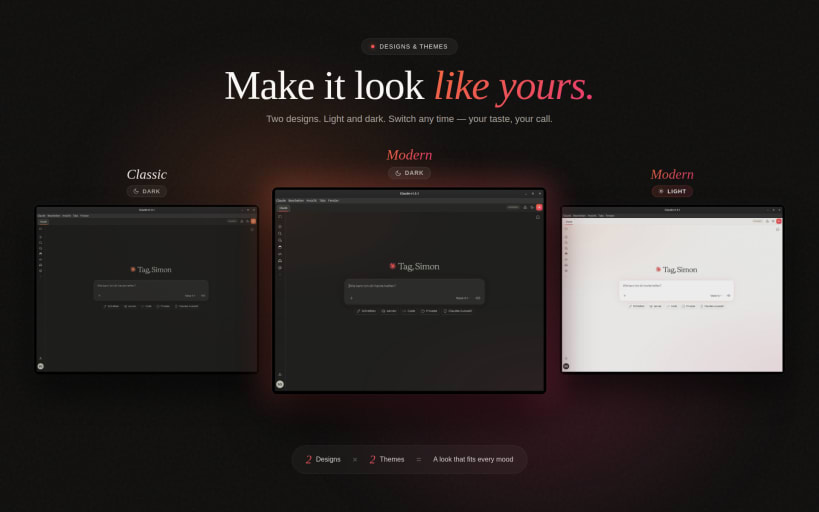
- Four colour themes (Light, Dark, OLED, Midnight Blue) and three accent styles (Modern, Classic, Neon), freely combinable, picked in a Design window that previews each one
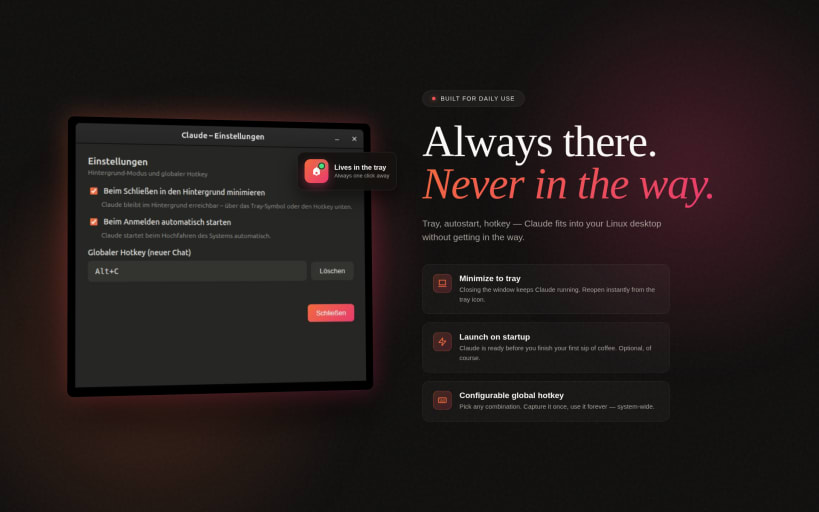
- System tray with optional minimize-to-tray
- Global Quick-Prompt hotkey - a small prompt window drops your text straight into a new chat from any app, with reusable templates
- Voice input - record voice messages directly in claude.ai
- OAuth logins in-app - Google, GitHub, GitLab, Bitbucket, Microsoft, plus MCP connectors
- Markdown export of conversations (Ctrl+Shift+E)
- Background notifications when Claude finishes answering
- Clipboard and screenshot hotkeys to start a chat from a selection or an image
- In-app bug report form in DE/EN/FR/ES/IT
- Window memory, crash recovery, offline page, download manager, autostart, sandbox enabled
Snap permissions:
For voice input, connect the audio-record interface once:
sudo snap connect claude-ai-desktop:audio-record
For attaching and saving files outside your home folder (external drives, /media):
sudo snap connect claude-ai-desktop:removable-media
The in-app wizard guides you through the microphone permission on first use.
Get in touch:
Use the built-in "Report a Bug" button (App Menu, Report a Bug) for feedback and bug reports, or write to simonlinuxcraft@pm.me. That address reaches the developer, not Anthropic support.
Source code: https://github.com/simonlinuxcraft/claude-ai-desktop-app (MIT licence)
Not affiliated with Anthropic.
This is an unofficial community wrapper around claude.ai for Linux. It is not made by, endorsed by, or affiliated with Anthropic PBC. "Claude" and the Claude logo are trademarks of Anthropic PBC. For account, login, subscription, billing or any service-side questions please contact Anthropic directly at https://support.anthropic.com
| Revision | Channel | Version | Build | Commit | Download SBOM |
|---|
The build and commit information is derived from build infrastructure records.
Install Desktop for Claude (Unofficial) on your Linux distribution
Choose your Linux distribution to get detailed installation instructions. If yours is not shown, get more details on the installing snapd documentation.











