

Lumina
Install latest/edge of Lumina
Ubuntu 16.04 or later?
Make sure snap support is enabled in your Desktop store.
Install using the command line
sudo snap install lumina --edgeDon't have snapd? Get set up for snaps.
Details for Lumina
Package name
- lumina
License
- unset
Last updated
- 4 June 2025 - latest/edge
Websites
Contact
External link warning
You are about to open
Do you wish to proceed?
Report a Snap Store violation
Report Lumina for a Snap Store violation
Snap Store Violation Report submitted successfully
Thank you for your report. Information you provided will help us investigate further.
Error submitting report
There was an error while sending your report. Please try again later.
Share this snap
Generate an embeddable card to be shared on external websites.
Image enhansing application
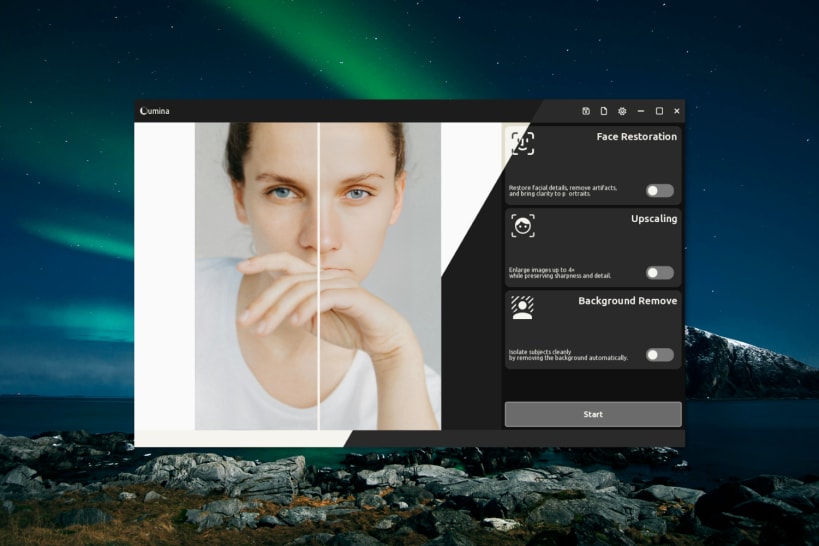
Lumina – AI-Powered Face & Photo Enhancer
Lumina is a fast, lightweight desktop app that enhances portraits and cleans up images using advanced AI models. Powered by real-time deep learning, it offers:
- Face Detection (YuNet) (CPU)
- Face Restoration (GFPGAN) (CPU)
- Background Removal (U²-Net) (CPU / GPU)
- Super Resolution (Real-ESRGAN) (CPU / GPU)
- And More..... (coming soon)
Model Downloads
When run for the first time Lumina will download each required model files from [Releases page](https://github.com/RameshRavone/lumina-dev/releases) of the Lumina Dev GitHub repository and place them in $SNAP_DIR_COMMON/.cache/lumina/models folder
$SNAP_DIR_COMMON = $HOME/snap/lumina/common (Usually)
Installation
Install Lumina on any Linux distribution that supports Snap with: snap install lumina
How to use
Lumina a support both CLI-Terminal and GUI-Editor mode
GUI  -  lumina editor --vsync
CLI   -  lumina cli -i <INPUT IMAGE> -o <OUTPUT> --actions face upscale`
Bug Reports and Feedback
Found a bug or have a feature request?
Please submit issues via our public [Issue Tracker Repository](https://github.com/RameshRavone/lumina-dev/issues).
Built natively with performance in mind, Lumina runs entirely offline — no internet connection needed. Perfect for photographers, designers, or anyone looking to upscale or restore images with ease.
| Revision | Channel | Version | Build | Commit | Download SBOM |
|---|
The build and commit information is derived from build infrastructure records.
Install Lumina on your Linux distribution
Choose your Linux distribution to get detailed installation instructions. If yours is not shown, get more details on the installing snapd documentation.











