

VIZTUBE PRO (viztube)
Install latest/stable of VIZTUBE PRO
Ubuntu 16.04 or later?
Make sure snap support is enabled in your Desktop store.


Details for VIZTUBE PRO
Package name
- viztube
License
- Proprietary
Last updated
- 4 November 2026 - latest/stable
- 3 November 2026 - latest/edge
Websites
Contact
Donations
Source code
Report a bug
External link warning
You are about to open
Do you wish to proceed?
Report a Snap Store violation
Report VIZTUBE PRO for a Snap Store violation
Snap Store Violation Report submitted successfully
Thank you for your report. Information you provided will help us investigate further.
Error submitting report
There was an error while sending your report. Please try again later.
Share this snap
Generate an embeddable card to be shared on external websites.
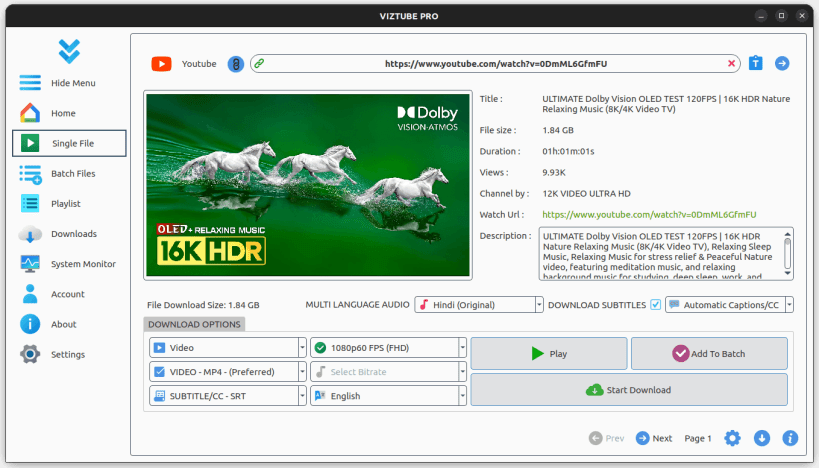
Download YouTube Videos/Music/Playlist in Full HD formats
ABOUT VIZTUBE:
VIZTUBE is a powerful YouTube video downloader that enables you to download videos, playlists, music, and audio from YouTube and other popular platforms in HD resolution. Now supporting 35+ languages, it's the ideal solution for your video downloading needs.
FEATURES:
- Download video/audio from websites such as Facebook, Instagram, TikTok, Rumble, Odysee, Bitchute, Twitter, Twitch, ArteTV, and more.
- Download YouTube videos/music in various formats with just one click.
- YouTube Multi-Language Audio Support : Download videos with multiple dubbed audio tracks.
- Download entire YouTube playlists in one click.
- Sign-In-Required Videos : Now you can download sign-in-required videos from YouTube by authenticating your account.
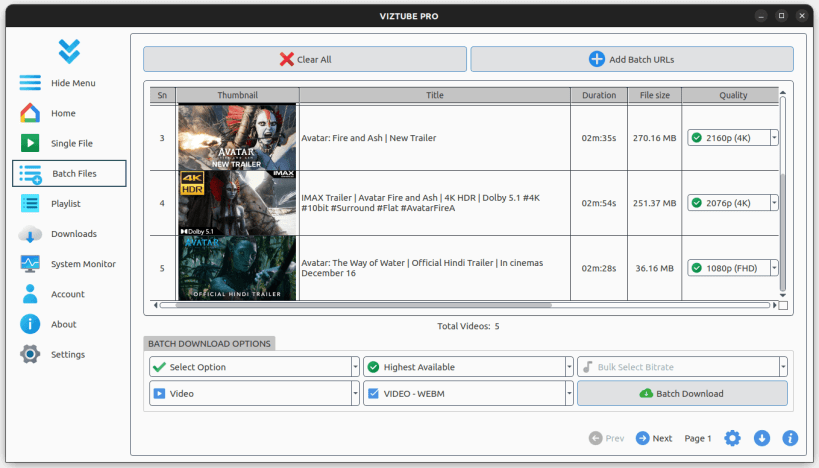
- Batch download multiple videos with a single click.
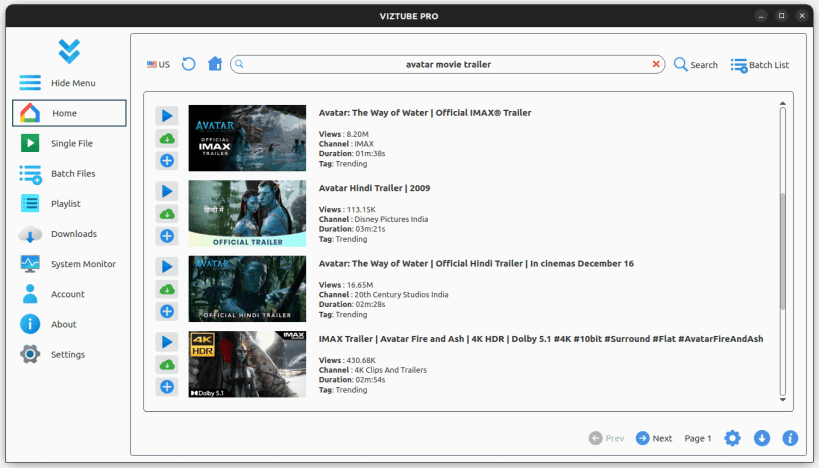
- Stream and play YouTube videos directly online without downloads.
- Supports YouTube subtitles and closed captions (CC) download.
- YouTube search integration with regional country support.
- Completely ad-free online streaming experience.
- Available in 35+ international languages.
APP NOTICE:
If the app is not launching after installation, run the following commands in your terminal:
sudo snap remove viztube --purge; sudo snap remove content-snap-core22 --purge; sudo snap install content-snap-core22; sudo snap install viztube; viztube
📌 Enable Removable Media Access : To allow downloads to external storage (USB, SD cards, etc.), run:
sudo snap connect viztube:removable-media
If CPU temperature is not displayed accurately in the system monitor, run the following command to connect hardware observation permissions:
sudo snap connect viztube:hardware-observe
Info: Some features are part of in-app purchases.
Keywords:
YTD Video Downloader, SnapTube, By Click Downloader, Allavsoft, VideoHunter, YouTube to MP3, Download YouTube, SnapDownloader, , YouTube DL, KTUBE, UTube, RedTube, Video Downloader, VideoSolo Inovideo, MP3 Studio, Leawo, iTubeGo, 4K Video Downloader, VideoProc, Y2mate, SaveFrom, YouTube Download, SaveMedia, Addoncrop YouTube Video Downloader, YouTube Video Downloader, BitDownloader, y2mate application, y2mate 2k, y2mate desktop, YouTube dashboard y2mate, Y2mate playlist, Clipgrab, Facebook Video Downloader, Instagram Downloader, TikTok Downloader, YouTube Shorts Downloader, Rumble Video Downloader, Snapchat Downloader, LinkedIn Video Downloader, SoundCloud Downloader, ESPN Videos Downloader, Yahoo Video Downloader, Reddit Video Downloader, Wikimedia and Wikipedia Video Downloader, Brighteon Video Downloader.
Hashtags:
#YouTubeDownloader #DownloadYouTubeVideos #HDVideoDownloader #MP3Downloader #VideoDownloaderApp #YouTubePlaylistDownloader #OnlineVideoDownloader #DownloadYouTubeAudio #4KVideoDownloader #FreeVideoDownloader #SnapDownloader #DownloadFacebookVideos #InstagramDownloader #TikTokDownloader #RumbleDownloader #BatchVideoDownload #YouTubeMusicDownloader #NoAdsVideoDownloader #SubtitlesDownloader #YouTubeSearchApp
| Revision | Channel | Version | Build | Commit | Download SBOM |
|---|
The build and commit information is derived from build infrastructure records.
Install VIZTUBE PRO on your Linux distribution
Choose your Linux distribution to get detailed installation instructions. If yours is not shown, get more details on the installing snapd documentation.











